Every video, summarized in seconds.
AI-powered timestamped summaries and key points that guide you to key moments in any video.
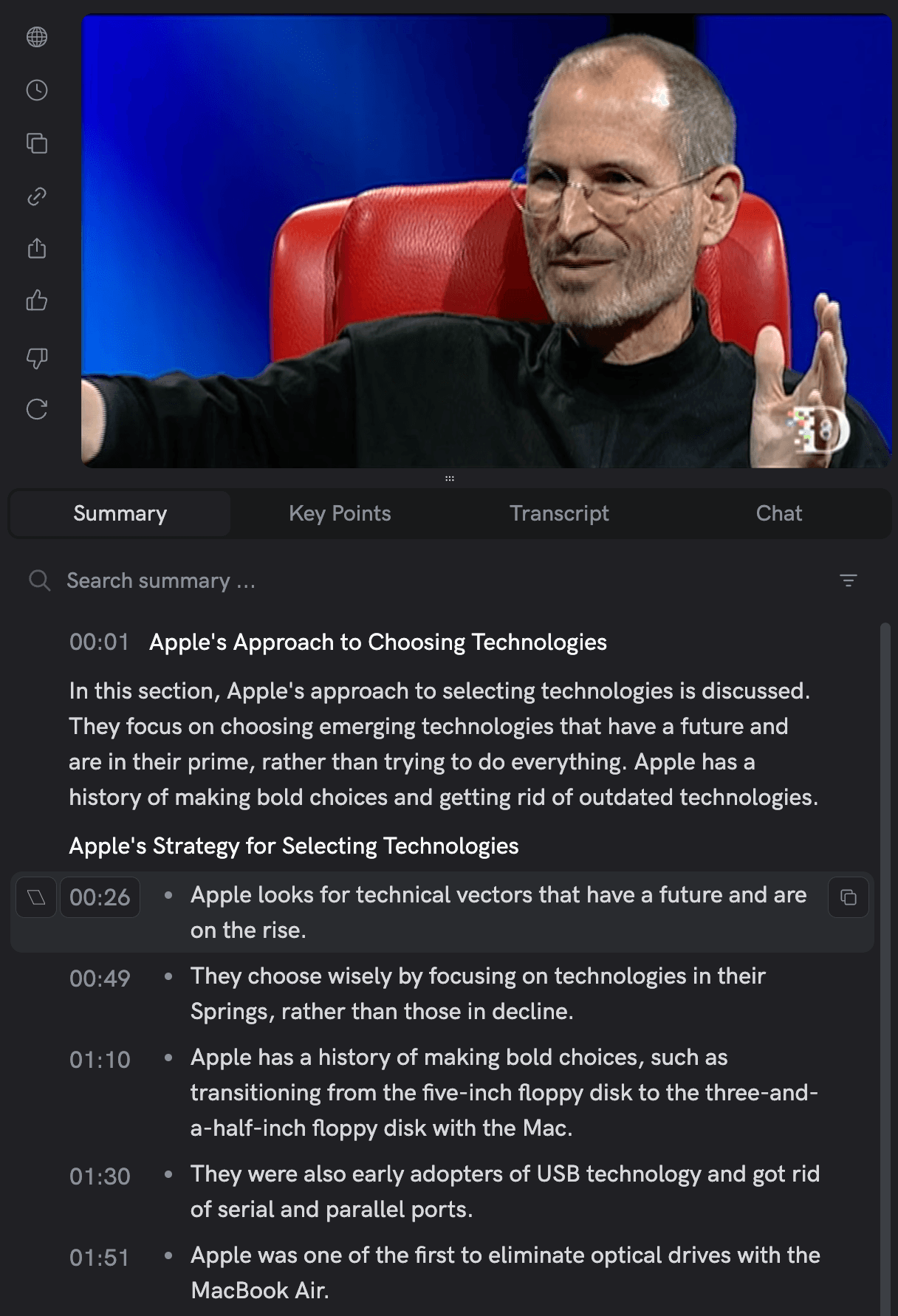
Apple's Approach to Choosing Technologies
Apple focuses on choosing emerging technologies that have a future and are in their prime, rather than trying to do everything.
- Apple looks for technical vectors that have a future and are on the rise.
- They choose wisely by focusing on technologies in their Springs, rather than those in decline.
- They were also early adopters of USB technology and got rid of serial and parallel ports.
The Importance of Choosing Wisely
- Sometimes people may criticize Apple for eliminating certain features or technologies, but they believe in picking the right horses for the future.
- Apple focuses on making the best products for customers by investing energy into emerging technologies.
Multiple formats. One goal: save you time.
Choose the format that fits your workflow.
Summary
- What matters, clearly explained
- Organized by section with timestamps
- Best for full understanding
Key Points
- Fast scanning: skip the rest
- Quick-hit takeaways
- Best for rapid assessment
In practice
A ninety-minute keynote, read in four minutes. Each point in the summary carries the timestamp, so the parts worth watching are one click away.
How AI video summarization works
Hours of video distilled into seconds of insight.
Paste
Drop any video URL
Transcribe
Speech to text
Summarize
AI extracts key insights
Navigate
Click to jump
Export
Save anywhere
What makes Timestamped Summaries unique?
Not just AI summaries. A smarter way to navigate video content.
- PrecisionSkip the fluff and dive directly into key moments with AI-generated timestamps.
- Two StylesDetailed narratives or compressed key points. Choose the depth that matches your workflow.
- MultilingualSummaries available in multiple languages, so you can access any video.
- ExportExport to Notion or Readwise. Copy as Word, Markdown, or CSV.
AI video summaries built for professionals
Researchers & Professionals
Identify key points without watching hours of footage.
Students & Educators
Skip to critical topics and streamline study sessions.
Content Creators
Organize and highlight valuable insights to maximize audience engagement.
In practice
Two hundred candidate sources for a literature review. The key points decide in a minute which ones deserve the full hour.
Explore related features
AI video summaries: frequently asked questions
What is a timestamped summary?
A timestamped summary is a concise overview of a video's content, broken down by key points with corresponding timestamps. This allows you to jump directly to specific sections of the video.
How accurate are the AI-generated summaries?
We use state-of-the-art large language models with custom fine-tuning for video summarization. However, the quality may vary depending on the video's audio and content complexity.
Can I use this feature on any video platform?
We support YouTube videos, with experimental support for Vimeo and Dailymotion. You can also upload private files up to 1GB for summarization.
How fast are the summaries generated?
Transcription and summarization run in parallel and are streamed in real-time, so you'll see results immediately without waiting for the entire process to complete.
Can I export summaries?
Yes. Export to Notion or Readwise, or copy as Word, Markdown, or CSV. Your summaries go wherever your workflow lives.
How many languages are supported?
We transcribe and summarize videos in 37 languages, with more being added regularly.
What's the difference between summaries and key points?
Summaries capture what matters, clearly explained and organized by sections with timestamps. Key points are designed for fast scanning quick-hit takeaways, so you can assess rapidly. Choose summaries for full understanding, key points when you need speed.
Can I edit the summaries or key points?
Currently summaries and key points are read-only, but you can highlight them with color-coded markers, add notes, and export to Notion or Readwise, or copy as Word, Markdown, or CSV for further editing.

Hours of video. Minutes of reading.
Researchers, professionals, and creators use it on YouTube videos and on their own recordings