Протокол SMTP | Курс "Компьютерные сети"
Introduction to SMTP Protocol
In this section, the lecturer introduces the Simple Mail Transfer Protocol (SMTP) and its significance in email communication.
Understanding SMTP Protocol
- SMTP is a protocol used for email transmission between user agents and mail servers. It plays a crucial role in sending emails both within and between mail servers.
- SMTP operates at the application layer, allowing it to work with various transport layer protocols. It uses port 25 for server-to-server email transmission and port 585 for email submission.
- Emails consist of three parts: envelope, headers, and body. The commands in the SMTP protocol focus on the envelope, which is essential for transferring emails between servers and clients.
Command Structure in SMTP
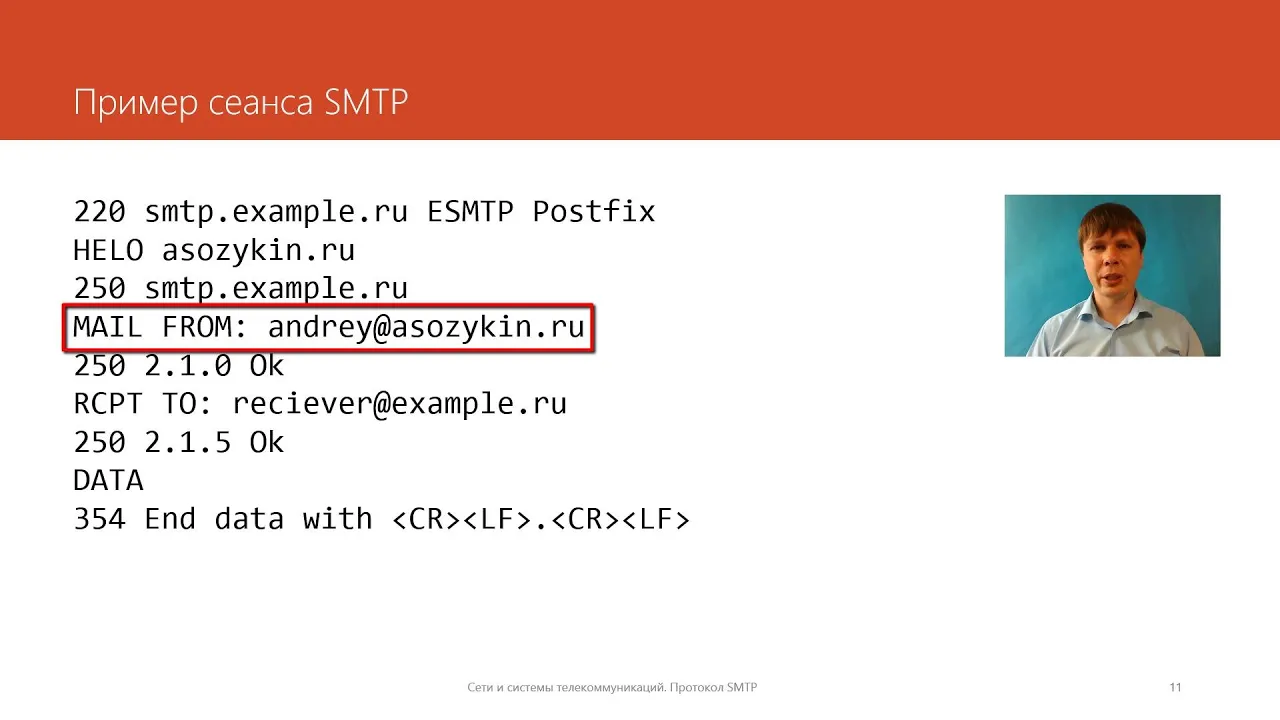
- The SMTP protocol functions in a text-based mode where clients and servers interact through textual command-response exchanges. Commands are four characters long, with common ones like MAIL and RCPT used for specifying sender and recipient addresses.
- The text-based nature of SMTP means that client-server communication occurs through simple text strings. Commands are typically four characters long without any specific reason behind this choice.
Server Responses and Error Handling
- Server responses in SMTP consist of two parts: a code indicating success or failure (starting with 2 or 5), followed by a textual message explaining the status or error encountered.
- Codes starting with '2' signify successful command execution, while those starting with '5' indicate errors requiring additional data or corrections from the client side.
Email Headers in SMTP
This section delves into the significance of email headers within the context of the SMTP protocol.
Email Header Components
- Email headers like "From," "To," "Cc," "Bcc," "Reply-To," Subject," Date" play vital roles in specifying sender, recipients, reply addresses, subject lines, and timestamps within an email message.
- These header components provide essential metadata for effective email communication by defining key aspects such as sender identity, recipient details, reply destinations, subject matter, and date of dispatch.
Practical Example of Email Composition
- When composing an email using SMTP commands like HELO to establish connection domains, MAIL FROM to specify sender address, RCPT TO to define recipient address(es), DATA to input message content; users structure emails effectively by separating headers from message bodies using empty lines.
- Including detailed information such as sender names alongside addresses enhances communication clarity while utilizing subject lines aids recipients in understanding message content promptly.
Concluding Email Transmission
- Properly formatted emails conclude with a period on a new line after message content completion. This signifies separation between headers containing metadata like sender details and actual message content comprising body text.
SMTP Protocol Overview
In this section, the transcript discusses the SMTP protocol, focusing on its extended version and key features.
Extended SMTP Commands
- Extended SMTP introduced new commands like EHLO and HELO instead of the traditional HELLO command.
- New commands such as STARTTLS for encrypted connections and SIZE to determine maximum message size were added in extended SMTP.
- Extended SMTP allows the use of 8-bit character sets, enabling direct transmission of non-ASCII characters without special encoding.
Enhanced Functionality in Extended SMTP
- In extended SMTP, sending Russian characters no longer requires special handling as it supports 8-bit character sets directly.
- Servers indicate support for extended commands upon receiving EHLO command, offering features like encryption and delivery confirmation.
Security Measures and Challenges
This part delves into security concerns within the SMTP protocol, addressing issues like data protection and spam prevention.
Address Verification and Encryption
- The lack of mechanisms to protect sender addresses in standard SMTP poses a vulnerability where anyone can impersonate an email sender.
- Standard SMTP lacks encryption, making emails susceptible to interception; however, extended SMTP offers encryption through STARTTLS command.
Spam Prevention Measures
- Modern mail servers combat spam by verifying domain names during connection establishment to prevent abuse like open relays.
- Mail servers may reject messages not intended for local users or operate as open relays allowing mass unsolicited emails.
Authentication and Data Integrity
This segment explores methods used for authentication and ensuring data integrity in email communication protocols.
Digital Signatures for Authentication
- DNS records store public keys for email domains enabling verification of sender authenticity using digital signatures.
Summary of SMTP Protocol