USB Ports, Cables, Types, & Connectors
USB Port, Cables, and Connectors
This section provides an in-depth exploration of USB ports, cables, and connectors, detailing their evolution, functionalities, and applications.
USB Evolution
- USB stands for Universal Serial Bus and serves as the standard for connecting peripherals to computers. It is widely used due to its universality.
- The USB port connects various devices like keyboards, mice, cameras, printers, scanners, external hard drives, flash drives.
- The development of USB aimed to simplify device connections by introducing a single standard connector and ensuring fast transfer rates.
- USB ports are hot-swappable and self-configuring, allowing easy connection/disconnection without turning off devices or extensive configurations.
- Different versions of USB have been released over the years with significant speed upgrades:
- USB 1.0 (1.5 Mbps), USB 1.1 (12 Mbps), USB 2.0 (480 Mbps), USB 3.0 (5 Gbps), USB 3.1 (10 Gbps), USB 3.2 (20 Gbps), and USB 4 (40 Gbps).
Types of Connectors
- Various types of connectors exist for different devices:
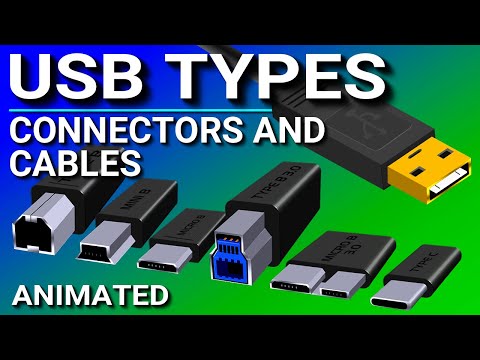
- Type A connector is standard rectangular; Type B connector is square with beveled corners; Mini B is smaller than Type B; Micro B is thinner than Mini B.
- Introduction of advanced connectors like:
- Type B 3.0 with higher transfer speeds and power supply capabilities;
- Introduction of the thin and versatile USB C connector with rounded edges containing 24 pins.
Cable Configurations
- Most traditional cables have different connectors on each end but:
- Standard type C cables have identical connectors on both ends for convenient use in connecting hosts/computers to other devices.
USB Ports and Their Versions
In this section, the speaker discusses the different versions of USB ports and how they are color-coded to indicate their respective versions on a computer's motherboard.
USB Port Versions and Colors
- USB 1.0 and 1.1 ports are white, considered old, slow, and outdated.
- USB 2.0 ports are black and have been around since the year 2000.
- USB 3.0 ports are blue, while USB 3.1 is teal, and USB 3.2 ports are red.