TANPA ADD ONS ‼️Cara Mail Merge dengan Gambar dari Url Google Drive
Introduction to Excel and Word Integration
Overview of the Tutorial
- The presenter introduces a tutorial aimed at office workers who primarily use Excel and Word, promising useful tips for data management.
- The focus is on integrating Excel data into Microsoft Word and inserting images from Google Drive instead of local files.
Setting Up the Workspace
Creating Folders and Documents
- The presenter creates a folder on the desktop named "mayo" to organize work efficiently.
- A new Word document is created, saved as a template in an older format (Word 97-2003), which is necessary for compatibility with image insertion.
Accessing Data from Google Forms
Downloading Data
- The presenter retrieves data from Google Forms by downloading it as an Excel file (.xlsx).
- Emphasis is placed on ensuring that the correct folder permissions are set in Google Drive to access images.
Preparing Images for Mail Merge
Managing Image Accessibility
- Instructions are provided on how to make images publicly accessible in Google Drive by adjusting folder settings.
- The importance of using public links for seamless integration into documents is highlighted.
Formatting Data in Word
Editing Document Content
- The presenter discusses removing unnecessary content from the document before proceeding with mail merge operations.
- A simple student card layout is designed within Word, featuring columns for names, IDs, and photos.
Structuring the Mail Merge Process
Setting Up Mail Merge Fields
- Steps are outlined for merging fields such as name and ID into the document using existing Excel data.
- Previewing merged results ensures that all fields display correctly before finalizing the document.
Inserting Images Dynamically
Linking Images via URL
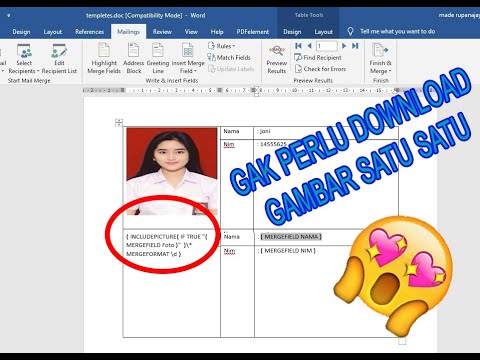
- Instructions are given on how to insert images dynamically using URLs sourced from Google Drive.
- Techniques for ensuring that only relevant fields (name, ID, photo URL) are included in the merge process are discussed.
Finalizing Document Layout
Enhancing Visual Appeal
- Tips on arranging elements within the document layout to improve aesthetics while maintaining functionality are shared.
Troubleshooting Image Insertion
Ensuring Correct Image Display
- Guidance is provided on troubleshooting issues related to image display during mail merges, emphasizing proper linking methods.
Conclusion and Considerations
Summary of Key Points
- The presenter concludes by summarizing key steps taken throughout the tutorial while highlighting potential challenges with internet connectivity when accessing large datasets.
Turn any video into a summary like this
YouTube links, meetings, lectures. With transcripts, search, and chat.