What is Microsoft Power Platform? | The Ultimate Beginner's Guide | Session 1
Introduction to Power Platform
Understanding Power Platform
- The session begins with an inquiry about participants' understanding of the term "Power Platform," emphasizing that no perfect definitions are required.
- The instructor introduces the session as a free preview on Power Platform, outlining topics such as what it is, expectations from the course, and curriculum details.
- This session aims to clarify doubts regarding Power Platform and KSR Data Vision's role in assisting learners.
Course Overview
- Indrajit Singh introduces himself as the trainer for the entire Power Platform course, highlighting his extensive experience in IT and data analytics.
- He mentions his background working with Fortune 500 companies and emphasizes that he will cover all aspects of the course without dividing topics among different trainers.
Exploring Microsoft Office 365 Products
Relation to O365
- The instructor draws parallels between Office 365 products (like Word, Excel, etc.) and components of Power Platform, explaining how each product addresses specific business problems.
- Participants identify various O365 products while discussing their functionalities; this sets a foundation for understanding how Power Platform operates similarly.
Components of Power Platform
Key Tools within Power Platform
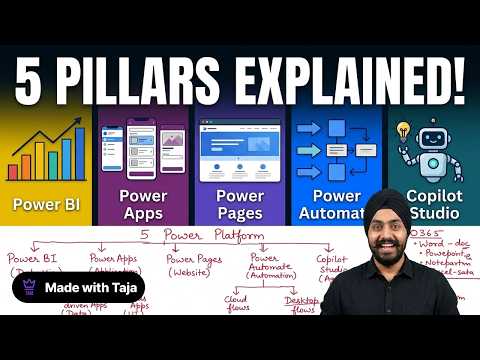
- Each component of the Power Platform is introduced:
- Power BI for data visualization,
- Power Apps for application creation,
- Power Pages for website development,
- Power Automate for automation processes,
- Copilot Studio for chatbot functionality.
Business Transformation Needs
- The instructor encourages thinking like business owners who need applications, websites, automation processes, agents (chatbots), and dashboards to digitally transform their businesses.
Ecosystem of Tools
Understanding Ecosystem vs. Tool
- Emphasizes that Power Platform is not just a tool but an ecosystem comprising multiple tools essential for digital transformation across businesses.
Types of Applications in Power Apps
- Discusses two types of apps within Power Apps:
- Model-driven apps, focused on data priority,
- Canvas apps, which allow customization based on user interface preferences.
Automation with Power Automate
Flows in Automation
- Explains distinctions between cloud flows (for cloud-based automation tasks like SharePoint integration), and desktop flows (for local system automations).
RPA Comparison
- Introduces RPA (Robotic Process Automation), noting that Power Automate Desktop competes with traditional RPA tools like Blue Prism and UI Path.
AI Capabilities in Power Platform
Leveraging AI Features
- Mentions AI Hub (formerly AI Builder), allowing users to utilize standard models or prompt engineering techniques within their applications.
Dataverse Integration
- Highlights Dataverse as an out-of-the-box data storage solution available with the platform.
Advanced Features: Code Apps
Introduction to Code Apps
- Announces new features called code apps aimed at enhancing app-building capabilities by breaking previous limitations related to customized UI design.
Model Driven Applications Explained
Example Use Case
Explains model-driven apps using examples from Dynamics CRM focusing on business processes rather than UI design.
Roles & Responsibilities of a Developer
- Discusses roles involved in developing applications using various components within the platform including designing, testing, deploying applications collaboratively.
Importance of Microsoft Brand
- Stresses Microsoft's reputation ensures longevity and relevance in technology space making skills learned through this platform valuable.
Course Structure & Content Delivery
Real-Time Projects
- Outlines course structure involving approximately 100 hours over 80 sessions focusing on hands-on projects across all modules ensuring practical learning experiences.
Overview of KSR Data Vision Services
Organizational Account and Licenses
- KSR Data Vision provides organizational accounts with premium licenses, generating credentials for users like Rahul (e.g., rahul@ksrconsultantservices.com).
- Users can access Power Platform services and Office 365 subscriptions via web browsers only.
Interview Guidance and Support
- The program includes frequently asked interview sessions after each module, along with CV preparation assistance from a dedicated team.
- A placement cell is available to help optimize profiles on job platforms like Naukri and LinkedIn, with regular sessions for queries.
Course Structure and Details
First Module and Class Timings
- The first module starts tomorrow, focusing on Power BI, with classes scheduled from 6 p.m. to 7 p.m. IST.
Class Recordings
- All sessions will be recorded and accessible in the KSR portal for one year; extensions are possible upon request.
License Validity
- Premium licenses vary: Power BI offers two months, while Power Apps provides one year; all other products come with a one-year license.
Open Q&A Session
Participant Questions
- Participants are encouraged to ask questions during the open session; Pradeep raises a question about Microsoft 365 licensing.
Software Installation Queries
- Clarification provided that users can install both Power Apps desktop app (for using built apps) and Power BI desktop app under their licenses.
Class Scheduling Concerns
Alternative Timing Requests
- Pradeep inquires about alternate evening class timings; the instructor explains that the only available slot is currently from 6 to 7 PM IST.
Certification Information
Certification Costs
- Certifications cost around ₹5,000 each; vouchers may occasionally be available but cannot be guaranteed by the instructor.
Course Content Updates
New Modules Introduction
- Mahesh asks if new modules have been added compared to previous batches; core apps are introduced as a new module this time.
Experience Claims Post-Course Completion
Work Experience Representation
- Discussion on how participants can represent their experience post-course completion based on practical exercises undertaken during training.
Career Prospects After Training
Expected Salary Ranges
- Insights shared regarding salary expectations based on experience levels: individuals with four-plus years could earn between ₹20,000 - ₹26,000 monthly depending on various factors.
Fast Tracking Learning
Accelerated Learning Options
- Participants familiar with coding or related fields may opt for accelerated learning through recorded classes from previous batches alongside current coursework.
Alumni Network Benefits
Ecosystem Development
- KSR Data Vision has developed an alumni network where past students can refer new candidates for job openings directly within their companies.
Job Application Support Tools
Job Posting Aggregation
- An alumni site allows students to view job postings aggregated from multiple sources including LinkedIn and Naukri, facilitating easier applications.
Turn any video into a summary like this
YouTube links, meetings, lectures. With transcripts, search, and chat.