UD3 Componentes de E S 11
Introduction to Auxiliary Memory Supports
In this section, the speaker introduces auxiliary memory supports and discusses their role in storage.
Types of Auxiliary Memory Supports
- There are different types of auxiliary memory supports, such as removable devices and optical supports.
- These devices are not typically used as primary storage but offer additional storage options.
- Examples include USB drives (pendrives) and memory cards.
- USB drives use NAND flash technology and have a small form factor for portability.
- They usually have capacities ranging from 32GB to 128GB, with read and write speeds limited by the hardware.
Differences between USB Drives and SSDs
- USB drives have lower performance compared to solid-state drives (SSDs).
- SSDs have advanced technology, including better controllers for managing read/write operations.
- The hardware limitations of USB drives result in slower speeds compared to SSDs.
- USB interfaces like USB 3.0 provide higher speeds than previous versions but still fall short of SSD performance.
Importance of Portability
- The main advantage of auxiliary memory supports is their portability.
- They are designed for easy transportation and can store significant amounts of data.
- Various manufacturers offer different models with varying capacities, so it's important to compare specifications before purchasing.
Understanding Pendrive Architecture
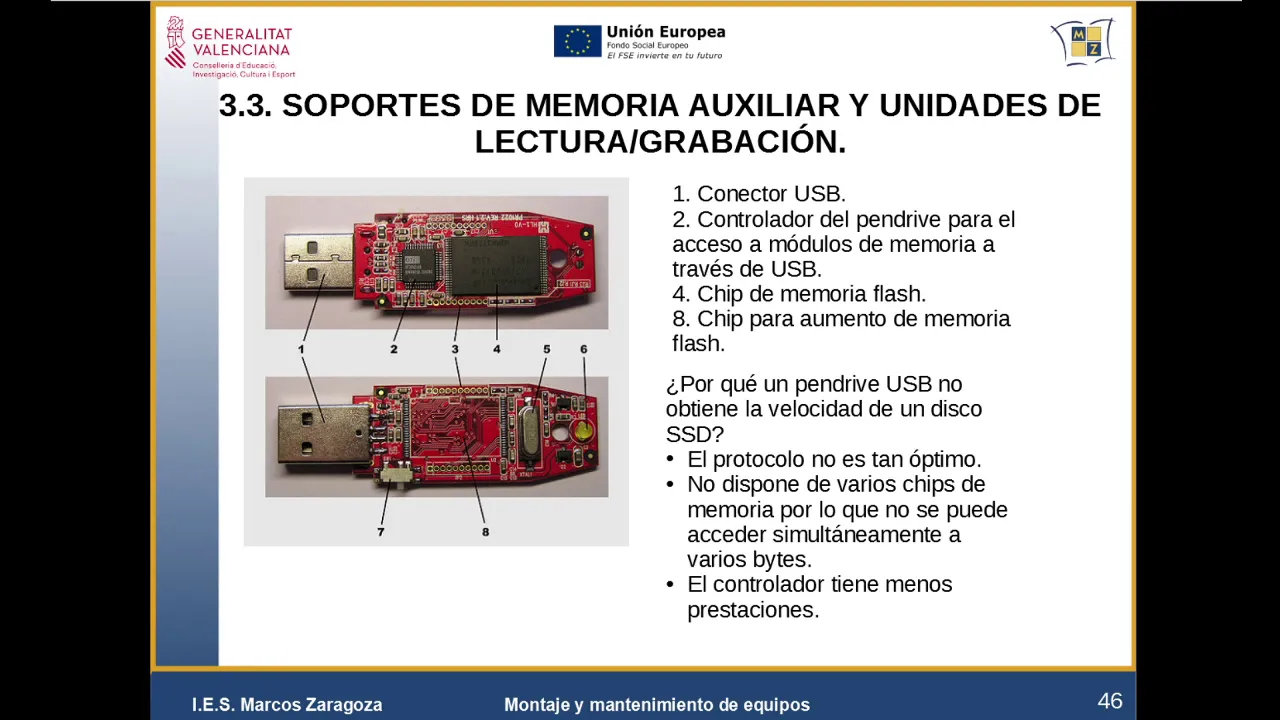
- Pendrives consist of connectors for interfacing with devices, a small controller, and flash memory modules.
- The controller manages the read/write operations but has fewer capabilities than an SSD controller.
- Flash memory modules provide the necessary storage capacity, which can be expanded by adding more modules.
Limitations of Pendrives
- Pendrives lack the speed and performance of SSDs due to their smaller controllers and single-chip access limitation.
- Unlike SSDs that can simultaneously access multiple chips for faster data transfer, pendrives can only access one chip at a time.
SD Memory Cards
- SD cards are a popular type of memory card with different formats and sizes.
- They are widely used in various devices, including cameras and smartphones.
- Other memory card formats include CompactFlash and Memory Stick, but SD cards are the most common.
Exploring Memory Supports
In this section, the speaker discusses where to find information about memory supports and provides insights into their availability and pricing.
Finding Information on Memory Supports
- To explore available memory supports, visit websites of manufacturers or sellers like PCBox or Amazon.
- These platforms provide detailed information about USB drives, memory cards, and other storage peripherals.
- It's important to compare prices and specifications from different sellers before making a purchase decision.
Factors to Consider
- When searching for memory supports, consider factors such as price, capacity, interface (e.g., USB 3.1), and brand reputation.
- The most common capacities available are 512GB for USB 3.1 drives.
- Newer models may offer higher speeds internally but still have limitations due to flash technology.
Internal Architecture of Pendrives
This section explores the internal architecture of pendrives and explains why they have lower speeds compared to SSDs.
Components of Pendrive Architecture
- Pendrives consist of connectors for interfacing with devices, a small controller, and flash memory modules.
- The controller manages read/write operations but has fewer capabilities than an SSD controller.
- Flash memory modules provide the necessary storage capacity.
Limitations of Pendrive Speed
- Pendrives have slower speeds compared to SSDs due to their smaller controllers with limited capabilities.
- Additionally, the communication protocol used in pendrives is not as optimized as that of SSDs.
- Pendrives typically have a single flash memory chip, limiting simultaneous access to data.
Differences between Pendrives and SSDs
This section highlights the differences between pendrives and solid-state drives (SSDs) in terms of performance and architecture.
Performance Differences
- SSDs offer better performance than pendrives due to advanced technology and multiple memory chips.
- SSD controllers have more capabilities for managing read/write operations efficiently.
- Simultaneous access to multiple memory chips allows for faster data transfer in SSDs.
Communication Protocol
- The communication protocol used in pendrives is not as optimized as that of SSDs.
- Pendrives typically have a single flash memory chip, limiting simultaneous access to data.
SD Memory Cards
This section provides an overview of SD memory cards and their different formats.
SD Memory Card Formats
- SD cards come in various formats, including standard SD, miniSD, microSD, etc.
- They are widely used in cameras, smartphones, and other devices for storage purposes.
- Other memory card formats include CompactFlash and Memory Stick, but SD cards are the most common.
Digital Secure Card and SD/SDHC Cards
This section discusses the digital secure card and different categories of SD/SDHC cards based on size and minimum writing speeds.
Types of SD/SDHC Cards
- The digital secure card is designed to make disks smaller without removing the mechanical parts that can cause failures.
- There are different categories of SD/SDHC cards based on sizes and minimum writing speeds.
- Categories include SD, SDHC, and others.
Changing Formats for Better Performance
- As technology advances, the format of SD cards has changed to achieve better speed and performance.
- Higher resolutions in cameras and video require improved formats for SD cards to provide optimal storage capabilities.
- Newer formats like UHS-I (Ultra High Speed Class 1) support higher data transfer rates, such as 312 megabits per second for 4K videos.
Different Classes of SD Cards
- Different classes of SD cards are available for specific purposes, such as Class 10 for Full HD videos and Class 18.1 for high-resolution videos.
- The class rating indicates the minimum sustained write speed required for a particular use case.
- It is important to check the specifications of an SD card to ensure it meets the required class for recording videos at specific resolutions.
Optical Disc Storage: CDs, DVDs, Blu-ray
This section explains how optical discs work and their different capacities.
Composition of Optical Discs
- Optical discs are composed of multiple materials, with a plastic layer covering a metallic layer.
- The burning process creates indentations on the metallic surface to represent 0s, while the unburned areas store 1s.
- A laser is used to burn smaller 0s and 1s, allowing for higher density and increased storage capacity.
Factors Affecting Readability
- Shorter wavelengths of lasers allow for faster burning and reading speeds, as well as higher density storage.
- Different disc formats have varying capacities: CDs (700MB), DVDs (4.7GB), Blu-ray (25GB).
- Precision in equipment and instrumentation is crucial for accurate reading and writing on optical discs.
CD and DVD Formats
- CDs are typically 12cm in diameter with a capacity of 700MB. They were commonly used for music and video discs.
- CD-RW allows multiple writings, while CD-ROM only supports read-only access.
- DVDs have the same size as CDs but can have double-layer configurations, increasing their capacity to approximately 8.5GB.
[t=1169] Conclusion
This section concludes the discussion on digital secure cards, SD/SDHC cards, and optical disc storage.
Key Takeaways
- Digital secure cards provide smaller disk sizes without removing mechanical parts.
- SD/SDHC cards come in different categories based on size and minimum writing speeds.
- SD card formats have evolved to support higher resolutions in cameras and videos.
- Optical discs use lasers to burn indentations for data storage, with shorter wavelengths enabling higher densities.
- CDs have a capacity of 700MB, DVDs can hold up to 4.7GB or more with double-layer configurations.
- Blu-ray discs offer even higher capacities, up to 25GB.
The transcript provided is a partial transcript and may not cover the entire video.
DVD Formats and Market
This section discusses the different formats of DVDs available in the market.
DVD Formats
- There are two main formats of DVDs in the market: DVD-R and DVD+R.
- DVD-R is for single-write, while DVD+R allows multiple writes.
- Blu-ray discs were invented by Sony and initially used in PlayStation consoles.
- Blu-ray discs have a larger capacity than DVDs, with initial capacity equivalent to 25 DVDs.
Blu-ray Discs
This section provides information about Blu-ray discs and their advantages.
Advantages of Blu-ray Discs
- Blu-ray discs offer multiple write capabilities.
- They can be used for video and audio storage on computers and other devices.
- However, they are being replaced by solid-state devices like USB drives for computer usage.
- Blu-ray discs are still useful for backup purposes and multimedia viewing.
Invention of Blu-ray Discs
This section discusses the invention of Blu-ray discs by Sony.
Invention of Blu-ray Discs
- Sony invented Blu-ray discs, initially using them in PlayStation consoles.
- The size of the disc is 12 centimeters, but its capacity depends on the number of layers it has.
- Multiple layers allow for higher storage capacity, such as storing up to 6 hours of high-definition video.
Types of Blu-ray Discs
This section explains the different types of writable and readable Blu-ray discs.
Types of Blu-ray Discs
- Writable (BD-R) and rewritable (BD-RW) formats are available for recording data on a Blu-ray disc.
- BD-RW allows multiple writes, while BD-ROM is read-only.
- Blu-ray discs are commonly used for video and audio storage on computers and other devices.
Market and Applications of Blu-ray Discs
This section discusses the market and applications of Blu-ray discs.
Market and Applications
- Blu-ray discs are being replaced by solid-state devices like USB drives in microcomputers.
- However, they still have a market for backup purposes and multimedia viewing.
- Blu-ray disc drives are available for reading and writing data, both internally and externally.
- The access time of these drives is an important factor to consider when purchasing them.
Access Time and Buffering
This section explains the importance of access time and buffering in optical disc drives.
Access Time and Buffering
- Optical disc drives require equipment to read the data, which can be connected internally or externally.
- Access time refers to the time it takes for the drive to retrieve data from the disc.
- Buffering is necessary to maintain a continuous flow of data during reading or writing processes.
- When purchasing optical disc drives, it is important to consider their access times for optimal performance.
Control and Synchronization in Optical Disc Drives
This section discusses control, synchronization, and parameters in optical disc drives.
Control and Synchronization
- Optical disc drives have controllers that regulate the flow of information between the drive and the computer.
- Synchronization is crucial to ensure real-time reading and writing processes without losing data sequence.
- Parameters such as access times should be considered when buying optical disc drives.
Choosing Optical Disc Drives
This section provides tips for choosing optical disc drives based on their specifications.
Tips for Choosing Optical Disc Drives
- Optimal access times for good performance are around 100 seconds.
- Lower access times may be more expensive but offer better performance.
- Consider the size and compatibility of the drive with your computer or device.
Examples of Optical Disc Drives
This section provides examples of optical disc drives.
Examples of Optical Disc Drives
- DVD-RW and DVD+RW are examples of optical disc drives that allow for multiple writes.
- Blu-ray disc drives are available in various models, offering compatibility with different formats.
- When choosing a Blu-ray disc drive, consider its interface (e.g., USB 3.0) for optimal speed.
Specifics of Blu-ray Disc Drives
This section discusses the specifics and features of Blu-ray disc drives.
Specifics of Blu-ray Disc Drives
- Blu-ray disc drives can be used for recording both DVDs and Blu-ray discs.
- Some models offer external connectivity via USB 3.0 for faster data transfer.
- Features such as encryption and password protection enhance data security.
Characteristics of Blu-ray Disc Drives
This section highlights the characteristics and specifications of Blu-ray disc drives.
Characteristics of Blu-ray Disc Drives
- Average access time ranges from 180 to 250 milliseconds.
- Different sizes (e.g., slim or beige) are available to suit various needs.
- Check the manufacturer's specifications for detailed information on specific models.
New Section
The speaker discusses a topic related to "tenemos" in the transcript.
Topic: Tenemos
- The speaker mentions the word "tenemos" at timestamp 0:28:13.
New Section
The speaker talks about something related to "desde entonces sobre el nominal más baby más" in the transcript.
Topic: Desde entonces sobre el nominal más baby más
- The speaker mentions the phrase "desde entonces sobre el nominal más baby más" at timestamp 0:28:23.
Turn any video into a summary like this
YouTube links, meetings, lectures. With transcripts, search, and chat.