2019 Trade Map 1: Entering Trade Map
Trade Map Overview
Introduction to Trade Map
- Trade Map is a tool designed for preliminary export market screening, focusing on market size, dynamism, and openness.
- It provides insights into competition among different products in various markets and trends over recent years.
Accessing Trade Map
- Users can access the tool via the website www.trademap.org after logging in.
- The home & search page serves as the starting point for all searches within Trade Map.
Selecting Trade Flow Direction
- Users must choose between examining imports or exports; this example focuses on imports to analyze global market size for specific products.
Searching for Products
Product Selection Process
- To research a product, users can enter its HS code directly (e.g., 090111 for coffee excluding roasted and decaffeinated).
- Alternatively, users can type the first letters of the product name (e.g., "C O F F" for coffee), which narrows down options dynamically.
Advanced Search Options
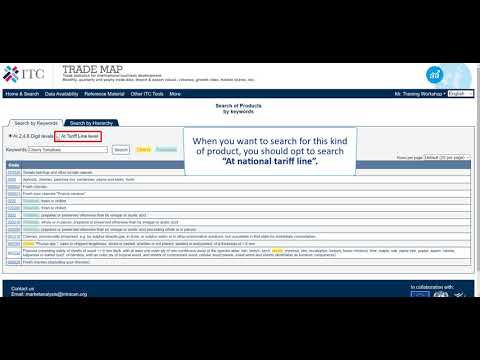
- If a desired product code isn't found among the first 30 displayed options, users should utilize the advanced search feature.
- This option allows searching beyond HS6 level codes, accommodating products like cherry tomatoes that may lack specific codes at that level.
Understanding HS Codes
National Tariff Lines and Code Revisions
- Results from national tariff line searches show various codes and descriptions; only certain countries provide specific codes for some products.
- It's crucial to be aware that HS codes are revised every five years; thus, knowing your code well is essential during these revisions.
Conducting Market Analysis
Example: Analyzing Coffee Imports
- For this example, coffee excluding roasted and decaffeinated is selected. Users leave the country/region field empty to analyze global demand.