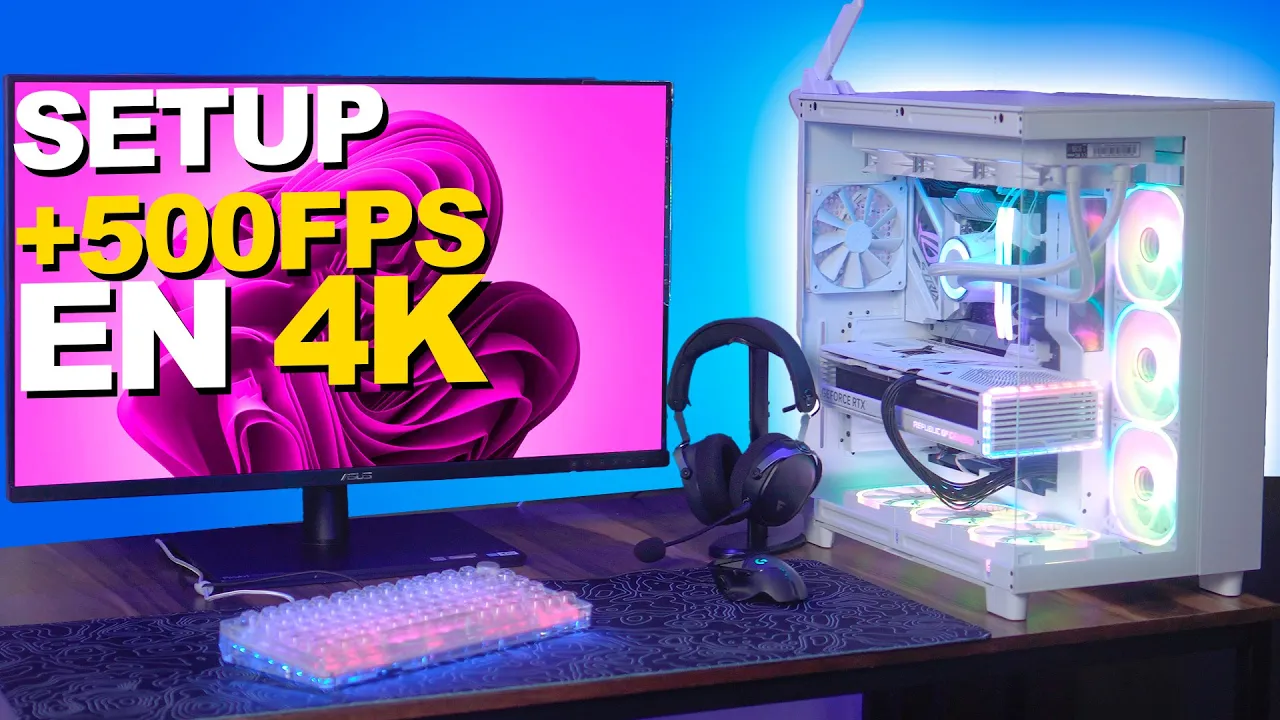
PC y Setup MÁXIMO para JUEGOS 8K y EDICIÓN 4K 2024
Arming a Top-of-the-Line Gaming Setup
The speaker begins the video by expressing excitement about assembling a high-end gaming computer setup and proceeds to unpack the components.
Unpacking Components
- The speaker is enthusiastic about unboxing an i9 processor, emphasizing the significance of this experience.
- While unpacking, the speaker engages with viewers' comments and emphasizes the importance of interaction.
- Highlighting the high-quality motherboard being unboxed, setting the tone for a top-tier build.
Building Efficiency and Interaction
The focus shifts to building efficiency, viewer engagement, and upcoming setup plans.
Building Experience
- Emphasizing building efficiency for a top-tier gaming setup to showcase assembly processes effectively.
- Encouraging viewer questions and interactions during the build process.
Viewer Engagement
- Discussing stock coolers and their limitations for high-performance processors like i9.
Giveaways and Engagement
- Announcing giveaways of ten computers to engage viewers in ongoing content participation.
- Encouraging viewers not to be disheartened if they miss out on initial giveaways as more opportunities will arise.
Component Details and Giveaway Information
Exploring component details, giveaway information, and engaging with viewers.
Component Insights
- Discussing hardware specifics such as screw kits for M.2 drives and their storage capacities.
Giveaway Strategy
- Teasing upcoming keyword-based giveaways while emphasizing genuine audience engagement over casual viewership.
Efficient Assembly Techniques
Demonstrating efficient assembly techniques while promoting sponsor products.
Efficient Assembly
- Showcasing liquid cooling systems, power supplies, and cables for streamlined assembly processes.
Sponsor Promotion
Important Discussion on PC Components
In this segment, the conversation revolves around various topics related to PC components and personal experiences with technology.
Exploring PC Component History
- The discussion delves into the age at which individuals acquired their first high-end graphics cards, highlighting technological advancements over the years.
- Reflecting on the timeline of graphics card releases, emphasizing personal experiences and technological progress in the field.
Personal Reflections and Engagement
- Engaging with viewers by prompting them to guess his age, fostering interaction within the community.
- Expressing frustration over small accessories that come with PC components, emphasizing a commitment to delivering quality builds to clients.
Assembly Process Insights
- Highlighting the satisfaction derived from removing protective plastic coverings before installation, focusing on attention to detail during assembly.
- Showcasing admiration for efficient cable management in fan installations, underscoring the convenience of streamlined setups.
Delegating Work Effectively
This part of the conversation centers on effective delegation strategies in business settings and practical steps for optimizing workflow.
Four Steps of Delegation
- Outlining a four-step process for delegating tasks effectively within a team or business environment.
- Emphasizing the importance of observing and assisting team members throughout task delegation processes.
Empowering Team Members
- Acknowledging personal growth in technical skills and hinting at future mastery in computer assembly techniques.
- Demonstrating enthusiasm for assembling components while maintaining a focus on meticulous organization and efficiency.
Addressing Viewer Questions
Addressing viewer inquiries regarding computer specifications and providing insights into hardware compatibility issues.
Clarifying Technical Queries
- Responding to a viewer's query about excessive SSD units versus RAM capacity, distinguishing between memory types and practical considerations.
- Discussing hardware configurations such as multiple SSD units and potential challenges associated with connectivity and adaptability.
Custom Build Requests
- Introducing a new build project requested by viewers, highlighting similarities to previous assemblies while catering to specific design or performance requirements.
Assembly Process Overview
In this section, the speaker begins the assembly process by preparing to install the processor and solid-state drives.
Processor and Solid-State Drive Installation
- The speaker mentions that the AMD Ryzen 5 5600G may not perform well.
- Emphasizes the importance of becoming an expert in computer assembly for advanced users.
- Discusses motherboard features and expansion options for system optimization.
- Demonstrates careful installation of the processor, advising to leave it in its packaging until needed.
- Ensures proper placement of liquid cooling components without moving existing thermal pads.
Thermal Management and Component Handling
This part focuses on thermal pad removal, thermal paste application, and avoiding contact with sensitive components during assembly.
Thermal Pad Removal and Paste Application
- Shows how to remove thermal pads carefully for efficient heat dissipation.
- Highlights the importance of not touching contact pins to prevent short circuits due to grease transfer.
- Emphasizes the need for cleanliness during component handling to avoid interference or damage.
Component Placement and Compatibility
The speaker discusses PCIe compatibility, bracket removal, and emphasizes meticulous handling during component installation.
PCIe Compatibility and Bracket Removal
- Explains PCIe 4.0 compatibility while removing brackets carefully for system optimization.
- Stresses the importance of learning attentively even at an advanced level of expertise in PC assembly.
Thermal Pad Considerations
Focuses on differentiating between thermal pads used for processors versus other components like SSD drives.
Thermal Pad Differentiation
- Clarifies distinctions between thermal pads used for processors (CR sheet) versus those used elsewhere in a PC build.
Final Assembly Steps
Concludes with final steps including solid-state drive installation, processor mounting, and thermal paste application.
Final Steps
Detailed PC Building Process
In this section, the speaker discusses the process of assembling a PC, focusing on the importance of thermal paste and proper component handling.
Importance of Thermal Paste
- When purchasing a cooling system for the CPU, it is recommended to also buy thermal paste as the pre-applied one may not be sufficient.
- The quality of thermal paste provided with components can vary, necessitating cleaning and reapplication for optimal performance.
- Applying a thin layer of high-quality thermal paste ensures efficient heat transfer and improved CPU cooling.
Assembly Tips
- Proper application of thermal paste is crucial for optimal heat dissipation and component longevity.
- Ensuring full coverage under the Integrated Heat Spreader (IHS) enhances contact and heat distribution.
Component Installation and Cable Management
This part covers installing components like fans, power supply unit (PSU), and managing cables effectively for better airflow and aesthetics.
Fan Installation
- Securely fastening all screws during fan installation prevents vibrations and ensures stable operation.
- Attaching fans to the heatsink promptly aids in efficient cooling without delays or complications.
Power Supply Unit (PSU)
- Opting for a modular PSU allows customized cable management, reducing clutter and improving airflow within the case.
Memory Installation and Component Selection
This segment focuses on installing memory modules (RAM), highlighting precision in component selection for specific tasks like design work.
Memory Module Selection
- Choosing appropriate RAM capacity based on computing needs enhances system performance for specialized tasks like design work.
- Precision in selecting components tailored to specific requirements optimizes system functionality and user experience.
Importance of Diverse Information Sources
The speaker emphasizes the significance of cross-referencing information from various sources to form well-rounded opinions in tech-related decision-making processes.
Research Approach
- Encouraging viewers to verify information from multiple sources fosters informed decision-making in technology-related endeavors.
Detailed PC Building Guide
In this section, the speaker reflects on a master named Johnny Guru and his disappearance, expressing well wishes. The focus then shifts to practical guidance on assembling a PC.
Reflecting on Johnny Guru
- The speaker reminisces about Johnny Guru, acknowledging his expertise and expressing uncertainty about his sudden disappearance.
- Practical advice is given to viewers regarding camera angles and component connections during the PC building process.
Assembling the Power Supply Unit (PSU)
- Detailed steps are provided for installing the power supply unit, including screw placement and camera angles for viewer clarity.
- Emphasis is placed on correctly aligning connectors for fans and RGB components to ensure smooth installation.
Connecting Components
- Instructions are given for connecting power cables to fans and RGB components, highlighting the simplicity of using a single connector for both functions.
- The significance of correctly passing cables through designated areas is stressed to avoid future complications during assembly.
Finalizing Assembly
- Viewers are guided through securing components with appropriate screws and ensuring stability in the build structure.
- Attention is drawn to the efficiency of utilizing minimal cables for streamlined connectivity within the PC build.
Researching Hardware Information
This segment delves into resources for hardware information, particularly focusing on English-language platforms known for in-depth reviews.
English-Language Review Platforms
- The speaker recommends English-language forums like Toms Hardware, AnandTech, and TechPowerUp for comprehensive hardware reviews due to their advanced testing methodologies.
Lack of Spanish-Language Resources
- Expresses surprise at the scarcity of advanced review platforms in Spanish-speaking communities compared to English counterparts.
Personal Experience with English Content
- Shares personal history of relying on English sources due to familiarity developed over years in the field rather than any bias against Spanish content.
Evolution of Hardware Forums
Reflecting on past experiences with hardware forums, highlighting changes from dedicated platforms like Hardware MX to modern social media-driven interactions.
Nostalgia for Forum Era
- Fondly recalls engaging with forums like Hardware MX where enthusiasts interacted passionately before transitioning towards social media-driven discussions.
Decline of Dedicated Forums
Preguntona del Buen Ramiro
In this segment, the discussion revolves around compatibility issues related to a specific motherboard model and a graphics card.
Clarifying Motherboard Compatibility
- Ramiro inquires about the compatibility of a specific motherboard model, 06d7TR, with an RX580 graphics card.
- The absence of chipset information on the motherboard raises concerns about its compatibility with the mentioned graphics card.
- Most motherboards in the last decade should support a GPU like the RX580 as long as they have a PCI Express slot.
Factors Affecting Performance
This part emphasizes that GPU compatibility is not solely determined by the motherboard but also depends on other crucial factors affecting performance.
Considerations for Optimal Performance
- Besides motherboard compatibility, factors such as processor type, RAM capacity, and power supply quality significantly impact GPU performance.
- Balancing components is essential to avoid bottlenecks and ensure optimal system performance.
Building a Balanced Ecosystem
The importance of creating a balanced ecosystem for computer components to work harmoniously and maximize efficiency is highlighted.
Creating Component Harmony
- Building an ecosystem where all parts complement each other ensures efficient operation and maximizes component performance.
- Properly securing the motherboard with screws is crucial for stability during assembly.
Organizing Cabling and Components
Focus shifts towards organizing cables and components effectively during assembly to ensure proper functioning.
Cable Management Strategies
- Placing the CPU cooler correctly and managing cabling around it is vital for system functionality.
- Attention to detail in cable placement enhances airflow and overall system aesthetics.
Power Supply Considerations
Discussion centers on selecting an appropriate power supply unit (PSU) based on system requirements for optimal performance.
PSU Selection Insights
- Choosing a PSU with adequate wattage ensures stable power delivery to all components.
Detailed PC Assembly Guide
In this section, the speaker emphasizes the importance of handling plastic components carefully during PC assembly to prevent overheating and potential damage.
Handling Plastic Components
- The speaker highlights the need to be cautious with plastic components due to their susceptibility to heat, which can lead to charring and potential damage.
- Emphasizes removing all protective plastic covers from the video card, including those on fans, to ensure proper ventilation and prevent overheating issues.
- Stresses the significance of securely placing components in position without unnecessary movement to avoid any accidental damage during assembly.
Finalizing PC Assembly
This part focuses on completing the PC assembly process by inserting key components like the video card and ensuring a visually appealing setup.
Inserting Video Card
- Demonstrates inserting the video card into specific slots meticulously, highlighting the visual impact it adds to the overall build.
- Appreciates the aesthetic appeal of a white video card in enhancing the overall look of the computer build, emphasizing its importance for a visually striking setup.
Cable Management and Power Supply
The speaker discusses cable management techniques and introduces a 600W power supply essential for powering up various components.
Cable Management Techniques
- Introduces a 600W power supply named "12V Power" required for efficient functioning of components within the PC build.
- Demonstrates meticulous cable management by organizing cables neatly at the back of the computer case for optimal airflow and aesthetics.
Setup Completion and Gratitude
This segment involves finalizing cable management, expressing gratitude towards a client for entrusting them with assembling a computer system.
Final Touches and Gratitude
- Concludes cable management with precision, preparing for showcasing the completed setup after ensuring all cables are neatly arranged.
Setting Up a Professional Monitor
In this section, the speaker discusses setting up a professional monitor, emphasizing key features and considerations for optimal performance.
Exploring Monitor Features
- The monitor boasts Ultra HD HDR, catering to graphic designers, video editors, and 3D designers due to its IPS panel with 180-degree viewing angles.
- It offers 100% sRGB color accuracy post-calibration, ensuring true-to-life colors for design work.
- The monitor includes various technologies tailored for design professionals, such as multiple connectivity options like HDMI ports, DisplayPort, USB Type-C, and USB Type-A.
Connectivity and Ports
- The monitor features two HDMI ports, a DisplayPort, a USB Type-C port, and two USB Type-A ports for versatile connectivity options.
- HDMI cables are highlighted for their ability to support resolutions up to 4K and high refresh rates like 240Hz.
- The speaker showcases the physical buttons on the monitor for power control and appreciates the stability provided by the stand.
High-end Peripherals Showcase
This segment focuses on showcasing high-end peripherals including a gaming mouse and keyboard while highlighting their premium features.
Premium Keyboard Experience
- A high-end mechanical keyboard is featured with customizable keys that offer an exceptional typing experience at a premium price point.
- Despite its costliness around 4000 to 5000 Mexican pesos, the keyboard's quality justifies the investment through its customizable nature and tactile feedback.
Top-tier Headset Details
- An elite Game Factor headset is introduced as a top-of-the-line wireless option with both Bluetooth and 2.4G connectivity options for extended usage periods of up to 22 hours continuously.
- The headset's premium quality is emphasized through its wireless capabilities suitable for gaming enthusiasts seeking convenience without compromising on performance.
Testing Wireless Peripherals
This part delves into testing wireless peripherals like headsets and mice while discussing their suitability for gaming purposes.
Wireless Peripheral Evaluation
- Detailed examination of connecting the wireless headset via Bluetooth or Wireless reveals user-friendly features like marked ear cups for easy identification.
Detailed Overview of Monitor Features
In this section, the speaker discusses various features and settings of a monitor, highlighting its capabilities for different tasks such as design work and everyday use.
Monitor Presets and Modes
- Different presets available for designers, including sRGB mode for realistic colors.
- Blue light mode to reduce eye strain while working in front of the monitor.
Advanced Settings and Configurations
- Options for image modes and calibration to tailor the monitor for specific tasks like photography.
- Ability to set up multiple screens using PIP and PBP functions for enhanced productivity.
Exploring Gaming Performance
The speaker transitions to showcasing gaming performance on the monitor, emphasizing its capabilities despite not being primarily designed for gaming.
Gaming Experience
- Demonstrating Cyberpunk gameplay at high frame rates with impressive performance.
- Testing various games at ultra-high settings with exceptional frame rates reaching 160 fps.
Discussion on Graphics Cards
The conversation shifts towards discussing Intel's graphics cards, specifically focusing on the Arc 770 model and its competitiveness in the current market.
Intel Arc 770 Graphics Card
- Evaluation of Intel's progress in video game development alongside graphics card improvements.
Detailed Setup Review and Motivation
In this section, the speaker discusses a high-end computer setup and emphasizes the importance of showcasing top-tier equipment not to boast but to motivate others.
The Significance of Displaying High-End Equipment
- The speaker showcases a top-of-the-line computer setup with high-end peripherals, including a 3D design monitor.
Motivation Through Display
- Emphasizes that displaying top-tier equipment is meant to inspire and motivate others rather than boastfulness.
Encouragement for Aspiring Enthusiasts
- Urges viewers to view displays of high-end setups as motivation, encouraging them to focus on their goals and progress rather than comparisons or arrogance.
Pursuing Goals with Determination
- Encourages setting clear goals and believing in one's ability to achieve them, highlighting that motivation stems from knowing what one wants.
Final Thoughts on Motivation