Atividade Final (AD)
Introduction to Active Directory Activity
Overview of the Selection Process
- The speaker welcomes participants and introduces the final activity of the selection process, emphasizing its importance.
Instructions for the Activity
- Participants are instructed to read all provided text carefully, as it contains crucial instructions for completing the Active Directory (AD) activity.
- The activity consists of three parts: a lab exercise, a report submission, and a video demonstration similar to previous activities.
Accessing the Lab Environment
Authentication Process
- Participants must authenticate using their registered Pacific email to access the lab environment.
- The lab may take 6 to 20 minutes to start; if it exceeds 20 minutes, participants should open a ticket on Discord for assistance.
Unique Lab Setup
- Each student has a unique lab environment that is not shared with others, ensuring individual access and security.
Objectives of the Practical Activity
File Access Goal
- The main objective is to access a specific file named "cadastro colaboradores 2026" located in a folder called "pessoal" on the file server.
Privilege Escalation Requirement
- To access this file, participants need to elevate privileges since only domain administrators have permission.
Scenario Context
Client's Request
- Participants are tasked with determining if someone without proper permissions can gain access to critical files within an AD environment.
Assumed Breach Model
- The exercise operates under an "Assume Breach" model where participants will use provided credentials as local users without domain privileges.
Exploring Privilege Escalation Paths
Domain Identity Acquisition
- After gaining local user access, participants must find ways to obtain domain credentials necessary for accessing restricted files.
Scope of Exploration
- All objects within the adtest.lab domain are in scope for exploration; however, certain tools and environments are out of scope.
Report Submission Guidelines
Report Structure Requirements
- Reports must be submitted in PDF format with up to 30 pages including cover and table of contents.
- An introduction listing problems found by criticality is required at the end of this section.
Evidence Collection and Organization
Importance of Documentation
- Participants should document their investigative processes thoroughly, including commands used and evidence collected through screenshots.
Mitigation Strategies Section
- A section detailing how identified issues can be mitigated should be included before concluding remarks in reports.
Formatting Considerations
Avoiding AI Formatting Pitfalls
- Caution against submitting reports formatted directly from AI tools; maintaining originality in formatting is essential for evaluation purposes.
Acceptable Use of AI Tools
Guidance on AI Assistance
- While using AI tools is permitted for grammar checks or formatting help, direct copying without modification could lead to negative comments during evaluations.
Handling Low Scores
Documenting Efforts
- If unable to escalate privileges successfully, documenting all attempts made will still reflect positively on effort put into report preparation.
Lab Usage Guidelines
Time Management During Lab Sessions
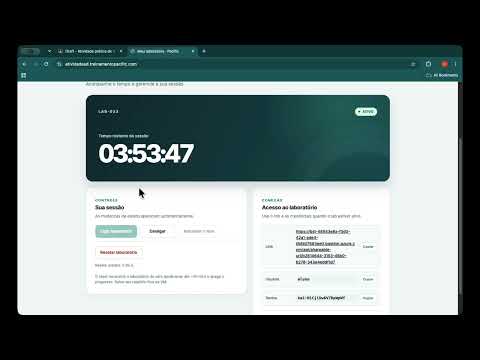
- Labs operate on a four-hour timer after activation; students can extend time if needed but should manage sessions wisely.
Resetting Lab Environments
Limitations on Resets
- Students have three resets available but should use them cautiously as they erase all progress made during lab sessions.
Deadline Awareness
Important Dates
- Access ends on November 17th while report submissions are due by November 21st; students must plan accordingly.
Creativity in Evidence Uploading
Innovative Solutions Required
- Students need creative methods for uploading or downloading files since direct uploads aren't allowed within lab environments.
Extra Credit Opportunities
Additional Activities Recognition
- Engaging in extra tasks like performing DC Sync or establishing persistence may earn additional points despite not affecting overall grades.
Logging Into Bash Environment
Initial Setup Recommendations
- Upon logging into bash, enabling copy-paste functionality simplifies command entry significantly during exercises.
Organizational Tips
Maintaining Order Within Workspaces
- Creating dedicated folders within virtual machines helps keep tools organized throughout testing phases.
Final Thoughts on Activity Execution
Encouragement and Support
- Students encouraged to enumerate extensively before executing attacks while also being mindful about documentation practices throughout their activities.
Early Completion Notification
Positive Feedback Mechanism
- Completing tasks ahead of schedule allows students to notify instructors who may provide positive feedback based upon early completion efforts.
Video Demonstration Expectations
Recording Requirements
- A follow-up video demonstrating privilege escalation processes must be recorded creatively while adhering strictly within specified time limits (max 20 minutes).
Turn any video into a summary like this
YouTube links, meetings, lectures. With transcripts, search, and chat.