UD3 Componentes de E S 12
Connectivity for Microcomputer Events
This section discusses the connectivity options for microcomputer events, focusing on input and output units. It explains the three main types of adapters or hardware devices used to connect computers to networks: Ethernet controllers, Wi-Fi controllers, and mobile technologies.
Types of Adapters for Network Connectivity
- There are three main types of adapters or control devices used to connect computers to networks: Ethernet controllers, Wi-Fi controllers, and mobile technologies.
- Ethernet controllers and Wi-Fi controllers are commonly found in desktop computers, laptops, workstations, tablets, and smartphones.
- Ethernet adapters are characterized by the 802.3 network standard and support speeds ranging from 100 megabits per second (Mbps) to 10 gigabits per second (Gbps).
- Ethernet adapters use wired connections and are typically connected to switches or routers.
- Mobile technologies allow access to networks through cellular connections and are commonly found in laptops, tablets, and smartphones.
Ethernet Controllers
This section provides an overview of Ethernet controllers used for network connectivity.
Characteristics of Ethernet Controllers
- Ethernet controllers follow the 802.3 network standard.
- They support bidirectional speeds for simultaneous transmission and reception.
- The speed standards have evolved from 10 Mbps (Ethernet), 100 Mbps (Fast Ethernet), to 1 Gbps (Gigabit Ethernet).
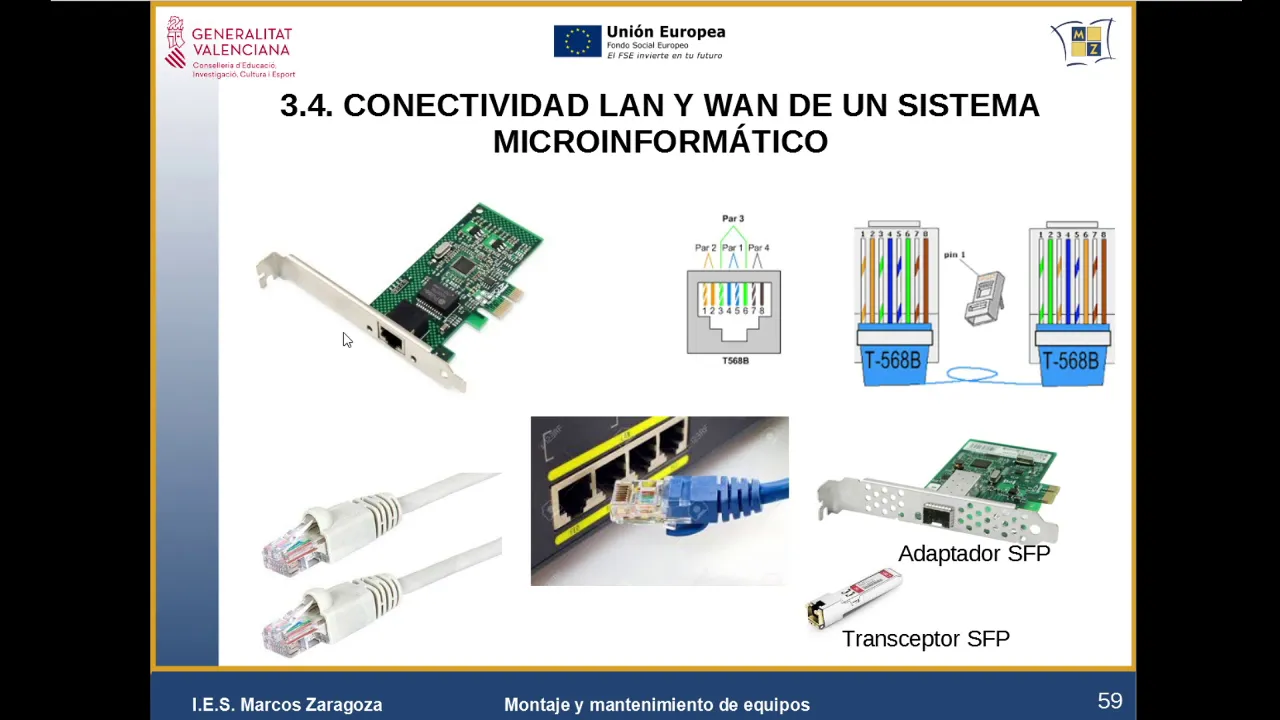
- Gigabit Ethernet is commonly used today with Category 5e copper cables and RJ45 connectors.
- Fiber optic cables can also be used with Gigabit Ethernet, providing higher speeds and longer distances.
Other Types of Networks
This section discusses other types of networks used for internet access.
Local Area Networks (LANs)
- LANs are used to connect computers within a limited area, such as an office or home.
- LANs can use copper cables or fiber optic cables for connectivity.
- Network interface cards (NICs) are commonly used to connect computers to LANs.
Network Interface Cards (NIC)
This section provides an overview of network interface cards used for network connectivity.
Characteristics of NIC
- NICs are expansion cards that connect to the motherboard of desktop computers or are integrated into laptops.
- NICs use different types of connectors, such as RJ45 for copper cables and specialized connectors for fiber optic cables.
- The wiring inside the cable follows the TIA/EIA 568 standard, which specifies the color positions in the connector.
- Some NIC adapters require fiber optic adapters for connecting to fiber optic cables.
Conclusion
In this transcript, we learned about different types of adapters and controllers used for network connectivity. We explored Ethernet controllers, Wi-Fi controllers, mobile technologies, and network interface cards. Each type has its own characteristics and is suitable for specific networking requirements.
Introduction to Network Cards
In this section, the speaker introduces network cards and their components. They explain that network cards are used for connectivity between devices and not necessarily for direct internet connection.
Components of Network Cards
- Network cards can be connected with cables or through Bluetooth.
- They facilitate point-to-point connectivity between devices.
- Network cards with wired connections are commonly used in homes.
- Wireless network cards use WiFi standards.
Types of Network Cards
This section discusses different types of network cards and their features.
Wired Network Cards
- Wired network cards provide a stable and reliable connection.
- They come with indicators to show if the link is functioning and if there is activity.
- These cards have internal controller chips for communication with the interface.
- The transfer speed depends on the type of interface, such as 100 Mbps or 1 Gbps.
Wireless Network Cards (WiFi)
- Wireless network cards, also known as WiFi, eliminate the need for cables.
- WiFi operates on specific frequencies, which may be shared by other devices causing interference.
- Different versions of WiFi exist, such as Wi-Fi 6 (ax), each offering theoretical speeds under ideal conditions.
- In wireless networks, the available bandwidth is shared among multiple devices connected to a single access point.
Understanding Wireless Networks (WiFi)
This section explains how wireless networks function and their limitations compared to wired networks.
Advantages of Wireless Networks
- Wireless networks provide flexibility by eliminating the need for physical cables.
- They are commonly used in homes without proper wired internet installations.
Limitations of Wireless Networks
- The performance of wireless networks depends on signal propagation and obstacles in the environment.
- Interference from other devices operating on the same frequencies can affect wireless network performance.
- The latest WiFi standards, such as Wi-Fi 6 (ax), offer higher theoretical speeds but are subject to limitations in real-world scenarios.
Network Card Connections and Hardware
This section discusses the hardware and connections used for network cards.
Network Card Connections
- Network cards can be connected through PCI Express ports in desktop computers.
- Laptops often use mini PCI Express ports for network card connections.
Network Card Hardware
- Antennas are used to propagate wireless signals in the air.
- Network adapters convert electrical signals into electromagnetic waves and vice versa.
- Point of access devices act as concentrators, connecting multiple computers to a wired network or a wider area network (WAN).
- Routers with built-in WiFi functionality serve as both routers and access points.
The transcript does not provide timestamps for every bullet point.
Wi-Fi Alternatives
This section discusses alternative options for accessing Wi-Fi when it is not available. It mentions the option of purchasing a USB device with built-in Wi-Fi adapter and antenna, as well as hardware specifically designed for mobile networks like 4G and 5G.
Wi-Fi USB Device
- A USB device with a built-in Wi-Fi adapter and antenna can be used as an alternative to access Wi-Fi.
- Some devices have detachable antennas, while others have integrated antennas.
- These devices can provide excellent access to Wi-Fi and are a cost-effective solution.
Mobile Network Hardware
- For accessing mobile networks like 4G or 5G, there are specific hardware options available.
- Having a 5G-enabled device is beneficial for microcomputing equipment.
- These hardware options allow for connectivity to WAN (Wide Area Network) and internet access.
Accessing the Internet via Routers
This section explains how internet access is typically achieved through routers and points of access.
Internet Connection in Homes and Businesses
- Internet connection in homes or businesses is usually provided by telecommunication companies such as Telefónica, Movistar, Vodafone, etc.
- These companies establish a connection between the home or business location and their network infrastructure.
- The router plays a crucial role in providing internet access within the premises.
Router Functionality
- The router receives the internet connection through various means such as fiber optic cables, coaxial cables, or basic telephone lines (ADSL).
- It may have ports for fiber optic connections or use bridge devices to adapt different types of connections.
- The router connects to the external network provided by the telecommunications operator and enables internal connectivity through Ethernet or Wi-Fi.
Understanding Routers and Access Points
This section provides an overview of routers, access points, and their functions.
Router as a Switch and Access Point
- A router serves as both a switch with multiple network ports and an access point for Wi-Fi connectivity.
- It acts as a bridge between the external internet connection and the internal network.
- In most households, there is always a router that combines these functionalities.
Connectivity Options
- The router connects multiple devices through Ethernet or Wi-Fi within the premises.
- It can receive the internet connection directly through fiber optic ports or via bridge devices that adapt different types of connections.
- The external connectivity provided by the telecommunications operator is linked to the internal network, which typically uses Ethernet or Wi-Fi.
These notes provide an overview of alternative options for accessing Wi-Fi, how internet access is achieved through routers, and the functionality of routers as switches and access points.
Turn any video into a summary like this
YouTube links, meetings, lectures. With transcripts, search, and chat.