Basics of OS (Computer System Operation)
Introduction to Operating Systems
In this section, the lecturer introduces the topic of operating systems and discusses their functions and examples.
Understanding Operating Systems
- An operating system is responsible for managing computer resources and providing a user-friendly interface.
- It performs various functions such as process management, memory management, file system management, and device management.
- Examples of operating systems include Windows, macOS, Linux, Android, and iOS.
Basic Concepts of Computer System Operations
This section focuses on the basic concepts related to computer system operations that are essential to understand how operating systems work.
Importance of Computer System Structure
- Understanding the structure of a computer system is crucial for comprehending the functioning of an operating system.
- It provides a foundation for learning about operating systems in a clearer way.
- Knowledge of computer organization and architecture is also gained through understanding the structure of a computer system.
Components of a Modern General-Purpose Computer System
This section explains the components that make up a modern general-purpose computer system.
CPUs and Device Controllers
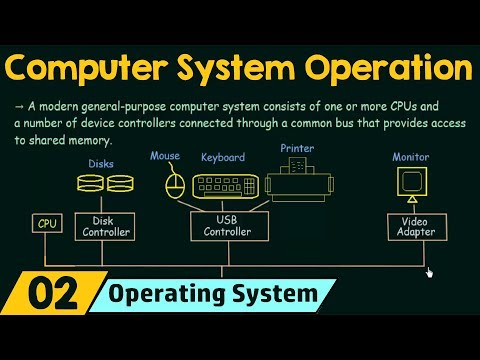
- A modern general-purpose computer system consists of one or more CPUs (Central Processing Units).
- The CPU is responsible for processing computations and calculations in a computer.
- It is not just the visible box but rather a small chip embedded in the motherboard.
- Device controllers are connected to CPUs through a common bus that provides access to shared memory.
- Each device controller manages specific types of devices such as disks, mice, keyboards, printers, etc.
Interconnection between Components in Computer Systems
This section explores how different components in a computer system are interconnected.
Device Controllers and Common Bus
- Each device controller is responsible for a specific type of device.
- The CPU and device controllers can execute concurrently, competing for memory cycles.
- All components, including the CPU and device controllers, are connected to a common bus.
- The common bus provides shared access to memory.
Conclusion
This section concludes the discussion on computer system operations and their relevance to understanding operating systems.
Importance of Computer System Operations
- Understanding computer system operations is essential for comprehending how operating systems function.
- It provides insights into the interconnections between different components in a computer system.
- This knowledge serves as a foundation for further exploration of operating system concepts.
Main Memory and Execution
This section discusses the concept of main memory and its limitations in terms of capacity. It explains that all executed tasks need to be loaded into main memory, which is finite. The size of RAM determines the amount of main memory available.
Main Points:
- Main memory is limited and finite, unlike unlimited or infinite.
- Tasks need to be loaded into main memory for execution.
- The size of RAM determines the amount of main memory available.
Device Controllers and Main Memory
This section explains how devices, such as disk controllers or adapters, need to be loaded into main memory for execution. It highlights that device controllers can execute concurrently with the CPU.
Main Points:
- Devices/controllers need to be loaded into main memory for execution.
- Disk controllers/adapters handle loading devices into main memory.
- Device controllers can execute concurrently with the CPU.
Concurrent Execution of Devices
This section describes concurrent execution, where multiple devices or controllers can work simultaneously. It uses an example of watching a video while typing on Microsoft Word without experiencing lag.
Main Points:
- Concurrent execution means devices/controllers can work at the same time.
- Example: Watching a video while typing on Microsoft Word without lag.
Orderly Access to Shared Memory
This section emphasizes the importance of orderly access to shared memory for seamless operation without lag or issues. A memory controller is responsible for synchronizing access to ensure each device gets its required share of memory.
Main Points:
- Orderly access to shared memory is crucial for smooth operation.
- Memory controller synchronizes access to shared memory.
- Each device needs its required share of memory for proper execution.
Memory Controller and Device Access
This section explains the role of a memory controller in ensuring proper access to memory for devices. It ensures that each device gets the necessary access to be loaded and executed smoothly.
Main Points:
- Memory controller ensures orderly access to shared memory.
- Each device/controller gets proper access to memory for smooth operation.
Basic Structure of Computer System
This section discusses the basic structure of a computer system, including the CPU, disk controllers, common bus, and memory controller. It highlights how these components are interconnected and work together.
Main Points:
- CPU, disk controllers, common bus, and memory controller form the basic structure.
- Components are interconnected via a common bus.
- Memory controller ensures proper sharing of memory between devices.
Introduction to Important Terms
This section introduces important terms related to computer systems. The first term is "bootstrap program," which is the initial program that runs when a computer is powered up or rebooted.
Main Points:
- Bootstrap program is the initial program that runs on power-up or reboot.
- It is stored in read-only memory (ROM).
- Bootstrap program loads the operating system (OS) into main memory.
Features and Functions of Bootstrap Program
This section explains the features and functions of a bootstrap program. It describes how it loads the OS from secondary memory into main memory and starts its execution. The OS acts as an interface between users and physical hardware.
Main Points:
- Bootstrap program loads OS from secondary memory into main memory.
- OS serves as an interface between users and physical hardware.
- Bootstrap program must locate and load the OS kernel into memory.
Loading OS Kernel
This section focuses on loading the OS kernel, which is the main part of the operating system. The bootstrap program locates and loads the OS kernel into memory during system startup.
Main Points:
- OS kernel is the main part of the operating system.
- Bootstrap program locates and loads the OS kernel into memory.
The summary includes key points from each section of the transcript, organized in a clear and concise manner. Timestamps are used to link to specific parts of the video for further reference.
English we know what is an interrupt when you are doing something if someone comes and disturbs you or if someone comes and says please stop doing this work and do something else that is an interrupt we are interrupted so think of it in the same context this is almost the same even in case of a computer
This section introduces the concept of interrupts in the context of a computer system. It explains how interrupts can occur from both hardware and software, and how they are signaled to the CPU through a system bus.
Definition of Interrupt
- An interrupt occurs when someone or something disrupts ongoing work.
- In the context of a computer, interrupts can be triggered by hardware or software.
- Hardware interrupts are signaled to the CPU through the system bus.
system and let's see what or how we can define this and what it actually is so the occurrence of an event is usually signaled by an interrupt from the hardware or software so we know that the CPU is always working it is doing some work and when the CPU is doing that work sometimes the hardware or software may
This section further explores how events are signaled as interrupts from hardware or software. It emphasizes that interrupts cause the CPU to stop its current task and execute a more important one.
Signaling Interrupts
- Events are usually signaled as interrupts from either hardware or software.
- The CPU, which is constantly working, may be interrupted by hardware or software during its tasks.
- When an interrupt occurs, the CPU stops its current task to execute a more important one.
interrupt the CPU it may come and tell the CPU that wait just wait with whatever you are doing and please execute this task that I am giving you this is more important so the CPU has to stop and it has to execute that task which comes up and that is known as an interrupt so the hardware may trigger an
This section explains how interrupts cause the CPU to pause its current task and execute a more important one. It highlights that interrupts can be triggered by hardware.
Hardware Interrupts
- Hardware can trigger an interrupt by sending a signal to the CPU.
- The signal tells the CPU to pause its current task and execute a more important one.
interrupt at any time by sending a signal to the CPU usually by the way of the system bus so we have different hardware in our system and then that Hardware can trigger an interrupt it can interrupt and how does it do that it sends a signal to the CPU and how can you send signal to the CPU by the way of
This section elaborates on how hardware triggers interrupts by sending signals to the CPU through the system bus.
Signaling Interrupts via System Bus
- Hardware in a computer system can trigger interrupts at any time.
- The hardware sends a signal to the CPU through the system bus.
- The system bus acts as a communication channel between different hardware components.
a system bus through the system bus I showed you in our previous diagram what I mean by bus so here this line it represents the common bus we have so similarly using a system bus
This section reiterates how interrupts are sent through the system bus, which acts as a common communication channel for various hardware components.
System Bus for Interrupt Communication
- The system bus is used as a communication channel for sending interrupts from hardware to the CPU.
- It represents a common pathway shared among different hardware components in a computer system.
the hardware can send the interrupt to the CPU and the CPU have to stop whatever it is doing and it has to execute the interrupt so we will see how to CPU
This section emphasizes that when an interrupt is sent to the CPU through the system bus, the CPU must pause its current task and execute the interrupt.
Interrupt Execution by CPU
- When a hardware component sends an interrupt to the CPU through the system bus, the CPU must stop its current task.
- The CPU then executes the interrupt, which takes priority over its previous task.
responds to the interrupt later so let us understand what is meant by interrupting that way now the next term I want introduce to you is known as a system call also known as the monitor core let's see what it says a software may trigger an interrupt by executing a special operation called as system core
This section introduces another type of interrupt called a system call or monitor call. It explains how software can trigger interrupts by executing specific operations.
System Call (Monitor Call)
- A software can trigger an interrupt by executing a special operation known as a system call or monitor call.
- Unlike hardware interrupts, these interrupts are triggered by software actions.
now as I told you when Hardware triggers a interrupt we usually call it as interrupts if the software is what that is triggering the interim if the software is causing
This section clarifies that interrupts triggered by hardware are generally referred to as interrupts, while those triggered by software are called system calls or monitor calls.
Differentiating Interrupt Types
- Interrupts triggered by hardware are commonly referred to as "interrupts."
- Interrupts caused by software actions are specifically termed "system calls" or "monitor calls."
the interrupt then that is known as a system call or a monitor core so I hope that made clear to you what an interrupt actually means now let us see how does
This section summarizes that interrupts triggered by hardware are called interrupts, while those triggered by software are known as system calls or monitor calls.
Understanding Interrupts
- Interrupts triggered by hardware are referred to as "interrupts."
- Interrupts caused by software actions are termed "system calls" or "monitor calls."
the CPU respond when it receives an interrupt so here it says when the CPU is interrupted it stops what it is doing and immediately transfers execution to a fixed location
This section explains how the CPU responds when it receives an interrupt. It states that the CPU stops its current task and transfers execution to a fixed location.
CPU Response to Interrupt
- When the CPU is interrupted, it halts its current task.
- The CPU then immediately transfers execution to a fixed location.
so I already told you how interrupts can arise either from hardware or software so CPU is already doing some work and then immediately it gets an interrupt from either
This section reiterates that interrupts can originate from both hardware and software. It emphasizes that the CPU receives interrupts while performing its ongoing tasks.
Origin of Interrupts
- Interrupts can arise from both hardware and software sources.
- The CPU may receive interrupts while actively engaged in executing tasks.
a hardware or a software so when the CPU is interrupted in that way what does it do it stops what it is doing it stops what
This section restates that when the CPU is interrupted, it ceases its current task.
Halting Current Task
- When the CPU experiences an interrupt, it halts its ongoing task.
- The interruption causes the CPU to stop whatever operation it was previously executing.
it was doing and would then it immediately transfers execution to a fixed location so whatever the CPU was doing
This section reiterates that when the CPU is interrupted, it stops its current task and transfers execution to a fixed location.
Transfer of Execution
- When an interrupt occurs, the CPU halts its current task.
- It then promptly transfers execution to a predetermined fixed location.
it just stops it and then it transfers this execution to a fixed location now what is that fixed location that we are talking about the fixed location usually contains
This section explains that the fixed location mentioned earlier refers to a specific memory address where the interrupt service routine (ISR) is located.
Fixed Location for Interrupt Service Routine
- The fixed location mentioned earlier refers to a memory address.
- This memory address holds the starting point of the interrupt service routine (ISR).
the starting address where the service routine of the interrupt is located now we have a new term here which is called service routine now what is a service routine
This section introduces the concept of an interrupt service routine (ISR), which represents the code or instructions executed when an interrupt occurs.
Interrupt Service Routine (ISR)
- A service routine, also known as an ISR, represents the code or instructions associated with handling interrupts.
- The ISR starts executing from a specific memory address known as its starting address.
service routine gets executed completely and then what happens on completion the CPU resumes the intercepted computation so we know that
This section explains that once the interrupt service routine (ISR) has been fully executed, the CPU resumes its previous interrupted computation.
Resuming Interrupted Computation
- After completing execution of the interrupt service routine (ISR), the CPU resumes its previously interrupted computation.
- The CPU continues from where it left off before being interrupted by executing further instructions.
Turn any video into a summary like this
YouTube links, meetings, lectures. With transcripts, search, and chat.