UD3 Componentes de E S 15
Introduction to Printers
In this section, we discuss printers and their different types.
Types of Printers
- There are various types of printers, each with its own differences.
- Dot matrix printers are less common but still used in certain areas. They use a needle matrix to impact ink onto a ribbon and then onto the paper.
- Thermal printers are commonly used for labeling and barcode printing. They use heat to activate special thermal paper that contains ink.
- Inkjet printers are widely used in homes and businesses. They work by spraying small droplets of ink onto the paper using either thermal bubble or piezoelectric technology.
Dot Matrix Printers
- Dot matrix printers use a needle matrix to impact ink onto a ribbon, which then transfers the ink onto the paper.
- These printers are commonly used in official documents and can also be used with special carbon copy paper for duplicate prints.
Thermal Printers
- Thermal printers use heat to activate specially coated thermal paper, resulting in the desired print.
- The advantage of thermal printing is that it eliminates the need for ink cartridges, making it more eco-friendly and cost-effective.
Inkjet Printers
- Inkjet printers are widely used in homes and businesses.
- They work by spraying small droplets of ink onto the paper using thermal bubble or piezoelectric technology.
- Inkjet printers use cartridges to store and apply ink, with options for black or multiple colors.
Conclusion
Printers come in various types, including dot matrix, thermal, and inkjet. Each type has its own advantages and applications. Dot matrix printers are commonly used for official documents, while thermal printers are suitable for labeling and barcode printing. Inkjet printers are versatile and widely used in homes and businesses.
Timestamps may not be exact due to limitations in the provided transcript.
Understanding Printer Resolutions and Mesh
In this section, the speaker explains the concept of printer resolutions and how they relate to mesh or grid patterns.
Printer Resolutions and Mesh
- A printer resolution refers to the number of dots or points that a printer can print per inch.
- The standard resolutions are 300, 600, 900 dpi (dots per inch), but other variations exist.
- The distance between the points in a mesh is consistent both horizontally and vertically.
- For example, in a 600 x 300 resolution, the printer prints 600 points horizontally and 300 points vertically.
- This creates a mesh or grid pattern with a total of 180,000 points for a single square inch.
- Different printers may have different resolutions and speeds. Higher resolutions generally result in better print quality.
- Printers often have a pages-per-minute rating indicating their printing speed.
Duplex Printing and Printer Features
In this section, the speaker discusses duplex printing and various features found in printers.
Duplex Printing
- Duplex printing refers to the ability to print on both sides of a sheet of paper.
- It is slower than single-sided printing due to the mechanism required for flipping the paper.
Printer Features
- Printers may have different maximum resolutions for horizontal and vertical printing.
- Connectivity options such as Wi-Fi and Bluetooth are available in some printers.
- Paper size options include A4 (most common) and A3 for larger formats.
- The capacity of paper trays varies depending on the printer model.
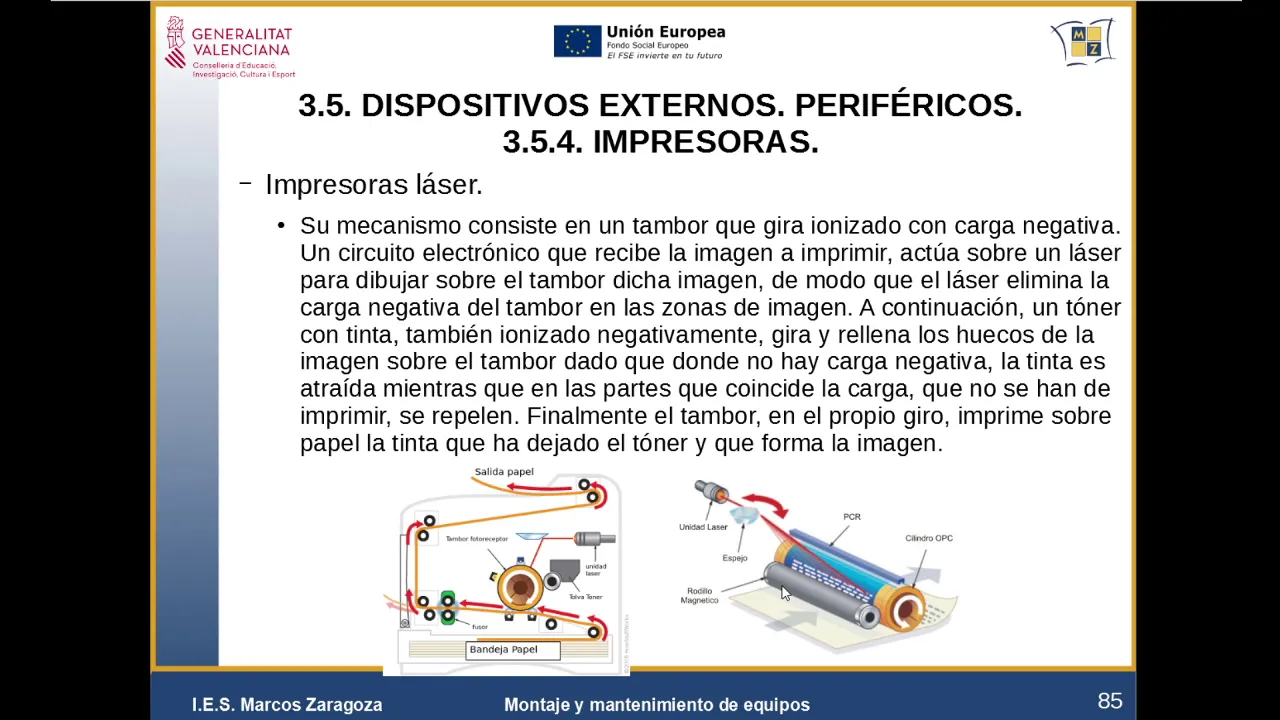
Introduction to Laser Printers
In this section, the speaker introduces laser printers and explains their basic functioning.
Laser Printers
- Laser printers use a different mechanism compared to inkjet printers.
- They have a drum that rotates and is charged with a negative charge.
- The image to be printed is drawn on the drum using laser technology.
- Toner, which contains the ink, is applied to the drum and transferred onto the paper.
- Laser printers are generally more expensive than inkjet printers but offer better print quality and durability.
Inkjet vs. Laser Printers
In this section, the speaker compares inkjet and laser printers in terms of color printing, cost-effectiveness, durability, noise level, resolution, and printing speed.
Inkjet vs. Laser Printers
- Inkjet printers are commonly used for both color and black-and-white printing.
- Laser printers are more suitable for high-quality color printing but can be more expensive.
- Inkjet printers may be more cost-effective for black-and-white printing due to cheaper cartridges.
- Laser printers are generally more durable than inkjet printers.
- Inkjet printers can be noisier due to the movement of mechanisms and printheads.
- While laser printer resolutions may not be as high as some inkjets, they still provide sufficient quality for most purposes.
- Printing speeds vary between 16 to 40 pages per minute depending on the printer model.
Introduction to 3D Printers
In this section, the speaker briefly mentions 3D printers without providing detailed information.
3D Printers
- The speaker briefly mentions that there are also 3D printers available but does not provide further details.
The transcript provided does not contain timestamps for all sections.
Printers Overview
This section provides an overview of printers, including their characteristics and types.
Characteristics of Printers
- Printers have different features such as capacity, input trays, wide depth, and height.
- They can be more voluminous than ink printers.
- Resolutions can vary in horizontal and vertical dimensions.
Types of Printers
- There are various types of printers available in the market.
- The transcript does not provide specific details about these types.
24-page Printers
This section briefly mentions 24-page printers without providing further details.
Features of 24-page Printers
- The transcript does not provide specific details about the features or connectivity options of 24-page printers.
Continuing with Notes
This section indicates a continuation of the previous notes.
Introduction to 3D Printers
This section introduces 3D printers and their capabilities.
Definition of 3D Printers
- A 3D printer is a machine capable of printing three-dimensional objects based on a design.
- Unlike traditional printers that print on paper, 3D printers can create objects with volume.
Printing Objects with Volume
- To print objects with volume, a different type of printer called a 3D printer is required.
- The process involves printing each layer from bottom to top using polymers or resins.
- Different techniques and technologies are used for layer-by-layer printing.
Types of 3D Printers
- The transcript mentions various types but does not provide detailed information about them.
Layered Printing Process
This section explains the layered printing process used in 3D printers.
Layered Printing Process
- The layered printing process involves several steps, including sketching a design, creating a 3D model on a computer, and separating it into layers.
- Each layer is printed from bottom to top using polymers or resins.
- The material is deposited and shaped to construct the object layer by layer.
Types of 3D Printers
This section briefly mentions different types of 3D printers without providing specific details.
Types of 3D Printers
- The transcript mentions FDM (Fused Deposition Modeling), SLA (Stereolithography), and SLS (Selective Laser Sintering) as types of 3D printers.
- It does not provide detailed information about these types.
Building Your Own 3D Printer
This section discusses the option of building your own 3D printer.
Building a DIY 3D Printer
- It is possible to build your own 3D printer from scratch, which can be more cost-effective than buying a pre-assembled one.
- Some people prefer to assemble their own printer, while others may choose to purchase an already assembled one at a higher cost.
Stereolithography (SLA) and Selective Laser Sintering (SLS)
This section introduces two technologies used in 3D printing - Stereolithography (SLA) and Selective Laser Sintering (SLS).
SLA and SLS Technologies
- SLA and SLS are two technologies that use a resin bath and a laser to shape the object layer by layer.
- SLA uses UV light to cure the liquid resin, while SLS involves sintering powdered material with a laser.
Applications of 3D Printing
This section discusses the wide range of applications for 3D printing technology.
Diverse Applications
- 3D printing offers a broad range of solutions, including clothing, tools, houses, and various types of spare parts.
- It has revolutionized both individual and industrial production capabilities.
Revolution and Industrial Impact
This section highlights the revolutionary impact of 3D printing in both domestic and industrial settings.
Revolutionizing Manufacturing
- The ability to fabricate objects using 3D printers has led to a revolution in manufacturing.
- Individuals can now create their own objects at home, while industries benefit from flexible machinery and new production methods.
Connectivity Options for Printers
This section briefly mentions connectivity options for printers.
Printer Connectivity
- Printers can be connected via USB, Ethernet (local area network), or Wi-Fi.
- USB connectors are commonly used, including Type B connectors specifically designed for printers.
Scanners in Administration
This section briefly mentions scanners used in administration tasks.
Scanning Documents
- Scanners are used to digitize information and transfer it to computers for further processing.
- Multifunction printers often include scanning capabilities.
New Section
This section discusses the intensity of light, file handling, and resolution in scanning.
Intensity of Light and File Handling
- The intensity of light affects how files are handled during scanning.
- Resolution is measured in points per inch (PPI), with 300 x 600 PPI being a common standard.
- Vertical and horizontal differentiation is not clearly explained.
- Scanning at 300 PPI or below is common for American standards.
Color Depth and Pixel Representation
- Each scanned point corresponds to a pixel that is represented on the computer.
- When displayed on a monitor, the scanned point appears as a pixel with color.
- Color depth refers to the range of colors available. RGB (red, green, blue) is commonly used.
- In 24-bit color depth, 8 bits are dedicated to each RGB component, resulting in 16.7 million colors.
New Section
This section explains color gamut and the calculation of color combinations.
Color Gamut
- Color gamut refers to the range of colors available based on color depth.
- In RGB color space, 8 bits are allocated for red, green, and blue components.
- With a total of 24 bits (8 bits per component), approximately 16.7 million colors can be achieved.
Calculation of Color Combinations
- To determine the number of possible combinations with 24 bits, calculate 2 raised to the power of 24 (2^24).
- Each color component has 8 possible values (2^8), resulting in numerous combinations.
New Section
This section introduces different types of scanners: handheld, roller-based, and flatbed scanners.
Types of Scanners
- Handheld Scanners:
- Portable scanners that can be held and moved over the document.
- Suitable for scanning smaller documents or specific areas.
- Roller-based Scanners:
- Scanners with a roller mechanism to feed the document through.
- Efficient for scanning multiple pages quickly.
- Flatbed Scanners:
- Scanners with a flat glass surface where the document is placed.
- Ideal for scanning larger documents or books.
The transcript does not provide further information about "tan burgués."
Turn any video into a summary like this
YouTube links, meetings, lectures — with transcripts, search, and chat.