2019 Trade Map 17: Company Data
Trade Map Company Data Overview
This section provides an overview of the company data feature on Trade Map, offering insights into how it connects buyers and sellers globally.
Finding Company Data on Trade Map
- To access company data, navigate to the home and search page and select "imports" to explore importing companies for a specific product.
- Enter the product name (e.g., Footwear) to identify the HS code matching your product. Then, leave the country field empty to view all companies importing that product worldwide.
Exploring Company Data Tables
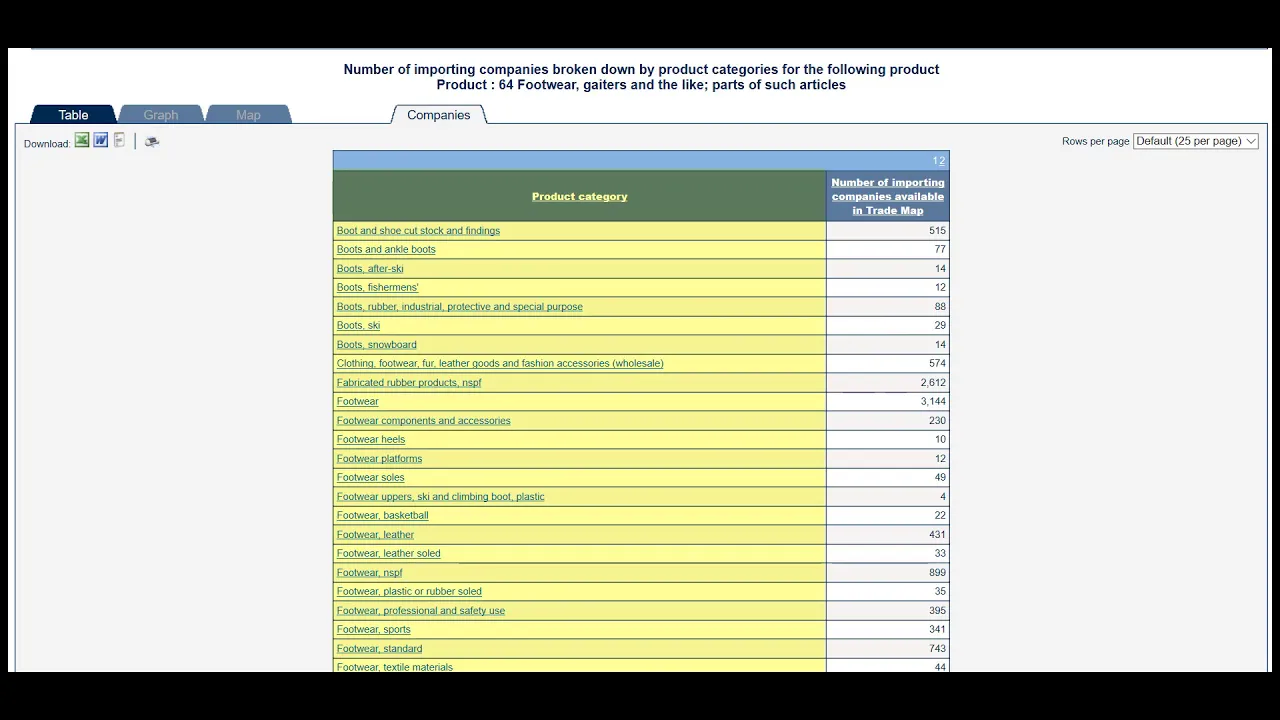
- Clicking on the "companies" button reveals a table showing different types of imported footwear by companies globally, categorized under specific product categories.
- For data on a specific importing country like France, enter the country name in the navigation bar or country-region field to view detailed information about imported products.
Detailed Company Information
- By selecting a specific product category (e.g., Footwear sports), you can access detailed information about individual companies, including their website, city, number of employees, and products traded.
- Clicking on a company's name displays a popup table with additional details such as phone numbers, executives' names, turnover figures, and whether they are distributors or producers.
Understanding Trading Partners