07 - Predecesoras y sucesoras
Task Sequencing and Resource Allocation in Project Management
Introduction to Task Insertion and Text Styles
- The speaker discusses the completion of task insertion and text style adjustments within a project, leading into the sequencing of tasks.
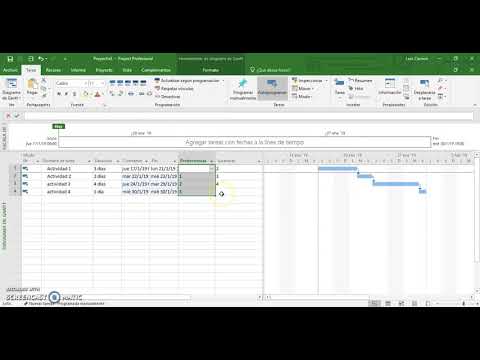
- A new file is opened for demonstration purposes, simulating multiple activities (Activity 1 to Activity 4), which will initially be set up manually before transitioning to automatic scheduling.
Managing Task Dependencies
- The focus shifts to correcting Activity 2, with a general overview of durations (three days, two days, etc.) being established for each task.
- The concept of "successors" is introduced; these indicate how one task's completion affects another's initiation or continuation. Only three out of four types of predecessors are discussed as commonly used in project execution.
Setting Up Predecessor Relationships
- An example illustrates that Activity 2 will commence after the completion of Activity 1, establishing a default predecessor link.
- The speaker elaborates on setting up resource hours by double-clicking on tasks and configuring start/end relationships (start-to-start or finish-to-finish).
Understanding Task Duration and Scheduling
- It’s emphasized that despite differing durations for tasks (e.g., three days vs. two days), they can still end on the same date if scheduled correctly.
- The instructor notes that task duration is influenced by configured working days in the calendar settings.
Advanced Dependency Configurations
- Discussion includes managing dependencies through postponement; for instance, a successor may need to wait two additional days after its predecessor finishes before starting.
- An example demonstrates how to set an activity (Activity 3) to begin shortly before its predecessor (Activity 2).
Customizing Task Links
- Further examples illustrate how to adjust start dates using negative offsets (-2 days), allowing flexibility in scheduling without confusion.
- Another scenario shows how different types of links can be created between tasks while ensuring clarity in their relationships.
Finalizing Task Sequences
- The process concludes with instructions on selecting multiple tasks sequentially and linking them together efficiently using drag-and-drop methods.
- Emphasis is placed on customizing sequences beyond default settings by selecting specific tasks while holding down control keys during selection.
Project Task Sequencing and Management
Understanding Task Dependencies
- The system applies predecessor tasks automatically when tasks are selected, allowing for logical sequencing within the project.
- It is crucial that all project tasks have successors, except summary tasks. All areas of the project should include predecessor tasks, with the initial task being an exception.
Project Initialization and Coordination
- The initial project does not have predecessors; similarly, a project's completion milestone will not have successors.
- The project starts on a specific date, which is essential for coordinating logistics such as transferring items.
Task Scheduling and Execution
- Tasks can be scheduled to occur in parallel; for instance, managing deliveries can happen simultaneously with other activities after coordination.
- Finalizing preparations depends on completing certain activities (e.g., Activity 4 and Activity 6), indicating a structured approach to task management.
Milestones and Handoffs
- Important milestones include the start date of the project and its expected completion date. These dates help track progress without detailing durations yet.
- A significant milestone is marked by executing transfers only after finalizing preparations to ensure clarity in task execution.
Finalization of Activities
- Marking completed transfers as milestones helps clarify when packing can begin based on prior task completions.
- Each activity must be mapped out clearly; however, this discussion focuses on marking key milestones rather than detailing every activity.
Conclusion of Task Sequencing
- The last task in this work package signifies the culmination of sequenced activities leading up to it.