SAP Tutorial for beginners - SAP ERP
ERP Overview
This section provides an overview of SAP ERP, its history, and evolution from R1 to the current ECC days.
History of SAP
- SAP was founded in 1972 by five former IBM employees.
- In 1991, SAP released R3 system which met with overwhelming approval due to its client-server concept and consistent use of relational databases.
- In 1999, the CEO announced the MySAP.com strategy which connected the backend ERP system to e-commerce platforms.
- Current focus is on real-time data with offerings around HANA and Business Suite.
Evolution of ERP Market
- In the early 70s, there was no real concept of an ERP system.
- In the 80s, these systems came to be known as standard ERP systems since SAP had broken new ground in this area.
- In the 90s, e-commerce became popular as a result business processes were defined that stretched across company boundaries.
- These new functions led to the development of new products such as new dimension products.
Logging into SAP ERP System
- The SAP GUI program connects the front-end computer with a specific SAP system at the back end.
- To start the SAP GUI, you need to install another program called "SAP Logon" provided by your administrator onto your laptop or machine.
- The list of systems that we can log on to is derived from a file on the frontend computer called saplogon.ini file.
- The load distribution enables the load to be distributed to many servers that are typically present in a production environment.
SAP ERP System
- The key elements of the screen are the client, user ID, password, and language.
- The standard SAP menu is displayed when you log in. You can also have a user role-based menu.
Introduction to SAP
In this section, the speaker introduces SAP and explains how to access further details about the system.
Accessing Further Details
- Clicking on a button allows users to see further details such as which system they are logged into, their client, user ID, program running, transaction code for that program, response time and other technical details.
- Users can switch between insert mode or overwrite mode by clicking on it.
- Users can go to a specific transaction in the standard SAP menu by double-clicking on it. They can also add frequently used transactions to their favorites folder.
- The transaction code for creating a sales order is VA001. As users gain more experience with the system, they can simply type in VA01 at the top command menu and press enter to access this same screen.
Personalizing the User Interface
- Pressing F1 while in a field provides information about that field and its technical details.
- Users can default specific fields by maintaining their user profiles in another session using a transaction for maintaining user profiles.
Maintaining User Profiles
In this section, the speaker explains how users can maintain their user profiles in SAP.
Defaulting Specific Fields
- Users can default specific fields by maintaining their user profiles using transaction SU3.
- The parameter ID VKO is used to default sales organization information for orders.
- To default sales organization information for orders, users should enter VKO followed by their country code in the parameter value field.
Conclusion
In this section, the speaker concludes the video and encourages viewers to explore SAP further.
Final Thoughts
- The speaker encourages viewers to explore SAP further and learn more about its capabilities.
Personalizing the SAP System
This section covers how to personalize the SAP system and reduce manual data entry.
Setting Defaults
- When launching the sales order create transaction, 0001 sales org is automatically defaulted.
- User maintenance SU3 can be used to set defaults for decimal notation, date format, time zone, default language, etc.
System-Wide Concepts
This section covers key concepts underlying the SAP system that users must know and understand.
Organization Elements
- The company's enterprise structure is mapped onto SAP applications using organizational elements.
- Transactions are application programs that execute business processes in the SAP system.
- The client is the highest level element of all organizational elements and represents the enterprise or main group holding company.
- Company code is a legal independent accounting unit representing central organizational elements of financial accounting. It also represents tax law, fiscal calendar, local currency, and tax reporting requirements.
- Controlling area groups organizational structure entity org unit and position are HR human resources related org units. Org unit describes various business units that exist in an enterprise while positions are individual employee assignments in the enterprise.
- Sales organization controls terms of sale to customer while plant can manufacture products distribute products or provide a service. Plant material stocks in inventory management can be differentiated according to storage location.
Master Data
- Master data is essentially of three different types: customer master, material master, and personnel master.
- Customer master contains key information that defines business relationship between a company and its customer. It has three-part structure: general data, company code data, and sales organization data.
- Material master contains all the key information a company needs to manage a material within its organization. The information is grouped into views that are organized by business functions.
- Personnel files are master data records.
HR Org Management
This section covers the basics of HR org management, including org units, positions, persons, transactions, and master data.
Org Units
- The highest level of HR org management is the HR org unit.
- Org units can be functional or regional departments or project groups.
- Multiple org units and their relationships form the org structure.
Positions and Persons
- Positions are individual employee assignments in the enterprise.
- Persons occupy these positions.
- A position inherits a job's characteristics but can also have additional characteristics specific to that position.
Transactions and Master Data
- Transactions are application programs that execute SAP business processes in the system.
- Whenever possible, master data is copied into the transaction to avoid re-entry of data.
- When a transaction is executed in the system, a document is created containing all relevant predefined information from master data and org elements.
Customer and Material Masters
This section covers how to find and display customer and material masters in SAP ERP.
Customer Master
- To find the customer master, go to Sales > Logistics > Sales and Distribution > Master Data > Business Partner > Customer.
- Use search if you don't know where to find a specific node.
- Display complete data for all views relevant to sales and distribution.
Material Master
- To find the material master, go to Logistics > Material Management > Material Master.
- Display current material data for all views.
- Enter organizational level for the material, such as plant.
Material Master and Transaction Creation
In this section, the speaker provides an overview of the material master and demonstrates how to create a transaction.
Material Master Overview
- The material master contains information about a company's materials.
- Users can quickly jump to different views within the material master.
- Additional data such as descriptions, unit of measures, and org levels can be entered in the material master.
- Configurable materials are used for items with multiple variations such as car colors or tire types.
Transaction Creation
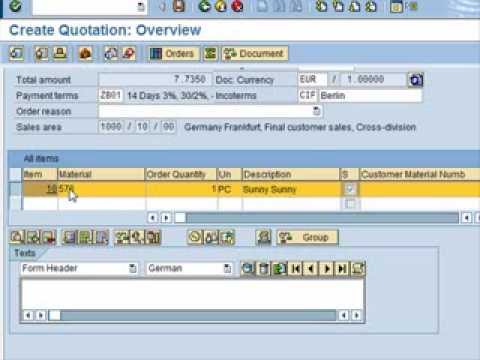
- A quotation is created using transaction code VA21 under sales and distribution.
- Required fields include customer, material, and quantity.
- Information at both header and item level is taken from customer and material masters.
- Once saved successfully, a unique number representing the quotation is generated.
- Validity dates must be entered before saving.