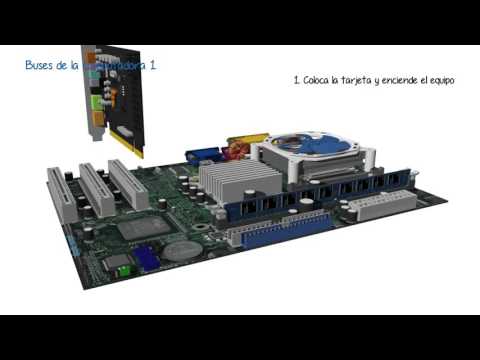
Buses de la computadora 1
Introduction to Computer Buses
This section provides an introduction to computer buses, their purpose, and components.
What is a Bus?
- A bus is a communication system that transfers data between computer components.
- It is composed of various elements such as cables, tracks on a circuit board, resistors, capacitors, integrated circuits, and protocols.
Purpose of Buses
- Buses reduce the number of paths required for communication between components by consolidating all necessary communications into a single data channel.
- They are often referred to as "data highways" or "autopistas de datos" in Spanish.
Characteristics of a Bus
- Width: The number of bits that can be transmitted simultaneously. For example, a 32-wire flat cable can transmit 32 bits in parallel.
- Frequency: Defines the speed at which data is sent and received. Expressed in megahertz (MHz).
- Transfer Speed: The amount of data that can be transported per unit of time. Calculated by multiplying the bus width by its frequency.
Types of Buses
- System Bus: Connects all components within a computer system.
- Data Bus: Transmits information or instructions from the sender to the receiver bidirectionally.
- Address Bus: Establishes the memory address for read or write operations unidirectionally.
- Control Bus: Specifies actions to be performed with data at the indicated memory position and includes synchronization signals.
Internal Expansion Buses
ISA (Industry Standard Architecture)
- An 8-bit bus initially supporting expansion cards like floppy drives and hard disks.
- Expanded to 32 bits with transfer speeds up to 33 megabytes per second (MB/s).
MCA (Micro Channel Architecture)
- A 16 or 32-bit bus with separate 32-bit and 64-bit address spaces for memory and I/O ports.
- Used in x86 processors with transfer speeds of 40 to 266 MB/s.
AGP (Accelerated Graphics Port)
- Enables direct communication between the graphics card and RAM.
- Transfer speeds of 133 MB/s for a 32-bit bus and 266 MB/s for a 64-bit bus.
PCI Express
- Point-to-point serial link structure with transfer speeds up to 1 gigabyte per second (GB/s).
- Supports x16 slots with a theoretical maximum speed of 16 GB/s unidirectional or 32 GB/s bidirectional.
Serial ATA (SATA)
- Mainly used for external hard drive connections, providing high-speed data transfer from 150 to 600 MB/s.
External Expansion Buses
PC Card (formerly known as PCMIA)
- Parallel bus with widths of 16 or 32 bits, commonly used in laptops for memory expansion and device connection.
USB (Universal Serial Bus)
- Widely used for various devices, offering bandwidth of one bit and transfer speeds up to 600 MB/s.
ExpressCard
- Replaced PC Card and uses a serial bus with transfer speeds of up to 60 MB/s.
FireWire (IEEE1394)
- Similar to USB but with bidirectional capabilities, offering transfer speeds from 50 to 400 MB/s.
Logical Operation of PCI Bus
This section explains the logical operation of the PCI bus when connecting an audio card.
Logical Operation of PCI Bus
- After installing the audio card and turning on the computer, the Basic Input/Output System (BIOS) initiates the plug-and-play routine.
- The BIOS sends recognition signals according to the established protocol to any device connected to the PCI bus, requesting its identity.
- The sound card responds by identifying itself and sending its identifier through the bus using the specified protocol.
- The plug-and-play BIOS checks the System Configuration Data (SCD) table to verify if the card's information is present. As it is a newly installed card, there is no record of it.
- The plug-and-play BIOS assigns an interrupt request (IRQ), memory address, input/output configurations to the audio card, and records them in the SCD.
- When the operating system starts, it detects that new hardware has been added by checking the SCD and prompts the user to load drivers for that specific operating system.
- When using the audio card, data from the microprocessor is sent through the Southbridge chipset (also known as Platform Controller Hub) to the PCI bus, which determines where to send this received information.
Conclusion
Computer buses are communication systems that transfer data between components within a computer. They reduce complexity by consolidating communications into a single channel. Buses have different characteristics such as width, frequency, and transfer speed. There are various types of internal and external expansion buses with different speeds and capabilities. The logical operation of a PCI bus involves recognizing and configuring newly installed devices through protocols established by plug-and-play routines in BIOS.