Intro to LaTeX : Learn to write beautiful math equations || Part 1
Introduction to LaTeX for STEM Students
Overview of LaTeX
- The speaker introduces a product aimed at STEM students and anyone who writes math formulas, emphasizing the importance of displaying mathematics beautifully.
- LaTeX is introduced as a markup language that allows users to write math formulas using code, which will be displayed in an aesthetically pleasing manner.
Getting Started with Overleaf
- The video focuses on using Overleaf, a free cloud-based platform for writing in LaTeX. Installers for PC and Mac versions are also mentioned.
- The speaker logs into Overleaf and creates a new blank project titled "hello YouTube," demonstrating the interface where code is entered on the left and output is shown on the right.
Understanding Document Structure
- Key components of a LaTeX document are explained:
begin documentandend document, where all content should be typed.
- The recompile button is highlighted, allowing users to see changes reflected in real-time as they type.
Preamble and Document Class
- The initial portion of the document called the preamble includes settings like title, author name, and date.
- Different document classes (e.g., article, book, presentation) can be used depending on the type of work being created.
Adding Mathematical Formulas
- To create mathematical expressions in LaTeX, users wrap formulas with dollar signs; inline formulas use single dollar signs while display equations use double dollar signs.
- Euler's formula is demonstrated by wrapping it between dollar signs. Curly brackets are used to group elements within exponents.
Advanced Formula Formatting
- The speaker explains how to create symbols (like π) using backslash commands (e.g.,
pi) within formulas.
- Inline versus display equations are discussed; display equations allow for more complex formatting without cluttering text flow.
Creating Fractions and Complex Expressions
- To create fractions in LaTeX, users employ the command
numerator/denominator, showcasing how this results in neatly formatted mathematical expressions.
Understanding Mathematical Notation and Limits
Auto-Scaling Brackets
- The speaker discusses the aesthetics of mathematical notation, particularly the size of brackets. They express a desire to raise an expression to the power of n but find the current brackets too small.
- To create auto-scaling brackets, they introduce commands
leftfor left brackets andrightfor right brackets, ensuring that the brackets adjust in size according to their content.
Adding Limits
- The speaker explains how to add a limit symbol using
limit, followed by an underscore for subscript notation. They use braces to indicate what should appear beneath the limit symbol.
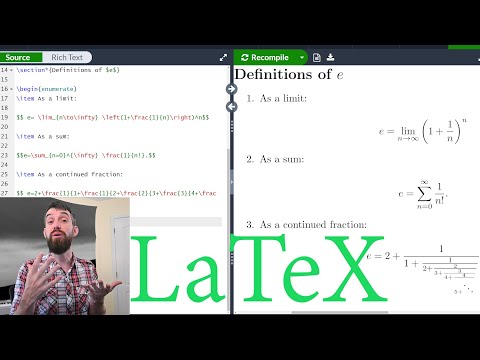
- A definition for e is introduced through limits, emphasizing memorization of various symbols used in mathematical expressions.
Exploring Stirling's Formula
- The discussion shifts towards another limit involving Stirling's formula, where n appears in both the numerator and denominator.
- The speaker describes how to denote an nth root using
sqrtwith additional square brackets around n , clarifying that this creates an nth root rather than a standard square root.
Summation Notation
- Transitioning into summation notation, they utilize
sumto create a sigma symbol. An underscore is used again for subscripts indicating where summation starts (from n = 0 ).
- The completed sum represents a series converging towards e , specifically showing terms as fractions of factorial values.
Continued Fractions
- The concept of continued fractions is introduced as a new way to define numbers or functions. It begins with 2 and builds upon itself recursively with fractions.
- As more layers are added (e.g., 1 on top and subsequent integers below), it illustrates how continued fractions can represent complex relationships succinctly.
Organizing Content with Lists
- To improve organization within their document, the speaker introduces list-making commands such as
beginenumeratewhich allows for numbered lists.
- By using
item, they demonstrate how items can be added sequentially, enhancing clarity when presenting multiple problems or concepts.
Customizing List Formats
- If preferred over numbered lists, switching from enumerated lists to itemized lists provides bullet points instead of numbers. This customization helps tailor presentations based on audience needs.
Section Management
Formulas and Packages in LaTeX
Introduction to Essential Formulas
- The speaker introduces a new section focused on essential formulas needed for calculus and linear algebra courses, emphasizing the importance of understanding these concepts.
Integral Formulas
- A basic integral formula is presented: int_a^b f(x) , dx, which represents the area under the curve from a to b.
- The speaker notes that some symbols may require additional packages; specifically, they recommend using the AMS math package for advanced mathematical symbols.
Advanced Integral Notation
- The speaker demonstrates how to write triple integrals using multiple interval signs (e.g., iiint f(x,y,z) , dx , dy , dz), highlighting the need for proper package inclusion.
Vector Notation in Linear Algebra
- To denote vectors in LaTeX, one can use backslash followed by 'v' (e.g., vecV = V_1, V_2, V_3) to create a vector with an arrow.
- The dot product between two vectors is illustrated using backslash 'cdot', resulting in expressions like vecA cdot vecB.
Matrix Representation
- For matrices, the speaker explains how to use the
bmatrixcommand from AMS math. This allows users to create matrices with specific formatting.
- An example of creating a row vector is provided: numbers are separated by ampersands (&), and rows are ended with double backslashes (.
Commenting Out Code
- To temporarily remove code or comments from display without deleting it, one can place a percent sign (%) before the line. This effectively hides it during compilation.
Including Images in LaTeX Documents
- The process of adding images involves including a graphics package. Users must upload their image files into their document directory.
- After uploading an image (renamed for simplicity), users can include it in their document using
includegraphics, specifying scaling options within square brackets and naming the file within curly braces.
Organizing Documents with LaTeX
Benefits of Using LaTeX for Document Preparation
- The speaker emphasizes the importance of having a well-organized document, highlighting that LaTeX allows users to present their homework assignments neatly and professionally.
- Encouragement is given to check the video description for additional resources, including installation links and information about Overleaf, which is beneficial for summer projects.
- The power of LaTeX in handling mathematical formulas is discussed; it simplifies formatting and spacing, making documents visually appealing without manual adjustments.
Importance of Learning Basic LaTeX Commands
- Mastering elementary codes in LaTeX can significantly enhance productivity by automating formatting tasks, allowing users to focus on content rather than layout.