UD3 Componentes de E S 3
Introduction to Magnetic Hard Disk Drives
This section introduces the concept of magnetic hard disk drives and discusses their mechanical components and geometry.
Components of a Magnetic Hard Disk Drive
- Magnetic hard disk drives are also known as hard disk drives (HDD) or mechanical disks.
- They consist of tracks, sectors, and read/write heads.
- The disks rotate, generating access times or latency to different sectors.
Access Time and Latency
- Access time or latency is the time it takes for the read/write head to reach a desired position on the disk.
- It includes the time to move the head to the desired track and wait for the sector to rotate into position.
- Access time is measured in milliseconds and varies depending on the speed of the drive.
Buffer Memory
- Magnetic hard disk drives have a buffer memory, typically SRAM (static RAM), which provides faster access speeds.
- The buffer memory allows for quicker data transfers between the CPU and the disk.
Importance of Buffer Memory in HDDs
This section explains how buffer memory in magnetic hard disk drives improves performance by allowing faster access speeds.
Purpose of Buffer Memory
- The buffer memory acts as auxiliary memory within the HDD.
- It enables faster access speeds and helps control data transfer rates independently from mechanical limitations.
CPU Interaction with HDD Controller
This section describes how the CPU interacts with the HDD controller to optimize data transfer rates.
Writing Data to Disk
- When writing data, if there is a large amount of data to be written, it is sent from the CPU to the HDD controller's buffer memory.
- The CPU can then perform other tasks while waiting for the HDD controller to write the data to the disk.
Reading Data from Disk
- When reading data, the CPU sends a read command to the HDD controller.
- The HDD controller retrieves the requested data from the disk and stores it in the buffer memory.
- The CPU can then access the data directly from the buffer memory, which is faster than reading from the disk itself.
Connection Interfaces for Magnetic Hard Disk Drives
This section discusses the connection interfaces commonly used for magnetic hard disk drives.
SATA (Serial ATA)
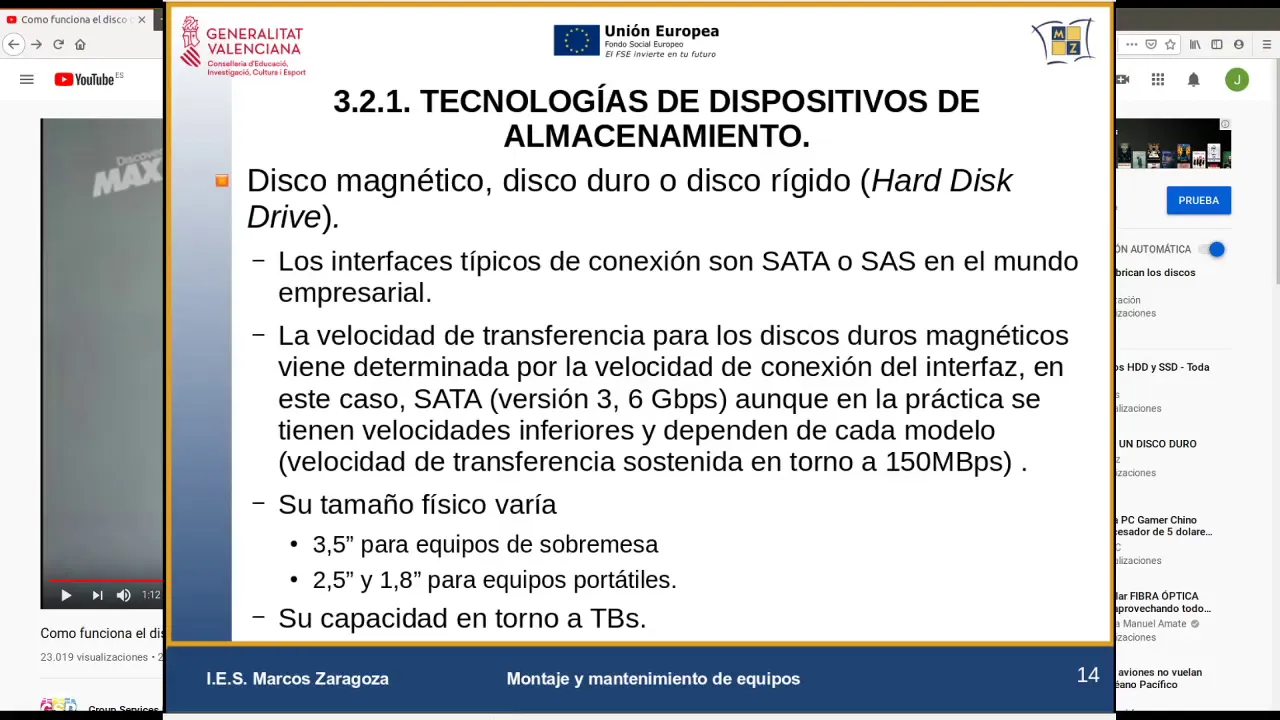
- SATA is a common interface for connecting magnetic hard disk drives.
- It provides a transfer speed of up to 6 gigabits per second (Gbps) in its latest version.
SAS (Serial Attached SCSI)
- SAS is an interface primarily used in enterprise environments.
- It offers higher transfer speeds and greater reliability compared to SATA.
Specifications of Magnetic Hard Disk Drives
This section provides information about the sizes and capacities of magnetic hard disk drives.
Sizes and Capacities
- Magnetic hard disk drives come in different sizes, such as 3.5 inches for desktop computers and 2.5 inches or 1.8 inches for laptops.
- The capacity of these drives can range up to terabytes (TB).
Examples of Magnetic Hard Disk Drives
This section presents examples of popular manufacturers and their specifications for magnetic hard disk drives.
Seagate Barracuda
- Capacity: 2 terabytes
- Size: 3.5 inches
- Rotation Speed: 7200 RPM
Western Digital
- Capacity: 1 terabyte
- Size: 3.5 inches
- Rotation Speed: 7200 RPM
These are just a few examples, and there are many other manufacturers and models available in the market.
Understanding Hard Drive Speed and Durability
In this section, the speaker discusses the speed and durability of hard drives.
Hard Drive Speed
- The latency of a hard drive is typically around 6 milliseconds.
- The sustained speed of a hard drive is usually around 50 megabytes per second (MB/s).
- The sustained speed calculation takes into account the latency and transfer rate interface.
Hard Drive Durability
- Hard drives have a limited number of cycles in which they can be completely filled and erased.
- Typically, hard drives can handle hundreds of thousands to millions of cycles without failure.
- Mechanical components in hard drives, such as motors and read/write heads, may eventually wear out or fail.
- External factors like scratches on the disk surface can also impact durability.
Types of Hard Drives
This section provides an overview of different types of hard drives.
Hybrid Drives (HDD)
- Hybrid drives combine magnetic storage with solid-state storage.
- These drives offer a balance between capacity and performance.
External Hard Drives
- External hard drives connected via USB 3.0 can achieve speeds similar to internal SATA drives.
- While internal technology may be inferior in external drives, USB 3.0 allows for fast data transfer rates.
- External hard drive models are available in various sizes and capacities.
Conclusion
Hard drives have specific characteristics related to their speed, durability, and types. Understanding these aspects helps users make informed decisions when choosing a suitable hard drive for their needs.
Turn any video into a summary like this
YouTube links, meetings, lectures. With transcripts, search, and chat.