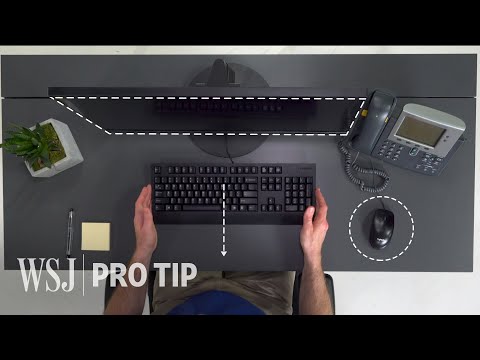
Ergonomics Expert Explains How to Set Up Your Desk | WSJ Pro Tip
How to Set Up Your Desk Ergonomically
Importance of Ergonomic Setup
- The narrator introduces the concept of desk ergonomics, highlighting that most desks are not tailored for individual users, which can lead to discomfort and pain over time.
- John Cinkay from the Hospital for Special Surgery emphasizes the necessity of an ergonomic setup to prevent future pain.
Step 1: Adjusting Your Chair
- The average desk height is between 29 to 30 inches; chair height should be adjusted so elbows are at a 90-degree angle.
- If feet do not touch the floor, using a footstool or a ream of paper is recommended for proper support.
Step 2: Monitor Positioning
- Monitors should be positioned about arm's length away and at eye level to avoid straining eyes or poor posture.
- For dual monitors, position them based on usage—primary monitor directly in front or both lined up if used equally. Use kickstands for laptops.
Step 3: Keyboard and Mouse Placement
- The keyboard should be placed where hands naturally rest; the mouse should be adjacent to it.
- Movement should come from the elbow rather than the shoulder to minimize strain and prevent injury.
Step 4: Phone Positioning
- Place your phone on your non-writing side to avoid cradling it against your shoulder, which can cause neck pain.
- Consider using a headset if you spend significant time on calls, allowing hands-free operation for typing or writing.
Step 5: Incorporating Movement
- Regular movement is crucial; after every 10–15 minutes, take breaks to stretch and change positions.