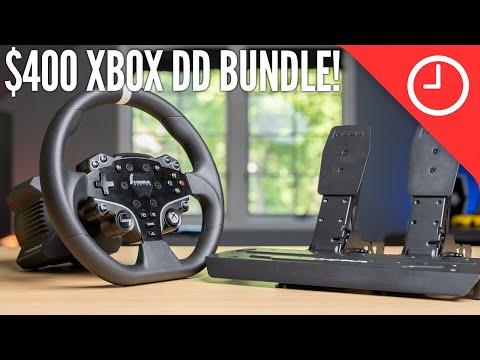
$400 XBOX direct drive bundle! Moza R3 unboxing, setup, and review
Introduction to the R3 Direct Drive Racing Wheel and Pedals
This section introduces the Moza Racing R3 bundle, which includes the R3 direct drive racing wheel and pedals. The bundle is officially licensed for Xbox and is priced at $400.
Unboxing and Setup
- The R3 bundle is being announced today, with availability expected in September.
- Future videos will compare the R3 bundle to other entry-level racing wheels like the g923.
- The package is similar to the previously reviewed R5 bundle.
- Upon unboxing, there are literature and an Xbox racing wheel included.
- The new R3 wheelbase is smaller than the R5 and other entry-level wheel bases like the g923 and T300.
- The desk mount, cables, hardware, bolts, nuts, washers, hex keys are also included.
- The pedal setup consists of a two-pedal SRP light that can be moved around and mounted in different positions on the base plate.
- Additional accessories like a third pedal for clutch or Performance Kit for improved brake pedal feel can be added.
- Power cable and USB cable for connecting to PC or Xbox are provided.
Features of the R3 Bundle
- The main difference between the R3 and previous bundles is its compact size.
- Despite its small size, it offers 3.9 newton meters of peak torque, comparable to other entry-level wheels like T300 rsgt from Thrustmaster.
- Pricing for this bundle is set at $400, making it an affordable option with direct drive functionality.
- Direct drive provides smooth operation with infinite rotation settings within the app.
Setups and Mounting Options
This section discusses various setups and mounting options for using the R3 bundle.
Mounting the Wheelbase
- Mounting the wheelbase is straightforward, depending on whether it will be used on a desk or with a wheel stand.
- The desk clamp is attached to the wheelbase and then secured to a desk.
- Alternatively, it can be mounted directly to a compatible wheel stand like the Next Level Racing Wheel Stand 2.0.
- Even with just two mounting holes used, the wheelbase feels secure.
Setting Up the Pedals
- Setting up the pedals depends on how they will be used.
- If using them on the floor at a desk, simply place them on the floor with grip pads underneath.
- On carpeted surfaces, additional bracing may be required to prevent movement.
- When mounting them on a wheel stand, it is possible but may not provide the smoothest experience.
Conclusion and Final Thoughts
This section concludes by highlighting the affordability and sought-after features of the R3 bundle.
- The R3 bundle offers an affordable entry-level direct drive racing experience for Xbox users.
- With its compact size and 3.9 newton meters of peak torque, it provides smooth and quiet operation.
- Direct drive functionality is highly desired in racing setups and usually comes at higher price points.
- The R3 bundle fills a gap in the market by offering an affordable option that is officially licensed for Xbox.
Timestamps are approximate and may vary slightly based on individual video playback.
Pedal Mounting and Adjustability
This section discusses the mounting and adjustability of the pedals.
Pedal Spacing and Mounting
- The spacing on the pedals may work better for mounting on the wheel stand 2.0 if all three pedals are used.
- The pedals come out of the box in the furthest settings, which may be too wide for some users.
- The pedals can be easily moved closer together in the middle using screws.
- Customizability is built-in, allowing users to adjust the position of the pedal plates.
Cable Connection Tip
- When mounting the pedals on something like the wheel stand 2.0, it is recommended to plug in the cable for the pedals before mounting them for easier installation.
Steering Wheel Mounting
This section explains how to mount and remove the steering wheel.
Mounting Process
- The mounting process is similar to that of R5.
- There are six ball bearings on top and four on the bottom of both wheelbase and wheel.
- Aligning these bearings allows for a secure connection between them.
- To remove the wheel, pull back from the quick release ring and disconnect it.
Compatibility with Other Wheel Bases
- The Xbox wheel is also a big release like R3's direct drive wheelbase.
- It is expected to work with other direct drive wheelbases that have all necessary connections at their back.
Wheel Design and Features
This section provides an overview of the design and features of Mozo's Xbox steering wheel.
Visual Similarity to R5
- The Xbox steering wheel visually resembles ES found on R5.
- It has 22 customizable buttons, themed for Xbox, including face buttons with Xbox colors and an Xbox home button.
- There are some minor differences in materials compared to the ES wheel on R5.
Material Difference
- The material on the Xbox wheel is not stitched leather like the ES wheel on R5.
- This change may be a cost-saving effort to keep the price point at $400.
RPM LEDs
- The wheel features RPM LEDs across the top.
- These LEDs offer different indicators when used on Xbox, but their compatibility with games like Forza Horizon 5 or Forza 7 is uncertain.
Pedals Overview
This section provides an overview of the pedals included with Mozo's Xbox steering wheel.
Similarity to R5 Pedals
- The pedals included with the Xbox steering wheel are the same as those in R5.
- They can be expanded upon by adding a clutch pedal or using a mod kit to enhance brake pedal feel.
Performance Kit for Brake Pedal
- A Performance Kit is available for $30 to improve brake pedal feel.
- It adds progressive resistance, allowing for better control during braking.
Rubber Pads
- Rubber pads are present under the pedals to prevent slipping when used on the ground.
- However, additional bracing may still be required when using them on carpeted surfaces.
Compact Wheelbase Design
This section discusses the compact design of Mozo's Xbox wheelbase.
Small and Compact Design
- The Xbox wheelbase is one of the smallest and most compact designs available.
- It measures approximately five and a half inches wide and four inches tall.
Overview of Inputs and Connectivity
The speaker discusses the various inputs available on the wheelbase, including pedals, a dash, a shifter, handbrake, and an emergency stop button. They highlight the compact design and the ability to add different components. The speaker mentions that everything can be connected to an Xbox.
- The wheelbase has inputs for pedals, a dash, a shifter, handbrake, and an emergency stop button.
- The compact design allows for easy customization with additional components.
- All components can be connected to an Xbox.
Power Indicator and LED Illumination
The speaker talks about the lack of a power indicator light on the front of the wheelbase. They mention that when powered on, RPM LEDs illuminate on the wheel after a short delay.
- There is no power indicator light on the front of the wheelbase.
- RPM LEDs illuminate on the wheel after powering it on.
- It takes a little bit of time for the LEDs to appear.
Temperature and Heat Management
The speaker shares their experience with temperature and heat management while using the wheelbase. They mention that it becomes warm to touch after extended use but does not get excessively hot due to its compact size.
- After three hours of continuous use, the wheelbase becomes warm but not overly hot.
- Compact size helps in managing temperature and heat effectively.
Adjusting Parameters with Moza Pit House App
The speaker explains how to adjust and tweak different parameters using Moza Pit House app when using the wheelbase on a PC. They also mention that Moza Racing mobile app can be used for Xbox, offering presets and customization options.
- Moza Pit House app can be used on a PC to adjust parameters.
- Moza Racing mobile app is available for Xbox users.
- Both apps offer presets and customization options.
Customization Options with Moza Racing Mobile App
The speaker discusses the customization options available through the Moza Racing mobile app. They mention the availability of presets for different games and driving styles, as well as the ability to create, save, and load custom presets.
- Moza Racing mobile app offers presets for different games and driving styles.
- Users can customize settings according to their preferences.
- Custom presets can be created, saved, and loaded.
User Experience with Xbox Compatibility
The speaker shares their experience using the wheelbase with Xbox. They mention that connecting via Bluetooth allows for adjustments and tweaks even without PC functionality. However, they note some minor issues with language in the app interface and sensitivity settings in certain games.
- Connecting via Bluetooth enables adjustments on Xbox.
- Minor issues with language in the app interface.
- Some game settings may require further tweaking for optimal performance.
Performance with Forza Horizon 5 on Xbox
The speaker highlights the compatibility of the wheelbase with Forza Horizon 5 on Xbox. They compare it to their experience with R5 bundle on PC, where additional configuration was required. They express satisfaction with how well it worked out of the box on Xbox.
- Wheelbase works perfectly with Forza Horizon 5 on Xbox without any additional configuration.
- Contrasts previous experience with R5 bundle requiring configuration changes on PC.
Transitioning from Controller to Wheel and Pedals
The speaker discusses the transition from using a controller to a wheel and pedal setup. They mention that it can take some time to adjust, especially for more arcade-focused games like Forza Horizon 5. However, they note significant improvements in games like Assetto Corsa.
- Transitioning from a controller to a wheel and pedal setup may require some adjustment.
- Arcade-focused games may still feel better with a controller.
- Games like Assetto Corsa show significant improvement with the wheel and pedal setup.
Performance and Feedback of the Wheelbase
The speaker talks about the performance and feedback of the wheelbase. They mention that while it has lower torque compared to other direct drive wheelbases, it still provides useful information. They highlight smoothness, quietness, and immersive experience in games like ACC and Forza Horizon 5.
- The wheelbase offers smooth and quiet performance.
- Provides useful feedback despite lower torque compared to other direct drive wheelbases.
- Immersive experience in games like ACC and Forza Horizon 5.
Paddle Shifters on the Wheelbase
The speaker discusses the paddle shifters on the back of the wheelbase. They mention that while they may not feel as premium as those on Logitech Pro wheels, they work well with satisfying clicks when actuated.
- Paddle shifters on the back of the wheelbase work well.
- Clicking sensation when actuated provides feedback.
- Not as premium feeling as Logitech Pro wheels.
Conclusion
The transcript covers various aspects of using a compact direct drive racing wheel bundle. It includes discussions on inputs, connectivity options, power indicator, temperature management, app customization options, Xbox compatibility, game performance comparisons between controllers and wheels, and the overall performance and feedback of the wheelbase.
Comparison with Logitech g923 and Upgradability
This section discusses the comparison between the Moza R3 bundle and the Logitech g923, as well as the upgradability options of the Moza R3.
Comparison with Logitech g923
- The Moza R3 bundle offers a direct drive experience out of the box, while the Logitech g923 is a more affordable option.
- Viewers are encouraged to subscribe for an upcoming video that will provide a detailed comparison between the two options.
Upgradability of Moza R3
- The Moza R3 bundle comes with 3.5 Newton meters of torque, which may be sufficient for most users initially.
- However, if users desire more power in the future, they have the option to upgrade various components such as wheels and wheelbases.
- Different add-ons are available for customization, including larger round wheels for drifting or GT-style wheels for specific games like ACC.
- The Moza R3 is compatible with other models like R5 and R12, allowing users to purchase more powerful wheelbases without needing to replace their existing peripherals.
Additional Options from Mozo Racing
This section highlights some additional options offered by Mozo Racing in addition to the R3 bundle.
- In addition to releasing the R3 bundle, Mozo Racing has announced several other products:
- Sequential shifter
- 400mm truck wheel
- Another GT wheel
- These additional options provide users with more choices when setting up their racing simulator.
- The availability of these products is expected towards the end of September.
Conclusion and Future Videos
This section concludes the video and provides information about future videos related to unboxing, setup, first impressions, and comparisons.
- The video concludes with an unboxing, setup, and first impressions of the Moza R3 bundle.
- Viewers are encouraged to share their thoughts about the product in the comments section.
- Future videos will cover topics such as comparing the Moza R3 with other setups and providing more in-depth coverage of the R3 bundle.
- Subscribing to the channel is recommended to stay updated on these upcoming videos.