01 # Fundamentals of Server Hardware v2
Fundamentals of Server Hardware
In this section, the instructor introduces the learning path for cloud computing and infrastructure as a service delivery model in Amazon Cloud. The focus is on server hardware, which is discussed in detail.
Learning Path for Cloud Computing
- The learning path includes six topics that may last for eight classes.
- Each session can be one and a half hour or two hours.
- The six topics are: server hardware, basics of networking, storage fundamentals, operating system concepts, virtualization, and cloud computing.
Introduction to Server Hardware
- A server is introduced along with its form factors and typical architecture.
- Major components of servers are discussed.
- Differences between servers and desktops are highlighted.
Gathering Information about Server Hardware
- Tools for identifying server hardware are discussed.
- Importance of server management tools is explained.
- Reasons why hardware maintenance is important are outlined.
Planning and Testing Hardware Upgrades
- How to justify the purchase of a new server or consolidate existing ones is explained.
Server Hardware Configuration
In this section, the speaker explains the importance of identifying hardware resources in server configuration and how it can be useful for system administrators at different levels.
What is a Server?
- A server is a durable hardware with reliability, availability, and serviceability as features. It has redundant components, hot swap, hot add capabilities.
- Personal devices do not have redundant components like servers.
- Servers need to be up and running 24/7; hence they require RAS (Reliability, Availability, Serviceability) features.
Redundancy in Servers
- Most components on regular servers have redundant components.
- Examples include two power supplies to the same server, at least two hard disks configured in RAID 1 to mirror hard disks.
- Redundant network interface cards are also present on servers.
- HBA cards are also redundant on a server using multi-pathing technologies.
- Hot swap and hot add capabilities should be available.
Conclusion
The speaker emphasizes that understanding server hardware configuration is essential for system administrators at different levels. The redundancy of components ensures that servers remain operational even if one component fails.
Server Hardware Overview
In this section, the speaker discusses server hardware and its features.
Features of Server Hardware
- RAID configurations provide fault tolerance in case of hard disk failure.
- Servers are designed to sustain high volume usage of resources such as processing capacity, memory, storage capacity, and expansion slots.
- Enterprise-class applications that are accessed by hundreds of thousands or lakhs of users require high processing capacity, memory, storage I/O, and networking throughput.
- The type of application hosted on servers determines the number of expansion slots required for more hard disks or network interface cards.
Importance of Data Centers
- Servers generate a lot of heat when used continuously without powering off. Therefore they need to be kept cool physically to operate optimally.
- Dedicated data centers provide a special room for servers to maintain optimal temperature and prevent overheating.
- Data centers are necessary because servers carry important roles in terms of business turnover.
Types of Servers
In this section, the speaker discusses common types of servers found in industries.
Common Types of Servers
- Web servers host various applications using web servers like Apache or IAS.
- Application servers can host thousands or lots of applications depending on their use cases.
- File servers allow collaboration through file sharing with permissions delegation configured with Windows operating systems in traditional data centers.
- Databases include RDBMS or no SQL databases and big data solutions.
Server Hardware Overview
In this section, the speaker provides an overview of server hardware and its different form factors.
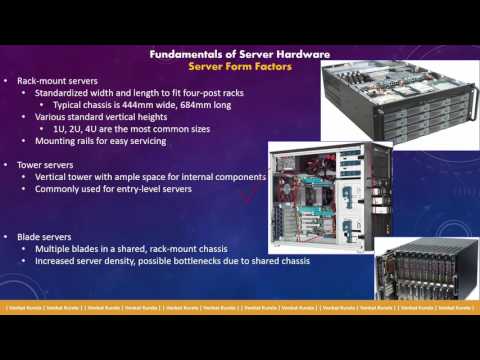
Tower Servers
- Tower servers are similar to personal computers and have a vertical design.
- They have a motherboard, fan for hot air, expansion slots, hard disks, CD/DVD drive space, and power supply.
- Entry-level server hardware that has been replaced by rack-mountable servers due to scalability issues.
Rack-Mountable Servers
- The second evolution in server hardware is rack-mountable servers.
- Horizontal design with better scalability and manageability in data centers.
- Replaced tower servers due to scalability and manageability issues.
Consolidation of IT Profiles
In this section, the speaker discusses how job profiles in IT are consolidating due to virtualization and cloud computing.
Profile Consolidation
- Virtualization introduced in 2006 led to consolidation of job profiles within companies.
- Cloud computing has extended this consolidation further.
- No longer need dedicated Windows/Linux administrators, network engineers, storage engineers, database engineers or SharePoint/mail engineers.
Everything as a Service
- Everything is available as a service today - managed database services from Amazon Cloud/Microsoft Azure etc.
- Providers install/configure/manage databases while users only configure the connection points.
- Networking concepts like VPC/virtual networks can be created with just a few clicks.
- Storage can also be easily attached to instances without needing a storage engineer.
Why Move Away from Tower Servers?
In this section, the speaker explains why the industry moved away from tower servers to rack-mountable servers.
Scalability Issues
- Tower servers had scalability issues which led to their replacement by rack-mountable servers.
- Manageability of tower servers in data centers was also a problem.
Holistic Approach
- Understanding server hardware, OS, networking, storage, database, virtualization and cloud fundamentals is important for a holistic approach.
- Helps in designing applications at a cloud level.
Rack Mountable Servers
In this section, the speaker discusses rack mountable servers and their scalability issues. He explains how these servers are organized in a standard width and length that fits into a four-post rack. The height of these servers varies from one U to four U.
Organizing Rack Mountable Servers
- Rack mountable servers are organized in a standard width and length that fits into a four-post rack.
- The height of these servers varies from one U to four U.
- One U stands for two inches, two U stands for four inches, and four U is eight inches of height.
- These servers are mounted to the four post using rail gates.
Designing Data Centers with Rack Mountable Servers
- A fully populated rack would look like this with at least one U gap between each server.
- Different cables of different colors are used for different types of communication.
- Racks are typically 42U in height but can be higher.
Blade Servers
In this section, the speaker introduces blade servers as the next evolution in server hardware after rack mountable servers. He explains that some components are shared in blade systems, unlike dedicated components on rack mountable servers.
Introduction to Blade Servers
- Blade servers are the next evolution in server hardware after rack mountable servers.
- Some components are shared in blade systems, unlike dedicated components on rack mountable servers.
Rack Mountable Servers and Blade Servers
In this section, the speaker discusses the differences between rack mountable servers and blade servers.
Rack Mountable Servers
- Rack mountable servers have independent components that generate a lot of heat and consume a lot of power.
- Traditional rack mountable servers take up a lot of space due to their dedicated components, which require more air filters and cooling units.
Blade Servers
- Blade systems were designed to overcome the challenges posed by rack mountable servers.
- Blades use shared components, allowing for more efficient use of space, power, and cooling.
- A blade chassis can hold 16 half-height blades or 8 full-height blades.
- Different hardware vendors offer blade solutions with varying numbers of server placements depending on the width of the blades.
Components in Blade Systems
In this section, the speaker discusses how blade systems consolidate components to reduce costs.
Consolidated Components
- The right side of a blade chassis contains consolidated components such as Ethernet pass-through and virtual connect.
- Sixteen blades share just eight network interface cards and four fiber optic cables in a single chassis.
- Compared to rack mountable servers, using blade systems requires fewer cables, less power consumption, and less cooling units.
Server Form Factors
In this section, the speaker discusses server form factors and how blade servers can benefit data centers in terms of space, cables, and management.
Blade Servers vs Rack Mountable Servers
- Blade servers are more space-efficient than rack mountable servers.
- Blade servers also require less cabling and are easier to manage.
- Converged solutions like Cisco UCS and hyper-converged hardware solutions like Nutanix, Flexprod, and re-block further optimize space usage by combining storage, compute, and networking in the same rack.
Server Architecture
In this section, the speaker discusses server architecture and explains why non-uniform memory access (NUMA) is used instead of symmetrical multi-processing (SMP).
SMP vs NUMA
- SMP was the traditional architecture for servers but has been replaced by NUMA.
- In SMP, all processors share a single bus for accessing memory which can become a bottleneck when multiple processors are trying to read or write large amounts of data.
- NUMA allows each processor to have its own local memory which reduces contention on the shared bus. This makes it more efficient for database applications that rely heavily on memory operations.
Importance of Hardware Knowledge for Application Administrators
In this section, the instructor emphasizes the importance of hardware knowledge for application administrators and how the industry has evolved in terms of scalability.
Evolution of Hardware Configuration
- Earlier, servers had 512 MbRAM and personal computers had 128 MbRAM to 512 MbRAM.
- Today, laptops can be configured with up to 16 cores of processing capacity and 32 GB or even 64 GB of RAM.
- Servers now have terabytes of RAM due to the introduction of big data repositories that store data from different database engines.
Non-Uniform Memory Access Nodes (NUMA)
- NUMA is an evolution at the hardware level where memory is divided into nodes.
- For example, a four processor system will have four NUMA nodes with equal distribution of memory.
- Operating systems are NUMA aware and schedule applications on processors equally to ensure an equal distribution of load on all processors.
Benefits of NUMA Awareness
- Equal distribution of load on all processors is done because operating systems are NUMA aware.
- Processor making companies have worked with operating system developing companies to extend newmer awareness.
Processor and Hardware Resources
In this section, the speaker discusses the processor or socket of a computer, which includes physical and logical cores, cache, processing power (measured in gigahertz), and hyper-threading. The speaker recommends taking notes on these hardware resources.
Processor Components
- The processor or socket of a computer has physical and logical cores.
- It also includes cache and processing power measured in gigahertz.
- Hyper-threading is another feature of the processor.
Note-Taking Recommendation
- The speaker recommends taking two pages of notes on all four hardware resources.