UD3 Componentes de E S 4
Introduction to Solid State Drives (SSD)
This section introduces the concept of solid state drives (SSD) and their advantages over traditional hard disk drives (HDD).
SSD Technology
- SSDs use flash technology, similar to that found in BIOS chips.
- They offer larger storage capacity compared to other memory types.
- Unlike RAM, SSDs retain data even when power is disconnected.
Advantages of SSDs
- Faster access times compared to HDDs.
- Consumes less electricity and produces less noise.
- More durable and less prone to damage from physical shocks.
Speed and Performance Comparison
This section discusses the speed and performance differences between SSDs and HDDs.
Speed Comparison
- SSDs are substantially faster than HDDs in both read and write operations.
- While HDDs perform well in sequential reading, SSDs outperform them overall due to their consistent access times.
Other Advantages of SSDs
- Lower power consumption compared to HDDs.
- Less fragile due to the absence of moving parts.
- Produce less noise during operation.
Cost and Lifespan Considerations
This section explores the cost and lifespan factors associated with using SSDs.
Cost Considerations
- The cost per gigabyte for SSD storage is higher than that of HDD storage.
- However, prices have been decreasing over time.
Lifespan Considerations
- The lifespan of an SSD is determined by the number of read/write cycles it can endure.
- Current technologies allow for approximately 5,000 - 10,000 cycles for consumer-grade SSDs.
- For typical home or professional use, an SSD can last more than 10 years.
Internal Structure of SSDs
This section provides an overview of the internal structure and components of SSDs.
Internal Components
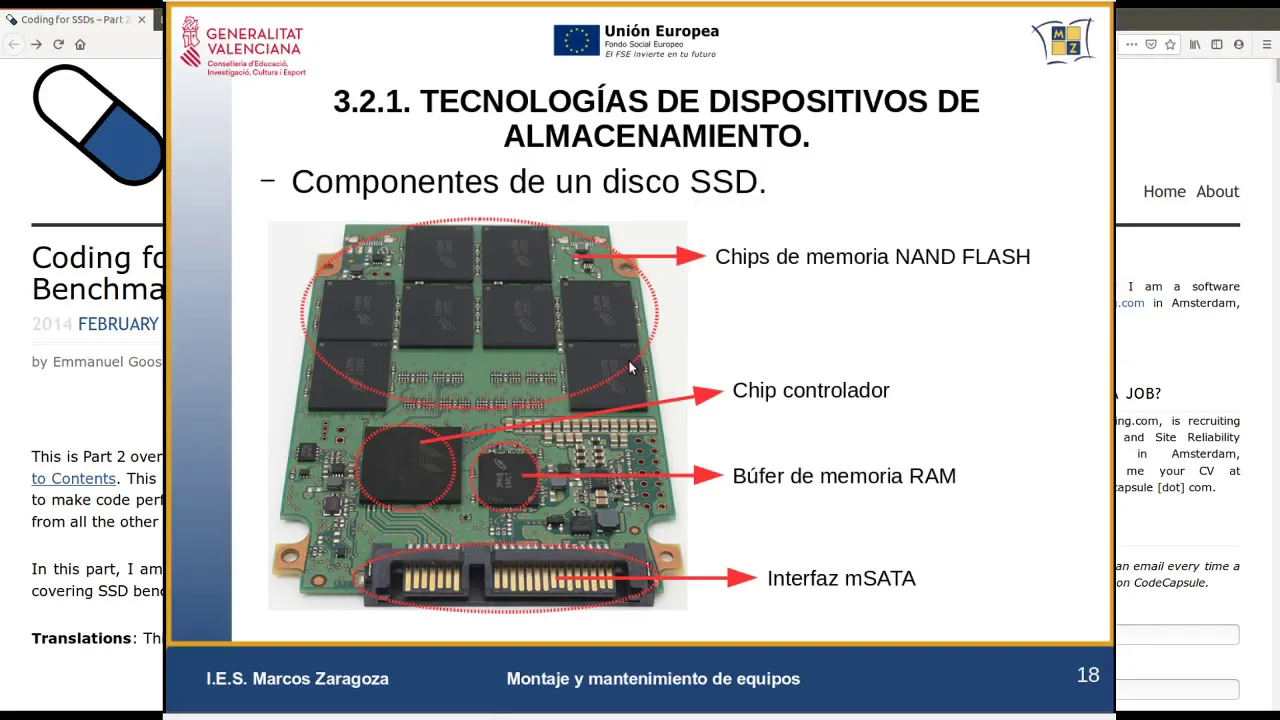
- SSDs consist of NAND flash memory chips, a controller, and an interface.
- The controller manages read/write operations and interfaces with the CPU.
- Buffering is used to optimize data transfer between the CPU and memory chips.
Types of SSD Cells
This section discusses different types of cells used in SSDs and their impact on capacity and durability.
Types of Cells
- Single-Level Cell (SLC) stores one bit per cell, providing greater durability but higher cost.
- Multi-Level Cell (MLC) and Triple-Level Cell (TLC) store multiple bits per cell, offering larger capacities at lower costs.
- However, MLC and TLC cells have shorter lifespans compared to SLC cells.
Conclusion
This section concludes the discussion on SSD technology by highlighting some useful resources for further exploration.
Useful Resources
- Additional information on SSD technology can be found on various websites.
- One recommended resource is a website dedicated to technology topics.
New Section
This section discusses the configuration of storage devices, specifically SSDs and HDDs, in computer systems.
Configuring Storage Devices
- SSDs are more expensive than HDDs.
- A common configuration is to use a smaller SSD for the operating system and applications, as it provides faster performance.
- The SSD allows for quicker boot times and faster loading of the operating system.
- Less frequently accessed data can be stored on a separate magnetic disk drive (HDD).
- This configuration optimizes performance by utilizing the speed of the SSD for frequently accessed data and the larger capacity of the HDD for less frequently accessed data.
New Section
This section explores additional considerations when using SSDs and HDDs in computer systems.
Fragmentation and Paging File
- Unlike HDDs, SSDs do not require defragmentation as their access times are consistent across different parts of the drive.
- Fragmentation does not significantly impact performance on an SSD.
- The paging file (swap file) does not need to be placed on an SSD to avoid excessive read/write operations. It is recommended to keep it on a separate drive to prevent degradation of the SSD's lifespan.
New Section
This section highlights further details about using SSDs in computer systems.
Limited Read/Write Operations
- It is advisable to minimize read/write operations on an SSD, except for essential applications or system-related tasks running in the background.
- Excessive read/write operations can degrade the lifespan of an SSD.
New Section
This section provides information about minimum storage capacities for different types of drives.
Minimum Storage Capacities
- Older models typically have a minimum capacity of 64GB, but it is recommended to use SSDs with a minimum capacity of 256GB.
- HDDs are available in larger capacities, providing ample space for storing files such as photos and videos.
The transcript provided does not contain any timestamps beyond this point.
Turn any video into a summary like this
YouTube links, meetings, lectures. With transcripts, search, and chat.