Lab 9 Part 2
Overview of Web Application Development
Initial Steps in Database Connection
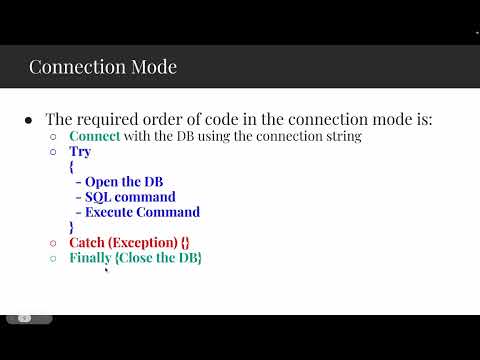
- The process begins with establishing a connection to the database using a connection mode, as previously discussed.
- It's important to ensure that the correct package for the system is installed; there was confusion in previous videos regarding Microsoft packages.
- The first step involves selecting tools and creating a new project, specifically using New DJ's version 4 solutions.
Setting Up Database Connection
- After installing necessary packages, the next step is to connect to the database either manually or by using a predefined connection string.
- To retrieve the connection string, right-click on the database properties after entering the server name.
- A problem arises if commands are executed without an established connection; thus, maintaining a persistent connection is crucial.
Creating Classes for Database Interaction
- A class should be created specifically for handling database interactions, which will include methods for executing commands and managing connections.
- Within the project structure, create a folder named "Models" where classes corresponding to each table will reside.
Class Structure and Functionality
- Each table will have its own class defined within this Models folder to facilitate data manipulation and retrieval.
- The primary focus should be on creating a database class that connects with all functions related to data operations.
Implementing Connection Logic
- The database class must define properties essential for establishing connections effectively.
- Once SQL Server is recognized within your environment, you can proceed with defining additional functionalities required for interaction with your application.
Executing Commands and Queries
Command Execution Process
- After setting up your classes correctly, begin implementing methods that execute SQL commands against your database.
- Ensure that any command execution includes error handling through try-catch blocks to manage exceptions gracefully.
Query Handling Techniques
- When writing queries, it's advisable first to test them in SQL Management Studio before integrating them into code.
- Functions should be structured such that they can handle repetitive tasks across different tables efficiently while allowing parameterization of inputs.
Data Retrieval Strategies
Fetching Data from Tables
- Use specific functions designed for retrieving data from tables rather than generic ones; this enhances clarity and maintainability of code.
- Establish clear query strings based on user input or predefined criteria before executing them against your database.
Error Management During Data Operations
- Implement robust error management strategies post-query execution to capture any issues arising during data retrieval processes effectively.
Finalizing Application Integration
Integrating Frontend with Backend Logic
- Once backend logic is finalized, integrate it seamlessly with frontend components ensuring smooth user experience when interacting with databases.
- Utilize appropriate frameworks like Razor Pages in C# for rendering dynamic content based on retrieved data from backend services.
This markdown file summarizes key points from the transcript while adhering strictly to timestamp rules. Each bullet point provides insights into various stages of web application development focused on connecting databases and executing queries effectively.
Turn any video into a summary like this
YouTube links, meetings, lectures. With transcripts, search, and chat.