Conditions: Making Decisions in Code
Introduction to Conditionals in Python
Overview of Conditional Statements
- The session focuses on how conditional statements work in Python, including the input function and various types of conditionals such as if, if-else, and else-if statements.
- The importance of asking questions through code is highlighted, emphasizing that certain operations depend on specific values.
Example: Fever Detection
- An example is provided where a code checks if a person has a fever based on their temperature being above 37.5 degrees Celsius.
- If the temperature exceeds this threshold, a "fever warning" is printed; otherwise, no action is taken.
Comparison Operators in Conditionals
Understanding Comparisons
- Various comparison operators are discussed: equality (==), inequality (!=), greater than (>), less than (<), and their inclusive counterparts (>=, <=).
User Input with Input Command
- The input command allows users to provide values dynamically instead of hardcoding them into the program.
- It’s noted that inputs are returned as strings by default; thus type casting may be necessary for numerical operations.
Types of Conditional Statements
Basic If Statement
- A simple example illustrates an if statement checking whether a student's score meets or exceeds 60 to determine passing status.
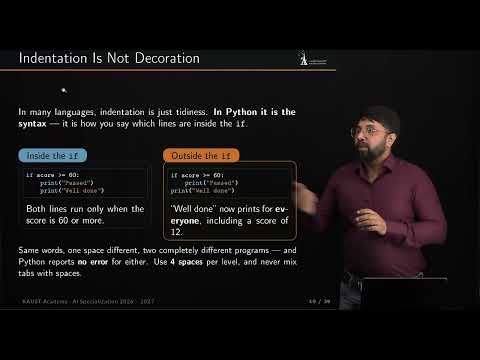
Indentation Importance
- Indentation defines the scope of what runs under an if statement; incorrect indentation can lead to logical errors in execution.
Using If Else Statements
Complementary Actions with If Else
- The structure of if else statements allows for executing one block when a condition is true and another when it is false.
Multiple Outcomes with Else If
- Else-if (elif in Python syntax) enables checking multiple conditions sequentially without nesting too deeply.
Logical Errors and Order of Conditions
Arranging Conditions Correctly
- Emphasis on arranging conditions from strictest to least strict prevents logical errors during execution.
Distinction Between Else If and Multiple If Statements
- Only one block within an else-if structure will execute upon finding a true condition, unlike independent multiple if statements which can all run.
Flowcharts for Visualizing Logic
Benefits of Flowcharts
- Creating flowcharts can simplify understanding complex conditional logic by visually representing decision paths.
Combining Multiple Conditions
Logical Operators: And & Or
- Logical operators 'and' and 'or' allow combining multiple conditions effectively within conditional statements.
Examples:
- For instance, checking both age and library card ownership before allowing book borrowing uses 'and'.
- Conversely, using 'or' checks eligibility for reduced fees based on age criteria.
Truthiness and Falsiness
Understanding Values in Conditionals
- Certain values like zero or empty containers are considered false while others are true. This affects how conditions evaluate without explicit comparisons.
Practical Application
- Knowing truthiness helps streamline code by directly evaluating variables instead of checking lengths or other properties explicitly.
Nested Conditionals
Membership Status Example
- A nested conditional checks both age and card status to determine full membership eligibility versus junior membership options.
Understanding Ternary Operations in Python
Introduction to Ternary Operations
- Ternary operations allow for concise conditional assignments, combining both the if and else parts into a single line.
- The syntax reads as: variable = value_if_true if condition else value_if_false. For example,
status = "adult" if age >= 18 else "minor".
Common Beginner Mistakes
- A frequent error is confusing the assignment operator (
=) with equality checking (==). It's crucial to use two equal signs for comparisons.
- Beginners often forget to include colons after
if,elif, andelsestatements, which are necessary for proper syntax.
Indentation and Logical Errors
- Incorrect indentation can lead to scope issues; it defines which code block runs after a conditional statement.
- When combining conditions, each must be checked separately (e.g.,
x == 1 or x == 2), rather than using a single comparison.
Else If Chains and Input Handling
- In an else-if chain, start with the strictest condition first; this ensures logical flow and prevents errors from overlapping ranges.
- Input returns strings by default; numerical data must be type-cast into integers or floats for accurate processing.
Precedence and Short-Circuiting in Conditionals
- The order of operations matters: all conditions in an AND statement must be true, while only one needs to be true in an OR statement.
- Short-circuiting means that once a definitive outcome is reached in conditionals, subsequent checks are skipped for efficiency.
Conclusion on Conditionals
- Python allows chaining comparisons naturally (e.g., checking if a score is between 0 and 100).
- Falsy values include empty containers or zero; understanding these helps avoid logical errors when validating conditions.
Turn any video into a summary like this
YouTube links, meetings, lectures. With transcripts, search, and chat.


