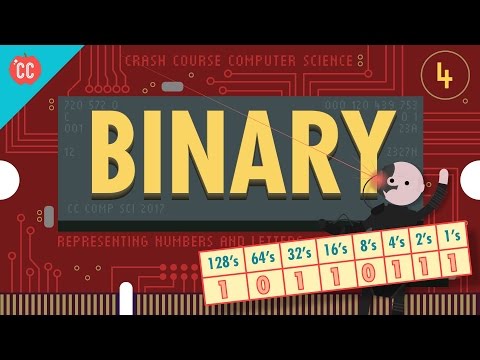
Representing Numbers and Letters with Binary: Crash Course Computer Science #4
How Computers Store and Represent Numerical Data
In this section, we will explore how computers store and represent numerical data using binary values. We will discuss the concept of base-two notation and how it relates to decimal numbers. Additionally, we will learn about the significance of bits, bytes, and different scales of data.
Binary Representation of Numbers
- Computers use binary values (1s and 0s) to represent information beyond true and false in boolean algebra.
- Binary numbers work similarly to decimal numbers, with each digit representing a different multiplier.
- For example, the binary number 101 represents 1 four, 0 twos, and 1 one, which equals the number 5 in base ten.
- Each column in binary has a multiplier that is two times larger than the column to its right.
Converting Binary to Decimal
- To convert a binary number to decimal, multiply each digit by its corresponding power of two and sum them up.
- For example, the binary number 10110111 can be converted to decimal as follows: 1 x 128 + 0 x 64 + 1 x 32 + 1 x 16 + 0 x 8 + 1 x4 +1 x2 +1x1 =183.
Arithmetic Operations with Binary Numbers
- Addition with binary numbers follows similar rules as decimal addition but uses base-two notation.
- The largest number that can be represented with n bits is equal to two raised to the power of n minus one.
- A byte consists of eight bits. Kilobytes (KB), megabytes (MB), and gigabytes (GB) denote different scales of data storage.
- Computers operating in 32-bit or 64-bit chunks can represent larger ranges of numbers.
Representing Positive and Negative Numbers
- Most computers use the first bit as a sign indicator: 1 for negative numbers and 0 for positive numbers.
- The remaining bits are used to represent the magnitude of the number, providing a range of roughly plus or minus two billion.
Conclusion
Computers store and represent numerical data using binary values. Binary numbers follow base-two notation, where each digit represents a different multiplier. Converting binary to decimal involves multiplying each digit by its corresponding power of two. Arithmetic operations with binary numbers follow similar rules as decimal operations but use base-two notation. The size of the binary representation determines the range of numbers that can be represented. Additionally, computers use the first bit to indicate the sign of a number, allowing for representation of both positive and negative values.
New Section
This section discusses the need for 64-bit memory addresses and the representation of floating point numbers using the IEEE 754 standard.
Computer Memory and Floating Point Numbers
- As computer memory has grown to gigabytes and terabytes, it became necessary to have 64-bit memory addresses.
- Computers must deal with numbers that are not whole numbers, known as "floating point" numbers.
- The most common method to represent floating point numbers is the IEEE 754 standard.
IEEE 754 Standard
- The IEEE 754 standard stores decimal values similar to scientific notation.
- A 32-bit floating point number consists of a sign bit, an exponent, and a significand.
- The sign bit represents whether the number is positive or negative.
- The exponent determines the scale of the number.
- The significand represents the fractional part of the number.
New Section
This section explains how computers represent text using numbers and introduces ASCII and Unicode encoding schemes.
Representing Text in Computers
- Computers use numbers to represent letters in order to store and process text.
- One approach is numbering each letter of the alphabet, but this has limitations for representing other characters.
- ASCII (American Standard Code for Information Interchange) was invented in 1963 as a 7-bit code to encode various characters including letters, digits, symbols, and control codes.
Limitations of ASCII
- ASCII was widely used but primarily designed for English language characters.
- To accommodate additional characters from different languages, codes 128 through 255 were utilized for "national" characters in some countries.
- However, this led to compatibility issues between different encoding schemes.
New Section
This section discusses the challenges with encoding multilingual characters and introduces Unicode as a universal encoding scheme.
Multilingual Character Encoding
- Different countries invented their own multi-byte encoding schemes to represent their respective languages.
- This resulted in compatibility issues when exchanging text between different systems.
- Japanese computers coined the term "mojibake" for scrambled text caused by incompatible encodings.
Introduction of Unicode
- Unicode was devised in 1992 as a universal encoding scheme to replace the various international encoding schemes.
- The most common version of Unicode uses 16 bits, allowing for over a million codes and accommodating characters from all languages, mathematical symbols, and graphical elements.
New Section
This section highlights the ubiquity of binary numbers in representing various forms of data, including text, sounds, colors, and file formats.
Binary Representation
- Various file formats such as MP3s or GIFs use binary numbers to encode sounds or colors.
- Text messages, webpages, operating systems, and other digital content are ultimately represented as long sequences of 1s and 0s.
Timestamps have been associated with relevant bullet points.
Turn any video into a summary like this
YouTube links, meetings, lectures. With transcripts, search, and chat.