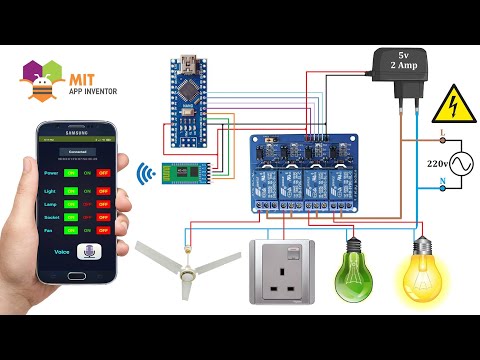
DIY Smart Home Appliance Control Via bluetooth
Introduction to Android Application Controlled Home Appliances
Overview of the Project
- The project focuses on controlling home appliances through an Android application, utilizing voice commands for operations like turning lights and fans on or off.
- The speaker emphasizes the importance of subscribing to their channel for updates on future projects.
Downloading Required Files
- Viewers are instructed to download necessary files including circuit diagrams, code, APK, and AIA files from a provided link in the description.
- After downloading, viewers are guided through extracting the zip file containing all essential components for the project.
Circuit Diagram Explanation
Components Used
- The circuit diagram includes an Arduino Nano, Bluetooth Module HC-05, Relay Module (4 channels), and a 220 Volt power source.
- It is noted that the neutral line connects directly with the load while the live wire connects to the relay's common terminal.
Power Supply Details
- A 5V power adapter provides necessary voltage for powering Arduino Nano, Bluetooth module, and relay module.
Code Overview
Initial Setup in Arduino IDE
- The code is opened in Arduino IDE; links to download it along with other resources are reiterated.
Libraries Utilized
- The 'EEPROM' library is used to save load status across sessions.
- 'SoftwareSerial' library allows communication with Bluetooth without interfering with built-in serial pins during code uploads.
Code Functionality Breakdown
Pin Initialization
- Pins for four relays are initialized as output; they start in LOW state which means loads will be OFF initially.
Variable Management
- Variables such as
load1,load2,load3,load4, andpowerare initialized to manage appliance states effectively.
Control Logic via Bluetooth Commands
Command Handling
- When specific commands ('A', 'B', 'C', 'D') are received via Bluetooth, corresponding loads (lights, lamp, socket, fan respectively) change state based on user input from the app.
EEPROM Updates
Managing Load Control with Arduino
Power and Load Management
- The variable
bt_datais initialized to 0. A check on thepowervariable determines if all four relays (loads) are turned off whenpowerequals 1.
- When
poweris set to 0, the system activates loads by writing their respective variables (load1,load2,load3, andload4) to the corresponding relay pins.
- A delay of 500 milliseconds allows for continuous printing of load statuses via Bluetooth, ensuring real-time updates on an Android app.
Uploading Code to Arduino
- Instructions are provided for uploading code to an Arduino Nano, including selecting the board and port in the tools menu.
- Overview of using MIT App Inventor begins, guiding users through logging in and starting a new project.
Developing an Android Application
Importing Project Files
- Users can import existing projects by uploading
.aiafiles from their computer, which contain necessary application components.
Application Interface Design
- The app interface includes buttons for controlling power, lights, lamps, sockets, and fans. Labels are used to display load statuses dynamically.
- The application features auto Bluetooth connection upon opening after initial pairing; it remembers previously connected devices.
Functionality of Control Buttons
Manual Control via Buttons
- Ten buttons facilitate manual control over each load: pressing specific buttons sends designated commands ('A' for Load1 On/Off etc.) via Bluetooth.
Voice Command Integration
- Voice commands trigger speech recognition that translates spoken instructions into Bluetooth signals for controlling loads (e.g., 'light on' sends 'A').
Status Updates and Feedback Mechanism
Real-Time Status Monitoring
- The app reads five variables related to power and individual loads. It visually indicates status changes (ON/OFF), with color coding for clarity (red for OFF, green for ON).
Building APK File
How to Download and Install an APK File
Steps for Downloading and Installing the APK
- The process begins with pressing a button to initiate the download of the APK file.
- Once downloaded, users are instructed to click on "show in folder" to locate the file.
- The next step involves copying the APK file onto an Android mobile device for installation.
- After installing the app, users need to pair their Bluetooth device.