Basics of Router
Introduction to Routers
Overview of Today's Session
- The session will cover the basics of routers and how they connect different local area networks (LANs) theoretically.
- A comparison between switches and routers will be made, highlighting their distinct functions in networking.
Understanding Routers
- A router is defined as a networking device that forwards data packets between computer networks, specifically two different LANs.
- Communication between devices on different IP addressing schemes (e.g., 10.x.x.x and 200.x.x.x) requires a router, as switches only connect devices within the same network.
Router Functions and Connectivity
Router's Role in Networking
- Routers can connect at least two networks: either two LANs, two wide area networks (WANs), or a LAN to an ISP's network for internet access.
- In a small office scenario with 50 computers, while switches suffice for internal communication, routers are necessary for internet connectivity through ISPs.
Router Interfaces
- A typical router has multiple interfaces; one connects to the local network while another connects to the ISP’s network for internet access. This dual connection facilitates external communication.
Differences Between Switches and Routers
Layer Functionality
- Switches operate at Layer 2 (Data Link Layer), while routers function at Layer 3 (Network Layer). This distinction is crucial for understanding their roles in networking.
- Routers maintain routing tables in memory, whereas switches store MAC address tables, indicating their differing operational focuses.
Working Mechanism of Routers
Example Scenario
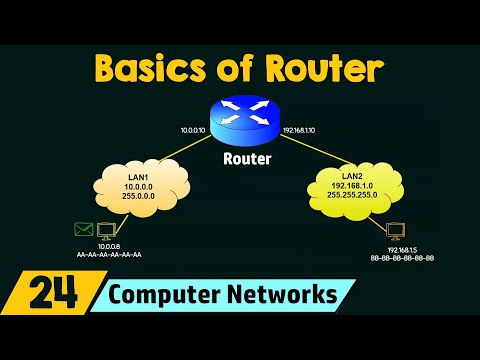
- An example illustrates two LAN setups: one using IP addresses starting with 10.x.x.x and another with 192.168.x.x; each requires specific subnet masks for proper communication among devices within those networks.
Understanding Router and Switch Functionality in Networking
Router Interfaces and Data Flow
- The router has two interfaces: one with IP address 10.0.0.10 connecting to one local area network (LAN), and another with IP address 192.168.1.10 connecting to a different LAN.
- For internal communication within the same LAN, devices can communicate directly through a switch; however, for inter-network communication, data must be sent to the router.
- When a computer wants to send data to an external destination (e.g., 192.168.1.5), it sends the packet to the router's interface at 10.0.0.10.
- The router is responsible for forwarding this data from its first interface (10.0.0.10) to its second interface (192.168.1.10), ultimately reaching the intended destination.
- Each interface of the router serves as a default gateway for devices in their respective networks, facilitating outbound traffic.
Default Gateway Concept
- The IP address 10.0.0.10 acts as the default gateway for all PCs in its local area network, while 192.168.1.10 serves as the default gateway for devices in that LAN.
Differences Between Switches and Routers
Functional Distinctions
- A switch connects multiple devices within a single local area network, whereas a router connects different local networks together.
Operational Layers
- Switches operate at Layer 2 (Data Link Layer), while routers function at Layer 3 (Network Layer).
Memory and Decision Making
- Switches maintain a MAC address table for forwarding decisions based on MAC addresses; routers use routing tables based on IP addresses.
Duplex Modes
- Switches can operate in both half-duplex and full-duplex modes; routers typically work only in full-duplex mode.
Summary of Key Learnings
- Understanding how routers connect different local area networks is crucial for networking fundamentals.
- Differentiating between switches and routers helps clarify their roles within network architecture, emphasizing their operational layers and decision-making processes.
Turn any video into a summary like this
YouTube links, meetings, lectures — with transcripts, search, and chat.