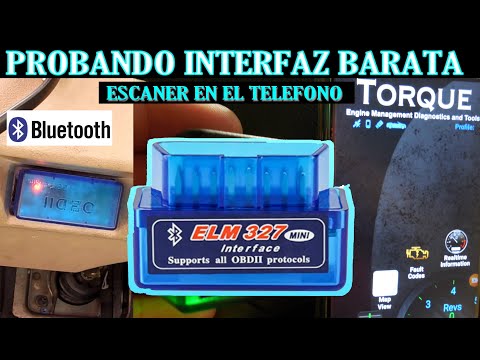
Probando la interfaz mas barata para tener escaner en el Telefono/Elm327 OBD2
Testing the LM 327 Interface
Overview of the LM 327 Interface
- The LM 327 is one of the cheapest interfaces available, priced between $8 and $10.
- It connects via Bluetooth to a smartphone, allowing the phone to function as a basic scanner.
Connection Process
- The interface requires software or an application for communication with the vehicle; Torque is highlighted as a popular choice.
- This type of interface connects to the vehicle's data link connector (DLC), which has been standard in cars in the U.S. since 1996.
Using Extensions for Connection
- An extension cable is recommended for connecting the interface to prevent damage due to its delicate nature. The extension costs around $10 and can be found on platforms like eBay and Amazon.
- Direct connection without an extension is possible but may lead to complications when disconnecting due to tight spaces or fragile connectors.
Initial Setup and Pairing
- After connecting, a red LED indicates that the interface is powered on; pairing with a smartphone involves enabling Bluetooth and entering a common passcode (usually "1234").
- Once paired, users need an application like Torque, available in both free (Torque Light) and paid versions (Torque Pro). The latter costs about $5.
Application Configuration
- Users must configure settings within Torque after starting their vehicle; this includes selecting Bluetooth connections from available devices.
- Successful connection will show indicators lighting up on both the app and interface, confirming data transmission readiness.
Functionality of Torque Application
- The Torque app allows users to view various parameters from their vehicle’s engine control unit (ECU), including diagnostic trouble codes (DTC) and emission monitor statuses.
Overview of Free vs. Paid Application Features
Comparison of Application Versions
- The free version offers basic options, while the paid version includes more comprehensive data and additional features such as RPM delay, throttle angle, GPS sensor integration, and marine graphs.
Accessing Diagnostic Codes
- To view fault codes, the user navigates to the settings menu and selects "fault codes," allowing them to read and clear any existing error codes.
Fault Code Analysis
- The application retrieves a specific fault code (P1 138), but the provided definitions are not applicable for Nissan vehicles; thus, the user seeks a web definition for accurate information.
- The web search reveals that the fault pertains to an air solenoid circuit issue related to the intake manifold, with potential causes including wiring issues or faulty sensors.
User Interface and Functionality
Customizing Display Options
- Users can customize their display by adding or removing graphical elements like digital indicators for RPM; however, advanced data is limited in this free application.
Data Communication Speed
- While data communication is somewhat slow, it successfully connects to vehicle systems and displays relevant information about RPM and other metrics.
Transitioning to Pro Version
Enhanced Features in Pro Version
- The pro version costs approximately five dollars more and provides additional parameters along with enhanced GPS functionalities compared to the free version.
Real-Time Information Access
- In real-time mode, users can access more detailed data such as oxygen sensor readings and fuel trim compensators alongside mission monitor statuses.
Observations on Data Accuracy
Data Transfer Issues
- There are occasional discrepancies in displayed RPM values within the app compared to actual readings from the vehicle's tachometer, indicating potential reliability issues with this interface.
Comparative Analysis of Applications
- Both applications provide similar functionalities regarding fault code retrieval; however, minor differences exist in how they present web-based definitions for troubleshooting.
Testing Across Different Vehicles
Cross-Vehicle Connectivity Tests
Evaluating Torque Application Connectivity
Initial Connection Observations
- The torque application begins to connect, indicating a difference in performance compared to another vehicle. The connection icon stabilizes after initial flickering.
- Real-time data review shows effective connectivity with no significant issues; parameters appear similar across both vehicles.
Data Monitoring and Comparison
- Mission monitors display consistent data tables, suggesting uniformity in results between applications.
- The free application connects without needing to reconfigure settings, allowing for immediate data access and comparison of faults observed in the previous vehicle.
Performance Assessment
- Effective phone connectivity is noted; no major issues were encountered during the connection process. Data retrieval operates normally, albeit with slight delays typical of such applications.
- Some incorrect data was displayed intermittently on the other vehicle, but overall functionality remains satisfactory for the price point.
User Feedback and Common Issues
- General consensus online suggests that this interface performs well relative to its cost, though some users report problems when leaving it connected continuously.
- Users who keep the interface plugged in while frequently accessing the app have reported battery drainage or potential damage due to constant power supply from the OBD-II connector.
Recommendations and Conclusion
- It’s advised not to leave any interface or scanner connected permanently to avoid overheating or damaging connectors and equipment.
- Personal preference leans towards disconnecting devices when not in use as a precaution against potential damage.
Community Engagement Invitation
- Viewers are encouraged to share their experiences with this type of interface regarding functionality and value for money.