UD2 Componentes fundamentales de los sistemas microinformáticos 17
Understanding Screen Sizes and Aspect Ratios
Key Concepts of Screen Measurement
- Screens are measured in inches, a unit more common in the Anglo-Saxon world, with one inch equaling 2.54 centimeters.
- The measurement is taken diagonally from one corner of the screen to the opposite corner, providing a standardized way to express size.
- For example, a 15-inch screen translates to approximately 38.1 centimeters when converted (15 x 2.54 cm).
Aspect Ratio Explained
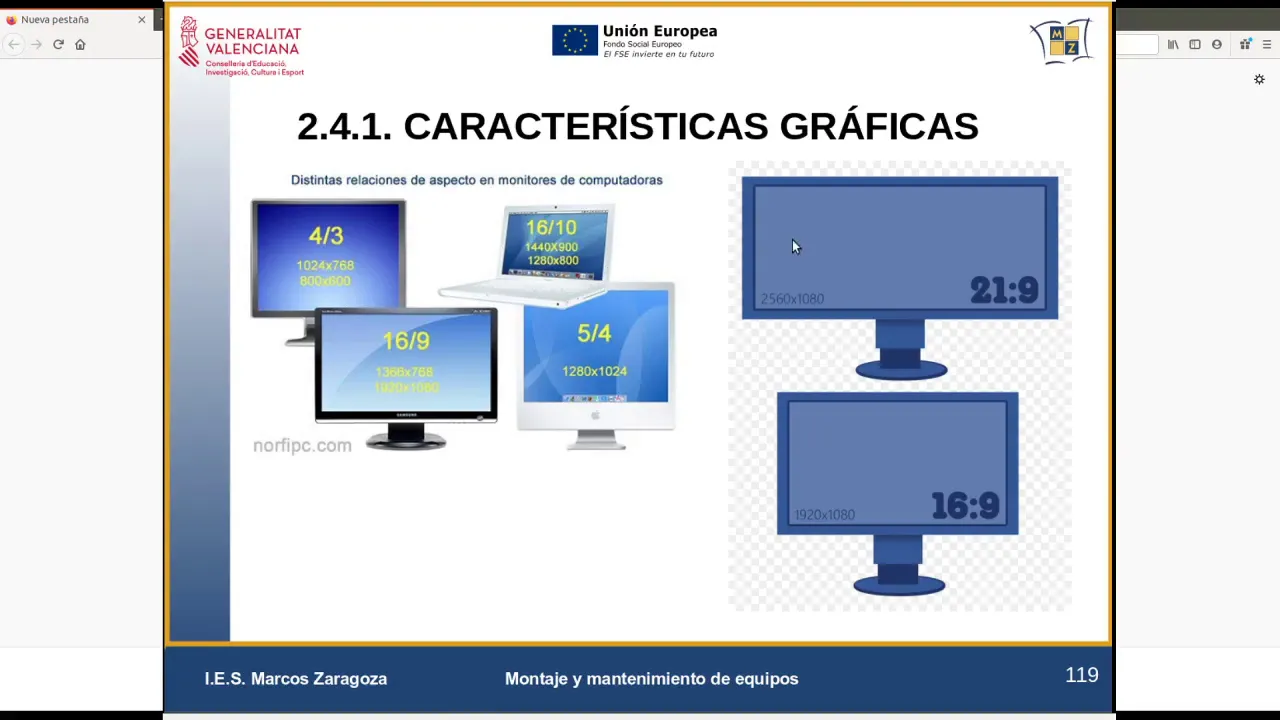
- The aspect ratio is defined as the width divided by height of a screen; for instance, a 4:3 ratio means for every four units of width, there are three units of height.
- A typical widescreen format is 16:9, meaning if the width is represented as 16 units, the height would be 9 units.
Optimal Viewing Distances
- Optimal viewing distances vary based on screen size and resolution; larger screens require greater distances for comfortable viewing.
- For example, with a 55-inch TV at 4K resolution, viewers should sit about one meter away to avoid pixelation.
Resolution Impact on Viewing Experience
- Different resolutions affect how close viewers can sit without noticing individual pixels; higher resolutions allow closer viewing.
- At Full HD (1080p), sitting two meters away from a similar-sized screen prevents pixel visibility due to denser pixel arrangement.
Summary of Resolutions and Their Requirements
- Older resolutions like DVD quality (480p) require viewers to be further away compared to modern high-definition formats like HD (720p).
Understanding Pixel Density and Image Clarity
The Importance of Pixel Distance
- The relationship between pixel resolution and image clarity is crucial; pixels must be appropriately spaced to ensure optimal image quality.
- If pixels are too far apart, the image appears less sharp due to gaps between them, leading to reduced clarity.
Pixel Density and Resolution
- Common pixel density values range from 0.15 to 0.30, which correlate with dots per inch (DPI) measurements found in screens.
- Higher pixel counts within a given area enhance image resolution, resulting in clearer visuals.
Industry Standards for Pixels
- The industry utilizes specific standards for pixel pitch (distance between pixels), typically ranging from 0.15 to 0.30 mm for optimal human perception.
- Increasing pixel density is essential as technology advances, particularly in computer displays where higher DPI translates to better quality.
Advancements in Display Technology
- Modern devices like smartphones feature increased pixels per inch (PPI), enhancing visual quality significantly—evident in technologies like Apple's Retina display.
- A denser arrangement of pixels improves light information capture and color accuracy, creating more lifelike images.
Dynamic Content: Refresh Rates and Response Times
Understanding Refresh Rates
- Displays not only show static images but also dynamic content; refresh rates play a critical role in how smoothly motion is perceived on screens.
- Refresh rate refers to the number of frames displayed per second; common rates include 60 Hz for monitors and up to 50 Hz for traditional TVs.
Impact on Visual Experience
- Higher refresh rates reduce flickering effects when displaying images quickly, improving overall viewing comfort by providing smoother transitions.
- However, increasing frame rates demands more powerful graphics processing capabilities, which can lead to higher costs.
Balancing Quality with Performance
- Excessively high refresh rates may create an unnatural viewing experience; the human eye has limits on perceiving rapid changes effectively.
Frame Rate Considerations in Media
- In film production, standard frame rates have evolved from 25 frames per second (fps); modern formats often exceed this for enhanced realism.
Graphics Processing Demands
Understanding Pixel Technology and Response Times
The Basics of Pixel Functionality
- Pixels utilize phosphorescent technology, which allows them to illuminate. However, the refresh rate can sometimes exceed the pixel's response time.
- There is a slight delay between when the graphics card sends color intensity signals to a pixel and when that pixel actually lights up, typically measured in milliseconds.
Importance of Response Time
- An ideal response time for cinema or gaming is around 5 milliseconds or less; higher response times can lead to visual artifacts.
- High response times may result in motion blur or trailing effects during fast-moving scenes, such as sports broadcasts.
Impact on Visual Clarity