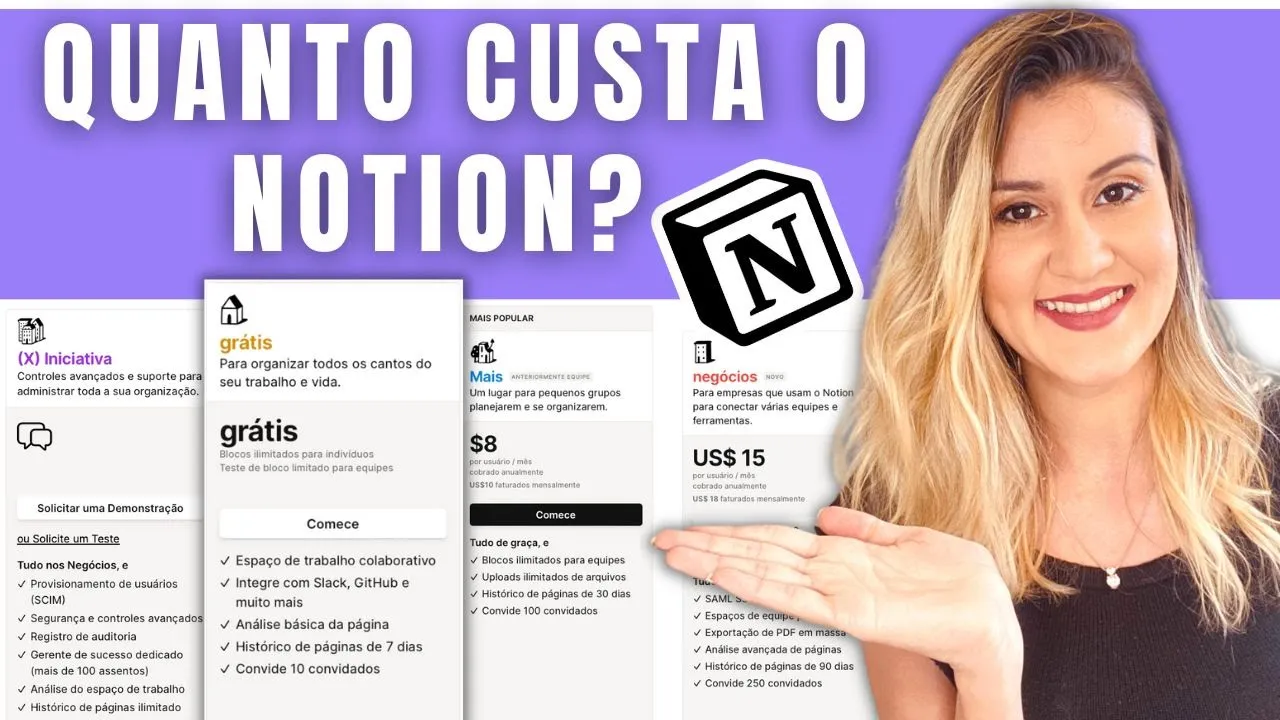
O Notion é Pago? Quanto custa o Notion? Tire suas dúvidas sobre os Planos do Notion
Introduction and Overview
In this video, Gabriela Lorrini discusses how Notion works, specifically focusing on the different plans available. She addresses common questions such as which plan is best to start with and the limitations of each plan.
Understanding Notion Plans
- Notion offers both free and paid plans.
- The first plan is the free plan, which is suitable for individuals.
- There are three paid plans: Personal Pro, Team, and Enterprise.
- Each plan has its own set of features and limitations.
Free Plan Features
- The free plan allows unlimited pages and blocks.
- Pages are where you can organize your content in Notion.
- Blocks refer to any type of content you add within Notion.
- Previously, there was a limit of 1,000 blocks for the free plan, but that limitation has been removed.
- You can still only view historical changes up to 7 days on the free plan.
Upgrading to Paid Plans
- If you add a member to your workspace on the free plan, it will start counting towards the block limit (previously limited to 1,000 blocks).
- The Personal Pro plan is suitable for individuals or small teams who need advanced features like version history and collaboration options.
- The Team and Enterprise plans are designed for larger organizations with more extensive collaboration needs.
File Upload Limitations
- The free plan has a file upload limit of 5 MB per file.
- However, there are workarounds such as uploading files to external services like Google Drive and linking them in Notion.
Gabriela's Usage Experience
- Gabriela personally uses the free plan for her own work and collaborations with her team member Kelvin.
- She finds that the free plan meets her current needs without requiring an upgrade.
Sharing and Collaboration
Gabriela explains the sharing and collaboration features available in Notion, including adding guests and members to workspaces.
Adding Guests and Members
- In Notion, you can add guests or members to your workspace.
- Guests are external users who can be invited to collaborate on specific pages within your workspace.
- Members are individuals who have access to the entire workspace.
Inviting Guests
- To invite a guest, you can share a page with their email address.
- The guest will receive an invitation email and can start working on the shared page once they accept the invitation.
Differentiating Guests and Members
- Guests have limited access only to the specific pages they are invited to.
- Members have full access to all pages within the workspace.
Conclusion
Gabriela concludes her video by summarizing the key points discussed about Notion plans, limitations, file uploads, and sharing/collaboration features.
Key Takeaways
- Notion offers free and paid plans with different features and limitations.
- The free plan allows unlimited pages and blocks without historical changes beyond 7 days.
- Upgrading to paid plans provides additional features like version history and advanced collaboration options.
- File upload limit for the free plan is 5 MB per file, but external services like Google Drive can be used as a workaround.
- Sharing in Notion involves inviting guests or adding members to workspaces. Guests have limited access while members have full access.
Timestamps provided may not align perfectly due to differences in transcription length.
Difference between Guest and Member
In this section, the speaker explains the difference between a guest and a member in a workspace. The level of access and permissions vary for guests and members.
- Guests have restricted access to specific pages in the workspace.
- Members have higher access levels and can access the entire workspace, including sharing pages with others.
- The membership plan determines the number of guests and members allowed.
Access Levels for Members
This section discusses the access levels that members have in a workspace.
- Members have access to the entire workspace, including all pages.
- They can also share pages with others as if they were the owner of those pages.
Difference Between Plans
Here, the speaker highlights the difference between plans based on the number of guests allowed.
- The free plan has a limit of up to 10 guests.
- Paid plans offer different pricing options based on features and number of guests allowed.
Pricing for Paid Plans
This section provides information about the cost of paid plans.
- The Plus plan costs $8 per user per month.
- The Business plan costs $15 per user per month.
- The pricing is calculated based on the number of users in your workspace.
Workspace Management and Billing
Here, the speaker explains how billing works for workspaces and multiple spaces within them.
- Each paid plan is associated with a specific workspace where you subscribed.
- Workspaces are separate entities, so you will only be charged for each individual workspace's subscription.
- You can use other workspaces for free without being charged.
Adding or Removing Members
This section covers how billing works when adding or removing members from a paid plan.
- The billing for members is done on a monthly basis, regardless of whether you have an annual or monthly plan.
- If you add or remove a member during the billing cycle, the charge will be prorated based on the time they were added or removed.
Adding Guests to Workspaces
This section explains how adding guests to workspaces works and its benefits.
- You can add guests to your workspace without any additional charges.
- This allows for collaborative work without incurring extra costs.
Managing Workspace and Plan
Here, the speaker demonstrates how to manage workspace settings and make changes to your plan.
- Access the settings menu by clicking on the left-side menu and selecting "Settings" and then "Members."
- In the Members section, you can manage guest permissions, add new guests or members, and upgrade your plan.