Operating Systems Lecture 2: Process Abstraction
Understanding Process Abstraction in Operating Systems
Introduction to Process Abstraction
- The lecture focuses on the concept of process abstraction, a fundamental idea in operating systems, which involves managing multiple processes.
- When an executable file is run (e.g., double-clicking a program), the OS creates a process, defined as a running instance of a program.
CPU Time Sharing and Scheduling
- The OS timeshares the CPU among multiple processes, giving each one the illusion of exclusive access to the CPU.
- The CPU scheduler consists of two parts:
- A policy that determines which process to run next.
- A mechanism for switching between processes once selected.
Components of a Process
- Each process has a unique identifier known as the Process ID (PID) and occupies memory space in RAM.
- The memory image of a process includes:
- Code: Compiled instructions from programs (e.g., C programs).
- Data: Variables used by the program.
- Stack: A dynamic structure for function calls and arguments.
- Heap: Memory allocated at runtime for dynamic data.
CPU Context and Open Files
- While executing, each process maintains its CPU context, including:
- Program counter pointing to current instruction.
- Various registers storing data relevant to execution.
- Stack pointer indicating current position in stack memory.
- Processes also manage open files for input/output operations such as standard input and output.
Creating a Process
- To create a new process, the OS allocates memory, copies executable code into it, sets up stack and heap areas, and opens necessary files for communication with other system components.
States of a Process
- Processes can exist in different states:
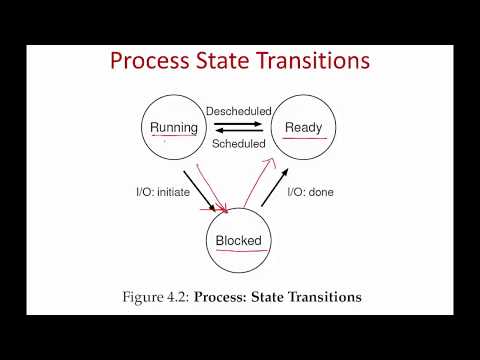
- Running State: Actively executing on the CPU.
- Ready State: Prepared to run but not currently executing; waiting for scheduling.
- Blocked State: Active but unable to execute due to waiting on an event (e.g., disk I/O).
Transition Between States
Understanding Process States in Operating Systems
Overview of Process States
- The main states of processes include ready, running, and blocked. There are also dead processes that have been terminated, but these will be discussed later.
Transitions Between States
- A process in the ready state is prepared to run. When it receives CPU time, it transitions to the running state. Due to time-sharing by the operating system, a running process can revert back to the ready state.
- When a running process initiates an I/O operation (e.g., reading from disk), it enters the blocked state until the operation completes. Once done, it returns to the ready state.
Example of Process State Transition
- In an example with two processes (Process 0 and Process 1), initially, Process 0 runs for three time slots before starting an I/O operation and becoming blocked.
- While Process 0 is blocked, the CPU switches to Process 1. After completing its I/O operation at time slot seven, Process 0 moves from blocked back to ready but may not immediately get CPU access.
Key Points on Scheduling
- Processes shuttle between ready, running, and blocked states based on their execution needs and I/O operations. Completion of I/O does not guarantee immediate scheduling; they must wait in the ready state.
Tracking Processes with PCB
- Operating systems utilize data structures like linked lists or heaps to track active processes through a structure known as a Process Control Block (PCB).
- Each PCB contains essential information about a process such as its identifier and current state. Different operating systems may use various names for this structure; PCB serves as a generic term.
Information Stored in PCB
- The PCB must retain critical details including:
- The process identifier
- The current process state
- Related processes (e.g., parent process)
Turn any video into a summary like this
YouTube links, meetings, lectures. With transcripts, search, and chat.