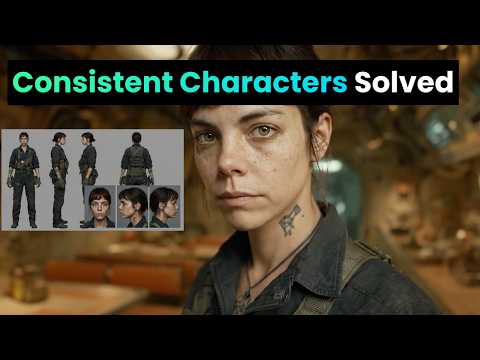
Consistent Character Sheets in Nano Banana (Prompts Included!)
How to Create Consistent Characters Using Reference Sheets
Introduction to Character Consistency
- The speaker believes that the issue of consistent character representation is now manageable and can be effectively addressed.
- They express excitement about demonstrating a technique to create a reference sheet from a single photo, which can then be used for generating videos or images with consistent characters.
Technique Overview
- The speaker mentions that character sheets can also be generated without a reference image, emphasizing the importance of sharing prompts in this process.
- A key aspect of this method involves using the reference sheet as an ingredient alongside a star image or prompt, rather than just converting images into videos.
Creating Reference Sheets
- To create reference sheets in Nano Banana, users should select "create image," add their reference image, and choose appropriate output settings (16x9 recommended).
- The speaker provides guidance on selecting the best close-up shots for effective character representation in wide shots.
Generating Videos with Characters
- After creating a start image with the character and adding it to the prompt, it's crucial to include the reference sheet for accuracy during video generation.
- The speaker demonstrates how to set up prompts for animations where characters perform actions like spinning around while maintaining consistency with their reference sheets.
Working with Multiple Characters
- When incorporating multiple characters in one scene, users need to upload both reference sheets to achieve desired results.
- The overall process is summarized: use Nano Banana for creating character sheets from images and incorporate them as elements when generating start frames or videos.
Conclusion and Call to Action
- The speaker expresses enthusiasm about utilizing this technique for future projects and encourages viewers to subscribe for more tutorials related to AI.