Facade Inspections: The Inspekt AI Interface
Inspect AI Interface Overview
Introduction to the Inspect AI Interface
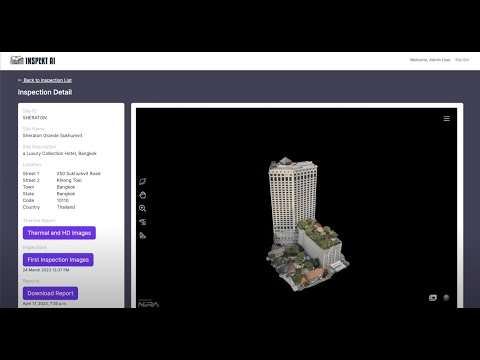
- The video begins with an introduction to the Inspect AI interface, highlighting its capability to provide extensive information about building inspections.
- Users log in to access a project page where all properties are displayed in one centralized location.
Navigating 3D Models
- Upon selecting a project, a 3D model of the building appears, allowing users to manipulate and explore different areas by zooming in for detailed inspection.
- Users can open a folder containing images of various flaws detected throughout the building, each categorized by color for easy identification.
Detailed Flaw Inspection
- The system allows users to view specific issues such as cracks, sealant problems, window defects, water damage, rusting, and loose materials.
- Clients often express amazement at discovering previously unnoticed issues on their buildings, enhancing their ability to protect valuable assets.
Thermal Imaging Insights
Understanding Thermal Images
- The thermal folder provides high-resolution thermal images that reveal hidden issues behind walls that are not visible through standard inspection methods.
- This feature helps identify energy leaks and thermal bridging within the building envelope using color-coded indicators (e.g., darker blue signifies energy loss).
Cost-Saving Benefits
- By pinpointing exact locations of leaks and inefficiencies, Inspect AI aids in cost-saving measures during renovations or repairs.
Comprehensive Reporting Tools
Detailed Flaw Listings
- A comprehensive list detailing every flaw found is available for review. This includes precise locations and descriptions akin to a bill of quantities for accurate remodeling specifications.
Engineer Prepared Reports