Data Warehouse Tutorial - Creating database (Lesson 2)
Creating a Database: Part One
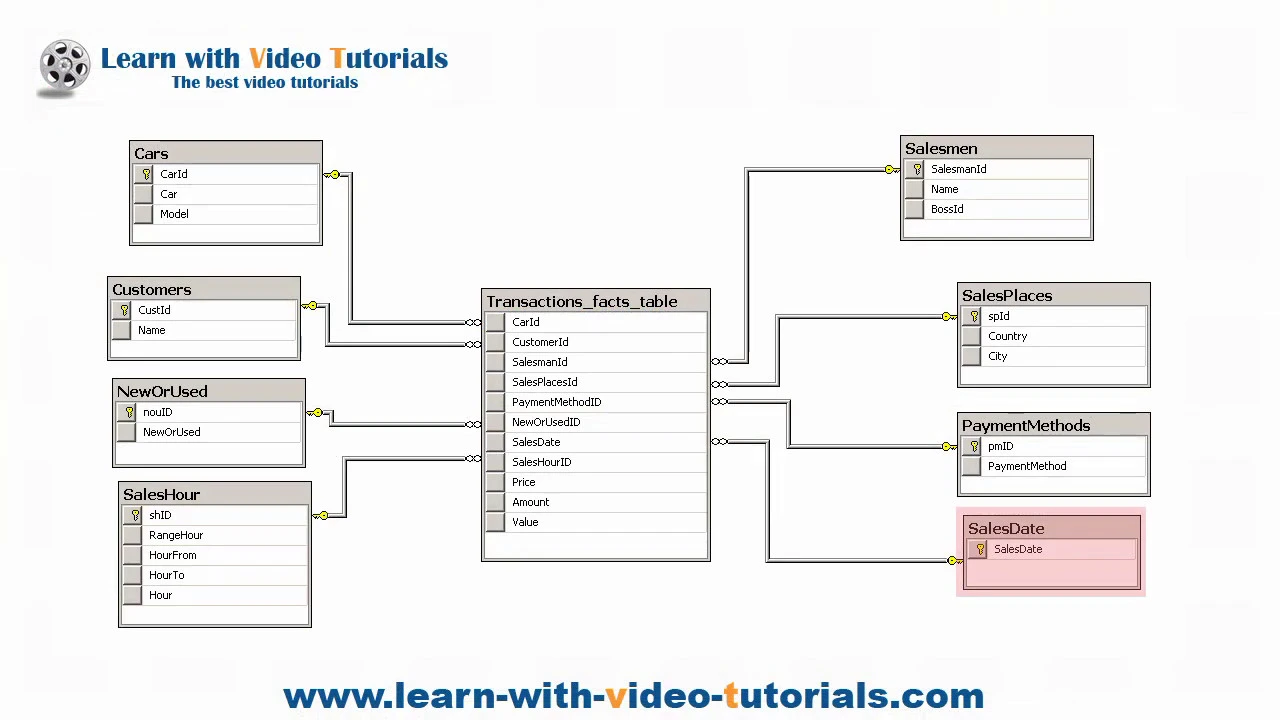
Overview of the Transactions Database
- The transactions database consists of nine tables, with the facts table being the most crucial. Other tables are categorized as dimension tables.
Steps to Create Your Database and Tables
- The CREATE DATABASE statement is used to establish a new database named "transactions" and set its recovery model to simple.
- The process begins by selecting the database using the USE keyword, which allows for subsequent operations on that specific database.
- Several key tables are created:
- Sales Places Table
- Customers Table
- Salesmen Table
- Cars Table
- Payment Methods Table
- New or Used Table
- Additional tables include:
- Sales Date Table
- Sales Hour Table
- Finally, the creation of the essential Transactions Facts Table concludes this section.
Inserting Sample Data
- A segment dedicated to inserting sample data into these newly created tables is introduced, emphasizing practical application after table creation.
Creating a User in Object Explorer