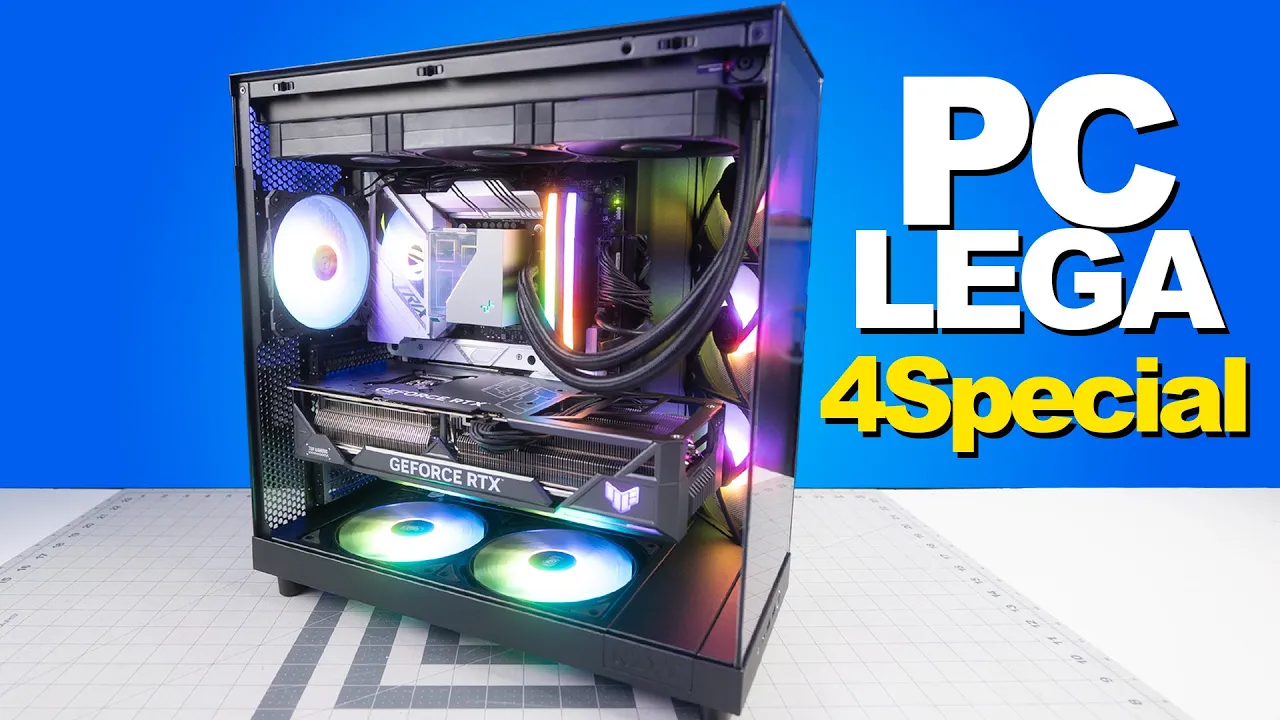
ARMO 1 de 4 PCs Edición Especial LEGA *PASO A PASO*
Vámonos a armar cuatro computadoras edición especial
The speaker introduces the assembly of four special edition computers, emphasizing their uniqueness and the process involved in assembling them.
Introduction to Special Edition Computers
- The speaker plans to assemble four special edition computers, each unique and part of a limited series.
- These computers will be identical and part of an exclusive edition available for immediate shipping.
- The assembly process is initiated with the first computer, while subsequent ones will follow a similar pattern due to their identical nature.
Details of High-End PC Assembly
The focus shifts to the high-end specifications and components used in assembling these special edition computers.
High-End Components
- Emphasis on using top-tier components for these machines targeted at high-performance gaming and professional work.
- Increased subscriber demand for such high-end builds led to the creation of this special edition series.
Special Features and Pricing
Discussion on the unique features, serial numbers, signatures, and pricing details of the special edition computers.
Unique Features and Pricing
- Special features include serialized units signed by the creators with specific details showcased during assembly.
- The video will be divided into two parts due to detailed assembly processes; special pricing available exclusively on hipro.com.mx for Mexican customers.
Powerful Hardware Configuration
Highlighting powerful hardware configurations essential for running various applications seamlessly.
Hardware Specifications
- Unpacking components like motherboards, processors, solid-state drives with ample memory capacity for optimal performance in gaming and professional software usage.
- Ensuring that these computers can handle any game or software application efficiently due to their robust hardware setup.
Software Activation and Cooling System Installation
Addressing software activation through VIP Ur cdk platform along with installing liquid cooling systems for efficient heat dissipation.
Software Activation and Cooling System
- Instructions provided on acquiring licenses from VIP Ur cdk for Windows or Office activation at low costs via PayPal for secure transactions.
Ventilator Installation and Component Overview
In this section, the individual discusses the process of installing a ventilator and provides an overview of computer components required for assembly.
Ventilator Types and Kit Components
- The ventilators come in different sizes, with 140 and 120 variants.
- It is recommended to use two 140 ventilators and one 120 ventilator for optimal performance.
- The individual introduces a specific computer build named "lega for special" that features high-quality components.
Unboxing the Graphics Card
This part focuses on unboxing a high-end graphics card and highlighting its features.
Unveiling the RTX 4090 Graphics Card
- The individual expresses excitement about unboxing the RTX 4090 graphics card.
- They emphasize the size of the graphics card, comparing it to their own PC's model.
Preparing Components for Assembly
Here, the focus is on preparing components such as video cards before installation.
Preparing Video Cards
- Stressing the importance of removing all protective plastic coverings before installation to ensure proper functioning.
- Emphasizing the necessity of using a power supply unit with at least 1000 watts due to high power consumption by video cards.
Installing Processor and Cooling System
This segment covers installing the processor and liquid cooling system while emphasizing attention to detail.
Processor Installation Process
- Detailed steps on installing a Core i9 14900 F processor correctly.
- Highlighting the significance of removing any obstructive stickers from components like processors for efficient heat dissipation.
Ensuring Proper Cooling System Setup
Focuses on setting up an effective cooling system for optimal performance.
Liquid Cooling System Setup
- Importance of following instructions provided with cooling systems, especially for beginners in PC assembly.
- Stressing on reading manuals thoroughly to understand unique mounting mechanisms for different processor types (Intel or AMD).
Assembly Process Overview
In this section, the speaker discusses the assembly process of a computer component.
Tornillería (Screws) and Disipador (Heatsink)
- Detailed discussion on the placement of screws for assembly.
- Reference to locating instructions in the manual for proper assembly.
- Importance of finding support points for delicate tasks like screwing.
RAM Installation and Cabinet Selection
This part covers installing RAM and selecting a computer cabinet.
Memory RAM Placement
- Instructions on correctly placing memory RAM in designated slots.
- Discussion on handling the cabinet carefully to avoid damage during installation.
Cabinet Selection
- Appreciation for the design and features of the chosen cabinet.
Setting Up a Computer System
In this section, the speaker discusses the components required for setting up a computer system, focusing on power connections for the video card and processor.
Power Connections for Components
- The video card requires a 12 Power of 600 watts connector.
- Two connectors are needed for the processor.
- Additional components such as testing equipment and other necessities are also mentioned.
Recommendations for Hardware Configuration
This part covers hardware recommendations and configurations, specifically discussing an RTX 4060 Ti with a Ryzen 7 5700X setup.
Hardware Recommendation Discussion
- Suggested using an RTX 4060 Ti with a Ryzen 7 5700X setup.
- Assured that this configuration would work well without complications.
Optimal Graphics Card Selection
The conversation shifts to selecting the ideal graphics card for optimal performance in conjunction with specific hardware components.
Graphics Card Selection Advice
- Recommended considering an RTX 4070 or RTX 4080 due to their compatibility and performance benefits.
- Advised against using an RTX 4090 due to potential overkill.
Power Supply Considerations
The discussion delves into power supply considerations concerning different graphics cards and their corresponding wattage requirements.
Power Supply Insights
- Emphasized the importance of matching the power supply capacity with the chosen graphics card.
- Suggested upgrading to accommodate higher-end graphics cards like the RTX series beyond the RTX 4060 Ti.
Assembling Components
This segment focuses on assembling various computer components, highlighting key steps in the process.
Component Assembly Process
- Encouraged upgrading power supply alongside installing new graphics cards for optimal performance.
Buying New vs. Used Components
The speaker reflects on their past habit of buying used parts to save money but eventually realized the benefits of purchasing new components.
Considerations for Purchasing New Items
- Emphasizes the importance of conducting a risk analysis before making a purchase decision.
- Highlights that even high-quality new electronic components can fail at some point, underlining the significance of being prepared for such scenarios.
- Discusses how the ability to acquire items impacts decision-making, stressing the importance of cultivating a forward-thinking mindset.
Future Planning and Decision-Making
The speaker delves into the implications of short-term thinking and urges listeners to consider future consequences when making choices.
Importance of Future-Oriented Thinking
- Warns against prioritizing immediate gratification over long-term planning, as it can lead to complications in the future.
- Encourages analyzing risks and anticipating potential problems associated with current decisions to avoid future challenges.
Psychological Aspects in Decision-Making
The speaker explores the psychological factors influencing decision-making processes, drawing parallels with sports psychology.
Psychological Impact on Performance
- Draws parallels between penalty kicks in soccer and decision-making under pressure, emphasizing the role of psychology in performance outcomes.
- Stresses the significance of understanding psychological aspects such as pressure and mindset in achieving optimal performance.
Focus on Mental Development
The speaker underscores the importance of mental development in enhancing decision-making skills and overall performance.
Prioritizing Mental Growth
Assembling Computer Components
In this section, the speaker discusses the process of assembling computer components, emphasizing precision and enjoyment in the task.
Assembling with Care
- The importance of carefully placing screws to ensure a flush fit.
- Discussion on using eight screws for secure attachment and enjoying the assembly process.
- Emphasizing the need to enjoy life and appreciate the present moment for attracting positive outcomes.
- Linking gratitude and enjoyment to increased rewards and personal growth.
- Encouraging gratitude for current possessions while striving for improvement.
Mentorship and Enjoyment
- Promoting finding ways to enjoy life through live mentoring sessions.
- Inviting participation in live mentorship sessions twice a week for enhanced learning experiences.
Ensuring Precision in Assembly
- Highlighting the joy of assembly as a key aspect of computer building.
- Planning an assembly process in stages for efficiency and precision, focusing on cable placement.
Component Selection and Functionality
- Selecting specific cables based on processor requirements like i7 or Ryzen 9 for optimal performance.
- Discussing power consumption differences based on processor capabilities and overclocking needs.
Efficient Cooling System Setup
- Explaining the importance of front panel connections for efficient system operation.
- Placing emphasis on meticulous setup procedures to ensure proper functioning of USB connections.
Ventilation Strategy Implementation
- Demonstrating correct installation techniques for USB Type-C and USB 3.0 connectors with attention to detail.
Describing Computer Build Process
In this section, the speaker discusses the importance of managing heat within a computer build and strategically placing fans to optimize cooling.
Ventilation Strategy
- The speaker emphasizes the need to prevent excessive heat from reaching components like the video card by strategically positioning fans for efficient airflow.
- Placement of fans at the bottom and rear of the case is highlighted as a method to extract heat effectively and maintain optimal temperatures.
Fan Selection and Installation
- Due to limitations in fan size compatibility, larger 140mm fans are recommended for effective cooling at the bottom of the case.
- The speaker appreciates the visual impact of installed fans, noting their robust appearance and potential benefits for GPU temperature management.
Aesthetic Considerations
- The speaker expresses satisfaction with how the fans look when installed at the bottom of the case, emphasizing their contribution to enhancing the overall appearance.
- Reflecting on past builds, it is acknowledged that omitting bottom fans can detract from aesthetics, prompting a commitment to always include them for an improved visual appeal.
Optimizing Component Cooling
This segment focuses on enhancing component cooling through strategic fan placement and addressing potential aesthetic concerns in computer builds.
Visual Impact of Fans
- The speaker highlights how adding bottom fans not only improves aesthetics but also enhances perceived power and completeness of a computer build.
- Adapters are utilized to convert multiple smaller fans into one larger unit for improved efficiency while maintaining a visually appealing setup.
Preventing Overheating Risks
- Removal of protective plastic covers from components is emphasized as crucial to prevent overheating issues caused by obstructed airflow or detached plastics entering fan mechanisms.
- Stressing that all internal plastic coverings must be removed due to potential heating complications that could impede proper ventilation within computer systems.
Final Assembly Steps
This part delves into final assembly steps involving connecting various components such as RGB elements and ensuring proper installation for optimal performance.
Component Connectivity
- Detailed steps are taken to connect various components correctly, including RGB elements, ensuring seamless integration within the system setup.
- Challenges in locating specific components during assembly are addressed, highlighting meticulous attention required for successful installation processes.
Completing Setup
- Final connections are made for essential components like pump units and additional fans, underscoring precision in component placement for efficient operation.
Assembly Process of a Machine
In this section, the speaker demonstrates the assembly process of a machine, focusing on specific steps and details.
Passing Components Through Gaps
- The speaker plans to pass a component through a gap between the heatsink and backplate. -
- Identifies a gap that allows for passing without issues. -
Cable Management and Connection
- Slowly passes cables through designated areas. -
- Emphasizes neat cable management for connecting components effectively. -
Finalizing Assembly and Connecting Components
This part covers finalizing the assembly process and preparing for component connections.
Final Steps in Assembly
- Completes the assembly process with attention to detail. -
- Prepares for connecting components at the rear of the machine. -
Connecting Multiple Fans Using an Adapter Hub
The focus here is on connecting multiple fans using an adapter hub for efficient setup.
Utilizing Adapter Hub for Fan Connections
- Demonstrates using an adapter hub to connect multiple fans efficiently. -
- Shows how to manage numerous RGB fans effectively with the hub. -
RGB Fan Connection Setup
This segment delves into setting up RGB fan connections in a chain configuration.
Chaining RGB Fans
- Explains the importance of correctly chaining RGB fans together. -
- Demonstrates step-by-step connection of RGB fans in a chain formation. -
Completion and Future Plans
Concluding remarks on completion, future plans, and upcoming content related to the build.
Final Touches and Future Content
- Wraps up assembly by closing all components securely. -