Протокол IMAP | Курс "Компьютерные сети"
New Section
The lecture introduces the IMAP protocol, detailing its history, evolution, and key features compared to POP3.
Introduction to IMAP
- IMAP was introduced in 1986 as "Intel Mail Access Protocol," with subsequent versions in 1988 and 1991. The current version, IMAP4 from 1994, is still in use.
- Unlike POP3, IMAP allows emails to be stored on the server rather than downloaded to clients immediately. It supports synchronization and complex actions like searching within emails.
- Multiple clients can access the same mailbox simultaneously with IMAP, catering to modern email usage where users have multiple devices.
Key Advantages of IMAP
- IMAP's advantage lies in supporting multiple client access to a single mailbox and enabling sophisticated email operations on the server side.
- However, challenges include limited server disk space necessitating periodic email deletion to prevent overflow.
Evolution of Email Protocols
This section delves into the differences between POP3 and IMAP protocols regarding storage management and user interactions.
Storage Management Comparison
- While POP3 limits users to a single mailbox, IMAP allows for multiple mailboxes (mailboxes or folders), facilitating better organization and message movement.
- In POP3, messages are typically stored locally; however, IMAP uses flags for message status tracking such as read/unread status and other metadata.
Understanding Flags in Email Communication
- Flags in IMAP serve as markers indicating various statuses like read/unread messages or drafts. They can be system-defined or user-defined for enhanced organization.
- System flags like Seen (message viewed), Answered (response sent), Draft (unfinished message), Deleted (marked for removal), and Recent (new message).
Client Interaction States in IMAP
Exploring the different states a client goes through when interacting with an email server using the IMAP protocol.
Client Interaction Phases
- Clients progress through four states: Not Authenticated (initial connection requiring login), Authenticated (successful login but no folder selection yet).
- Selected State follows folder selection allowing reading and managing messages within that folder. Finally, Logout signifies disconnecting from the server after completing tasks.
Command Execution in IMAP
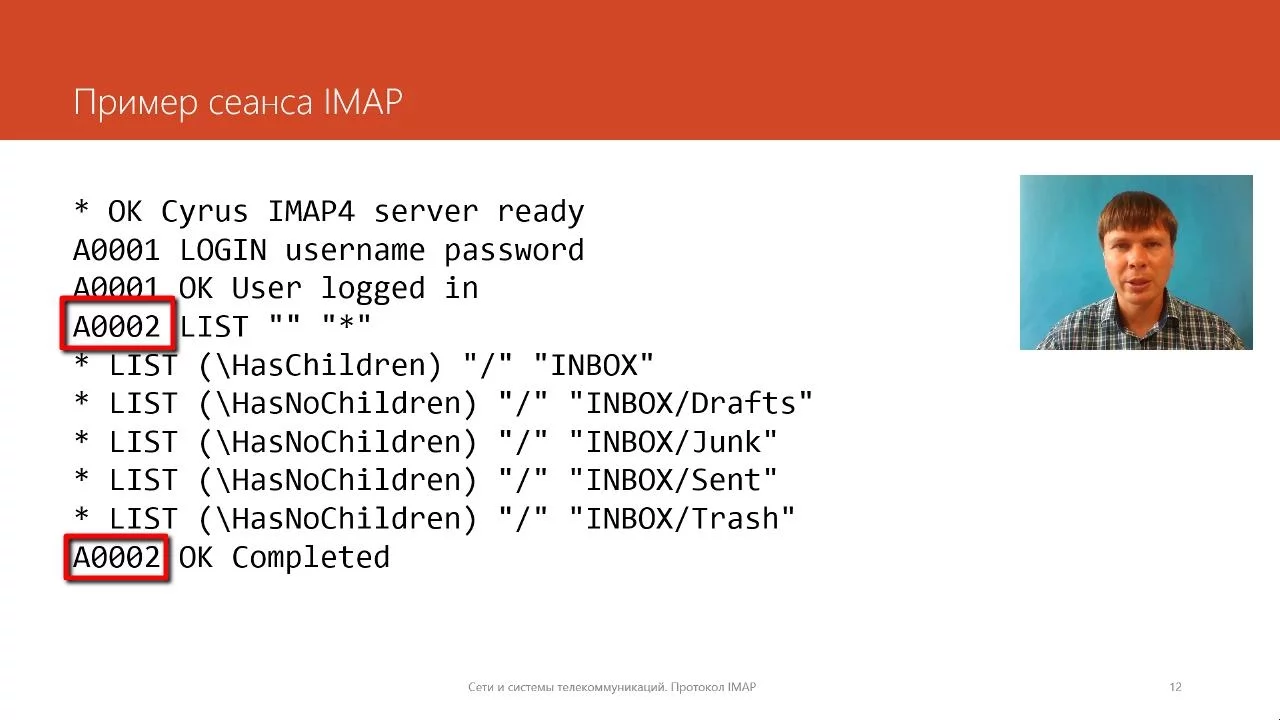
- Unlike other protocols, IMAP permits concurrent command execution by clients. Commands are tagged for identification purposes during interactions with servers.
Understanding IMAP Protocol
In this section, the speaker explains the successful execution of a command in the IMAP protocol and discusses errors that may occur due to incorrect commands or insufficient arguments.
Execution of Commands in IMAP Protocol
- Successful completion of a command does not guarantee error-free execution.
- The occurrence of a "bad" error indicates incorrect client commands or insufficient arguments.
Authentication Process in IMAP
- Clients need to authenticate using the "login" command, which includes both username and password.
- Unlike POP3, IMAP requires simultaneous input of username and password for authentication.
Selecting Mail Folders
- After authentication, clients must choose a folder to work with using the "select" command.
- The selection process involves choosing folders like Inbox and understanding message flags such as forwarded messages and spam indicators.
Working with Messages in IMAP
This section delves into managing messages within an IMAP session, including viewing message flags, accessing message content, and marking messages for deletion.
Viewing Message Flags
- Clients can view message flags using the "fetch" command to understand message status.
- Message flags like seen (S), answered (A), and flagged (F) provide insights into message status.
Marking Messages for Deletion
- To delete messages, clients set the "deleted" flag using the "store" command followed by expunging deleted messages from the folder.
- The "expunge" command permanently removes marked messages from the folder.
Advanced Commands in IMAP
This section explores advanced commands in IMAP for managing folders, copying/moving messages, searching for specific emails, and closing folders efficiently.
Folder Management Commands
- Various commands enable creating, deleting, renaming folders along with moving/copying messages between folders.
- Commands like "copy," "move," and "close" facilitate efficient organization within an email account.
Enhanced Functionality with Extensions
- Extensions like COPYMOVE enhance standard functionality by allowing seamless movement of messages across folders.
- The extension MOVE introduced in 2013 enables direct transfer of messages between folders without duplication.
Challenges & Complexity of IMAP Protocol
Discusses challenges posed by complexity in implementing simultaneous access to mailboxes by multiple clients while maintaining data consistency.
Complexity & Limitations
- The complexity of IMAP arises from enabling concurrent access to mailboxes by multiple clients while ensuring data integrity.