Configuración vpn ssl (fortinet)
Introduction to VPN SSL Configuration
In this section, Vicente introduces himself as a networking specialist and promises to provide a tutorial on configuring VPN SSL for those unfamiliar with the topic.
Setting Up the Network Diagram
- Vicente explains the network diagram setup, involving a Linux machine simulating a core connected to the internet with four interfaces leading to remote and local forts.
- Details are provided about connecting from one machine to another within the fort, including configurations and connections to virtual equipment.
IP Configurations and Assumptions
- Vicente discusses IP configurations, assuming two public IPs for the fort and demonstrating network mappings.
- The setup of interfaces on the fort is explained, highlighting LAN connections and server ports for Windows Server.
Basic Network Policies
- Vicente elaborates on setting up basic policies for traffic routing based on port 8 towards interface one for navigation purposes.
- Preparation for VPN SSL configuration is discussed, emphasizing that even beginners can follow along despite its complexity.
User Creation and Group Setup
This part focuses on creating users, defining groups, and preparing for VPN SSL configuration.
User Creation Process
- Steps are outlined for creating users who will connect to VPN SSL; if no Active Directory exists, users are created directly in the fort.
- Vicente creates two users named "invitado" with corresponding passwords before organizing them into an SSL group.
Group Formation and Membership Assignment
- A group named "grupo ssl" is formed where both users are added; this ensures organized user management within the SSL setup.
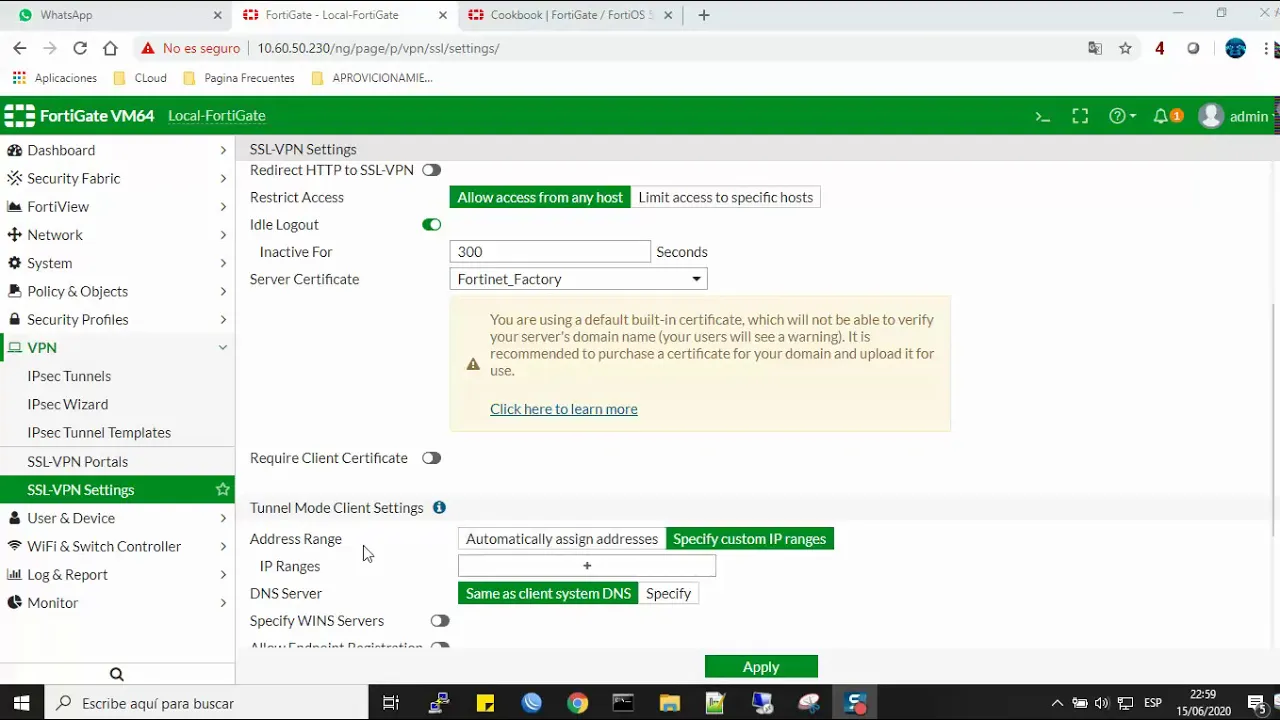
- Moving into VPN SSL settings, interface selection is crucial along with specifying listening ports like 443 instead of default 43 for avoiding conflicts.
Configuring Access Control and Authentication
This segment delves into access control settings, port configurations, certificate handling, IP address allocation, and user authentication within VPN SSL setup.
Port Configuration and Access Control
- Changing listening port to avoid conflicts by selecting port 443 instead of default 43; ensuring smooth local connectivity without interference.
- Addressing access control concerns by allowing connection from any location while maintaining default settings in certificate handling for simplicity.
Authentication Settings
- Default settings retained in IP range allocation ensure automatic address assignment upon connection initiation through VPN SSL.
Configuring VPN SSL and Portals
In this section, the speaker explains the process of configuring VPN SSL and portals on a Fortinet device, emphasizing the importance of specific settings to ensure proper functionality.
Configuring Automatic Settings
- Selecting "automatic" for automatic addressing and routing within the Fortinet device.
- Choosing the networks to connect to through the tunnel for user connections.
- Explaining that without proper configuration, users may lose internet access when connecting via FortiClient.
Network Selection and Configuration
- Allowing internet access through the Fortinet device while enabling users to connect to specific networks.
- Selecting networks for user connections and adjusting default ranges if needed.
- Leaving settings at default for internal network connection while configuring other parameters.
Policy Application and User Setup
- Applying configurations in policies correctly to avoid connectivity issues.
- Directing traffic from specific sources towards VPN SSL destinations.
- Creating VPN rules for traffic flow between different network segments.
Policy Configuration and User Access
This section delves into policy configuration details and user access setup within a VPN SSL environment on a Fortinet device.
User Group Assignment
- Assigning users to specific groups for streamlined access control.
- Linking user groups with policies to regulate traffic flow effectively.
Destination Settings and Network Routing
- Defining destination addresses for outgoing traffic from VPN SSL connections.
- Specifying network routes for remote connections using designated IP addresses.
Finalizing Configuration and Testing Connectivity
- Completing basic setup requirements for VPN SSL functionality.
- Emphasizing the critical role of split tunnel configuration in ensuring proper connectivity.
Remote User Connection Setup
The speaker elaborates on essential steps required for establishing remote user connections successfully within a configured VPN SSL environment on a Fortinet device.
Split Tunnel Configuration Importance
- Highlighting the significance of enabling split tunnel configuration in policies for seamless remote user connectivity.
Correct Configuration Validation
- Stressing the necessity of verifying correct configurations in policies to facilitate smooth operation.
Remote User Connection Initiation
Detailed Configuration of VPN SSL
In this section, the speaker discusses the detailed configuration steps for setting up a VPN SSL connection and adjusting network policies to enable connectivity.
Setting Up VPN SSL Connection
- The user creates a VPN SSL connection for another user to connect through FortiClient to the public IP 10.200.11.
- Adjustments are made to network configurations, changing to 192.168.100.10/24 as the new segment with internet access enabled for this segment.
- Modifications in policies and network settings are made to ensure proper internet access for the new segment (192.168.100.10/24).
Network Policy Adjustments
- Changes are made in the full access VPN settings, modifying segments and ensuring all necessary adjustments are saved.
- Port configurations are updated, specifying port 8 for traffic from VPN SSL using the new segment.
Finalizing Configuration and Connectivity
- Additional changes in network settings are made within full access VPN, ensuring connectivity towards specific networks is established.
- After completing configurations, users can connect via remote services like FortiClient, enabling connectivity with the main office or specific machines within the network.
Testing Connectivity and Access
This part focuses on testing connectivity post-configuration by pinging remote servers and verifying successful connections through FortiClient.
Testing Connectivity
- The user demonstrates connecting through FortiClient and pinging machines in the main office to test accessibility.
- Simulating local connectivity after establishing a VPN connection highlights successful internal communication but lack of external access initially.
Configuring Gateway Settings
- Instructions on configuring gateway settings with public IP (assuming 10.201.1), emphasizing port adjustments for proper communication establishment.
- Further details on configuring ports (e.g., changing from 10.443), applying settings, and connecting using created user credentials like "guest1."
Verification of Connectivity
The speaker verifies successful connectivity post-configurations by demonstrating active connections through FortiClient and seamless interaction with the main office's resources.
Verification Process
- Connecting successfully via FortiClient confirms established VPN connection and subsequent accessibility to main office resources.
- Confirmation of connectivity showcases effective setup of VPN SSL connection with FortiClient, ensuring smooth interaction with designated networks.
Conclusion: Future Configurations
Concluding remarks emphasize simplicity in current configuration while hinting at future advanced setups involving site-to-site VPN configurations.
Future Prospects
- Basic configuration completion sets groundwork for potential advanced setups like site-to-site VPN configurations.