DDCA Ch4 - Part 9: Testbenches
Test Benches in System Verilog
In this section, the speaker discusses the importance of test benches in System Verilog for automating simulations and testing modules.
Test Benches Overview
- Test benches are non-synthesizable modules used to automate simulations and test other modules.
- Three types of test benches: simple test bench, self-checking test bench, and self-checking with test vectors.
- Simple Test Bench: Involves setting input values, running simulations, and observing outputs manually.
- Self-Checking Test Bench: Adds output verification to automate error detection during simulation.
Enhancing Test Benches
- Truth Table Representation: Describes how representing expected outputs as a truth table simplifies error checking and debugging processes.
Detailed Explanation of Clock Usage in Test Benches
In this section, the speaker explains the utilization of clocks in test benches to compare actual and expected outputs.
Clock Utilization in Test Benches
- The last test bench reports discrepancies between actual and expected outputs by generating a clock signal. This clock is used to delay input assignment before output comparison.
- The rising edge of the clock introduces a delay for the module to calculate its output, while the falling edge triggers output comparison with new inputs successively.
- Clocks are crucial for assigning inputs, waiting before output comparison, and running synchronous circuits effectively within test benches.
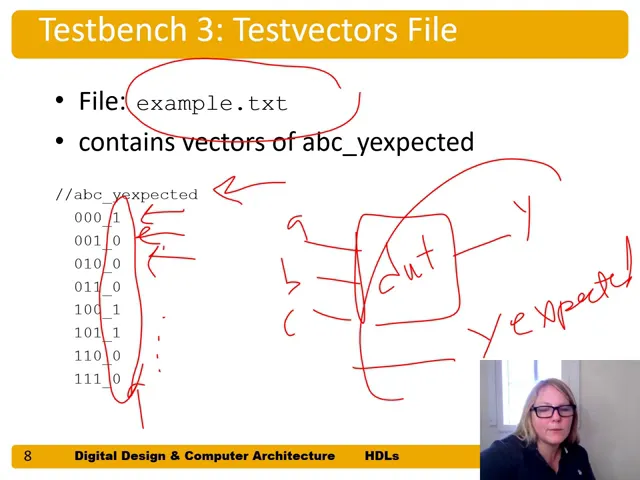
- Test vector files outline input-output expectations. By comparing actual and expected outputs, discrepancies can be identified using additional wires like 'y expected.'
- Test bench structures involve clocks, reset signals, input assignments, and error tracking mechanisms for efficient testing of sequential logic circuits.
Clock Generation and Initialization Process
This part delves into clock generation processes and initializations at the beginning of simulations.
Clock Generation Process
- An always block generates clocks without a sensitivity list. Clock transitions from one to zero at specific intervals facilitate timing control during simulations.
- Initial blocks execute at simulation start to read test vectors stored in files into arrays for subsequent testing procedures.
- Reading test vector files initializes arrays with input combinations for testing purposes while resetting bookkeeping variables like errors and vector numbers.
Application of Test Vectors on Rising & Falling Edges
This segment elucidates applying test vectors on clock edges for input assignment and output comparison within test benches.
Applying Test Vectors
- Test vectors are applied on rising edges to assign inputs (a,b,c), along with expected output values (y). Output comparisons occur on falling edges based on assigned values.
Binary and Hexadecimal Representation
In this section, the speaker discusses the usage of binary and hexadecimal representations in a testing scenario.
Binary vs. Hexadecimal Representation
- Binary is suitable for certain cases like incrementing vectors.
- "For example, a, b, and c we could print in hexadecimal...binary makes sense."
- Hexadecimal can be more appropriate in some situations.
- "But you could also sometimes hexadecimal makes more sense."
Testing Vectors Array Incrementation
This part focuses on incrementing the vector number within the test vectors array during testing.
Incrementing Vector Number
- Utilizing vector number incrementation at clock rising edges.
- "Use that to assign at the right next rising edge of the clock..."
- Checking for completion based on valid values in the test vectors array.
- "Hey, are we done with valid values in the test vectors array..."
Completion Criteria and Summary Statement
The discussion centers around completion criteria for testing and generating a summary statement.
Completion Criteria
- Determining completion based on defined binary values.
- "If undefined four bits of binary x then we're done..."
- Generating a summary statement upon completion of tests with errors.
- "It would say eight tests completed with however many errors happened..."
Simulation Results Viewing
Exploring how to view simulation results after completing testing.
Viewing Simulation Results
- Halting simulation when no more test vectors are available.
- "And then if we don't have any more test vectors then we stop at the simulation..."
Comparison Operators Explanation
Clarification on using equals and not equals operators in comparisons.
Understanding Comparison Operators
- Justifying the use of multiple equal signs for comparisons involving x and z values.
- "So why don't we have equals equals equals and not equals equals..."