UD3 Componentes de E S 7
Introduction to Solid State Drives (SSD)
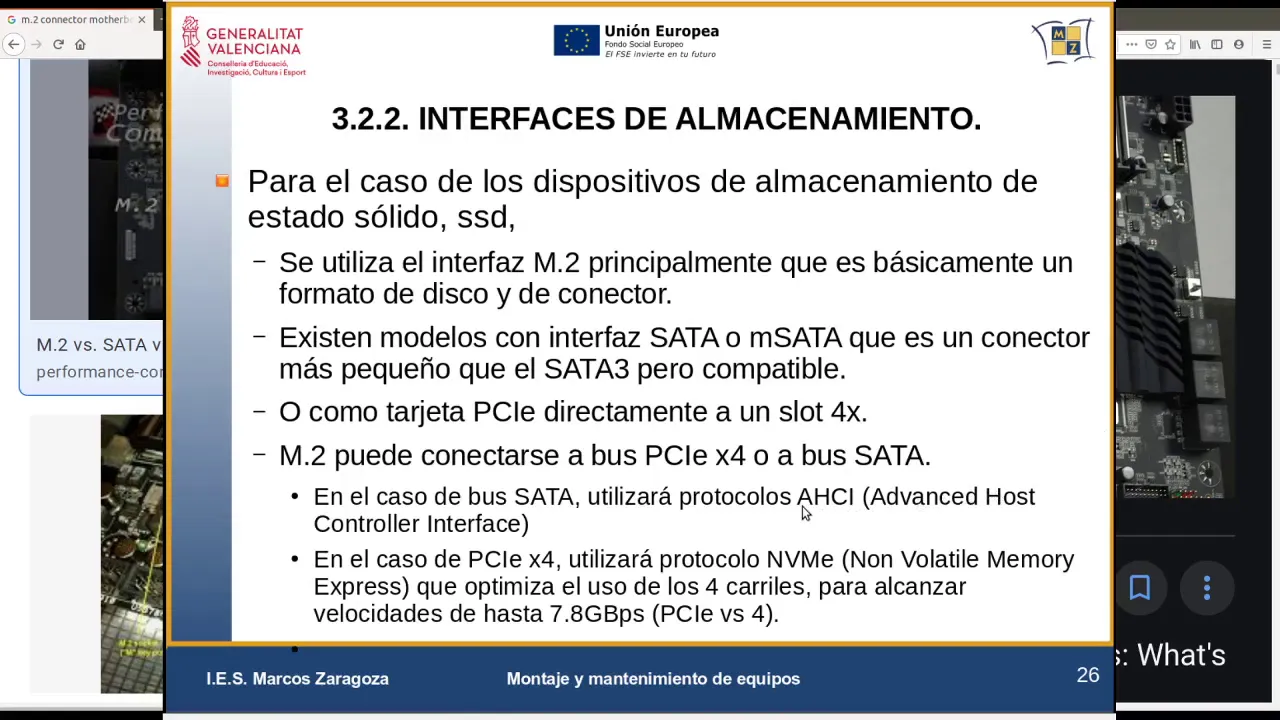
In this section, the speaker introduces solid state drives (SSD) as a type of storage device. They mention that SSDs can be connected using SATA or M.2 interfaces.
Types of SSD Interfaces
- SSDs can be connected using SATA or M.2 interfaces.
- SATA interface is commonly used and comes in version 3.
- M.2 interface is a smaller connector that is directly attached to the motherboard.
- M.2 SSDs have a circuit board without a metal casing and are directly connected to the motherboard.
Other Forms of SSD Connections
- Another way to connect SSDs is through PCI Express cards in a 4x slot.
- There are three main types of connections/interfaces for SSDs: M.2, eSATA with its variant mSATA, and PCI Express cards.
Understanding the M.2 Connector
The speaker explains that the M.2 connector is not a bus but rather a connector on the motherboard. They discuss how it connects to the CPU and show images of M.2 connectors on motherboards.
The M.2 Connector
- The M.2 connector is not a bus but rather a connector on the motherboard.
- It can be found by searching for "M.2 connector on motherboard" in an internet browser.
- The size of the disk and the connector are both referred to as "M.2."
- The M.2 connector is soldered onto the motherboard and has bus lines underneath it.
Bus Options for M.2 Connectors
The speaker discusses different bus options available for connecting devices behind an M.2 connector, such as SATA and PCI Express. They explain that the choice of bus affects the speed and protocol used for communication between the CPU and the SSD.
Bus Options for M.2 Connectors
- The bus underneath an M.2 connector can be either SATA or PCI Express.
- The connection with the chipset can be either SATA or PCI Express.
- The protocol used for communication between the CPU (including programs and operating system) and the SSD depends on whether it is connected via SATA or PCI Express.
- PCI Express supports higher speeds than SATA, but both can use similar communication protocols.
Understanding Communication Protocols
The speaker explains that communication protocols determine how data is exchanged between the CPU, operating system, and SSD. They discuss how different protocols are optimized for specific types of storage devices.
Communication Protocols
- Communication protocols define how data is requested from and returned by an SSD.
- Different protocols have different levels of efficiency and speed.
- SATA uses a protocol called AHCI (Advanced Host Controller Interface), which was originally designed for mechanical/magnetic hard drives.
- AHCI may not fully utilize the capabilities of solid state drives, leading to slower performance.
Introduction to NVMe Protocol
The speaker introduces the NVMe (Non-Volatile Memory Express) protocol as a more efficient option specifically designed for solid state drives. They explain that NVMe can be used with M.2 connectors connected via PCIe x4 bus.
NVMe Protocol
- NVMe (Non-Volatile Memory Express) is a protocol specifically designed for solid state drives.
- It offers better optimization for SSDs compared to older protocols like AHCI.
- NVMe can be used with M.2 connectors connected via PCIe x4 bus.
Benefits of NVMe Protocol
The speaker discusses the benefits of using the NVMe protocol with SSDs connected via PCIe x4 bus. They mention that not all SSD controllers support NVMe, but it offers improved performance and optimization.
Benefits of NVMe Protocol
- The NVMe protocol is well-suited for SSDs and offers better performance.
- It optimizes the use of all four lanes in a PCIe x4 bus.
- Not all SSD controllers support NVMe, so compatibility should be checked.
Timestamps are approximate and may vary slightly.
Understanding the Communication between Operating Systems and Storage Devices
This section explains the communication between operating systems and storage devices, focusing on buses and protocols.
Types of Communication Protocols
- The operating system communicates with the disk through two protocols: AHCI and NVMe.
- AHCI is used for mechanical disks (HDD) and some SSDs connected via SATA or PCIe.
- NVMe is used for high-performance SSDs connected via PCIe.
Communication Path for Mechanical Disks
- The communication path for mechanical disks involves the following steps:
- The operating system communicates with the driver (AHCI).
- The driver loads the operating system.
- The driver recognizes the hardware's communication protocol (AHCI).
- The disk operates using the AHCI protocol.
Communication Path for SSDs
- SSDs can be connected via different interfaces, such as SATA or PCIe.
- For SSDs connected via PCIe, they can use either AHCI or NVMe protocols.
- The communication path for an SSD connected via PCIe involves:
- Direct connection to the chipset through a PCIe bus.
- Simplified communication path compared to mechanical disks.
- Faster communication between the operating system, applications, and SSD.
Different Paths to Reach Storage Devices
This section discusses different paths to reach storage devices based on various protocols and connections.
Three Paths to Reach Disks
- There are three paths from the operating system and applications to reach storage devices:
- SATA Express with AHCI protocol
- Utilizes legacy SATA connections.
- Less commonly used in modern systems.
- PCIe with AHCI protocol
- Uses a direct connection through a PCIe bus.
- Provides faster data transfer compared to SATA Express.
- PCIe with NVMe protocol
- Utilizes the NVMe protocol for high-performance SSDs.
- Offers the fastest communication path currently available.
Chipset and Controllers
- All communication paths pass through the chipset, which acts as a hub for adapters and various connections (PCIe, SATA, etc.).
- The chipset determines compatibility and supports different protocols.
- Controllers are responsible for managing communication between the operating system and hardware devices.
Advantages of PCIe with NVMe Protocol
- The PCIe with NVMe protocol is the fastest communication path for SSDs.
- It simplifies the communication path by bypassing certain parts of the chipset.
- Allows direct communication between the operating system, applications, and SSD.
Summary of Communication Paths
This section provides a summary of the different communication paths discussed in the transcript.
Communication Paths Overview
- SATA Express: Utilizes legacy SATA connections but has limited usage in modern systems.
- PCIe with AHCI Protocol: Provides faster data transfer than SATA Express by using a direct connection through a PCIe bus.
- PCIe with NVMe Protocol: Offers the fastest communication path for high-performance SSDs by utilizing the NVMe protocol. Allows direct communication between the operating system, applications, and SSD.
The transcript continues beyond this point but does not provide any additional relevant information related to storage device communication.
Turn any video into a summary like this
YouTube links, meetings, lectures. With transcripts, search, and chat.