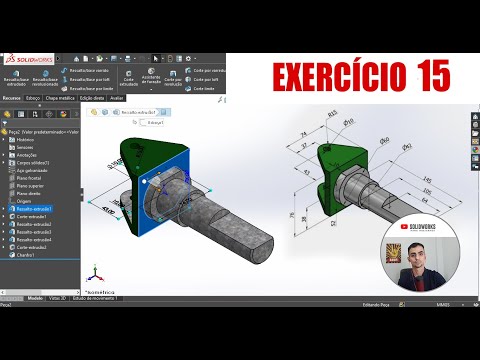
SOLIDWORKS PARA INICIANTES - EXERCÍCIO 15
Introduction to the Lesson
Overview of the Exercise
- The instructor introduces a new lesson on drawing, encouraging viewers to follow along and practice at home.
- Viewers are invited to compare their drawing time with the instructor's, emphasizing self-paced learning.
- The importance of engagement is highlighted; viewers are encouraged to like the video as a form of feedback.
Drawing Process Begins
Setting Up the Drawing
- The instructor opens a new document for drawing, starting with defining the main body shape.
- A sketch is initiated by selecting the top plane and creating a vertical line from the origin point.
Creating Shapes
- The instructor demonstrates how to create concentric circles using specific mouse movements and clicks.
- Vertical alignment is established between two points for precision in design.
Defining Dimensions
Adding Measurements
- Key dimensions are introduced: width of 74mm and center distance of 43mm from an edge.
- Additional measurements include a radius of 10mm for holes being created in the design.
Finalizing Sketch Details
Completing Initial Design
- A circle representing a hole is drawn with a diameter defined as 10mm.
- A radius measurement of 15mm is added to finalize the first sketch before moving on to extrusion features.
Extrusion and Material Selection
Extruding Features
- The instructor explains how to extrude shapes downward, specifying dimensions such as 76mm height.
Material Application
SolidWorks Tutorial: Creating a Shaft
Editing Appearance and Material Selection
- The speaker discusses selecting a green color for the object, emphasizing the importance of visual appeal in design.
- A mention of using galvanized steel material to achieve a specific texture, encouraging viewers to test this on their own systems for quality assurance.
Sketching Techniques
- The speaker invites viewers to enroll in a beginner's SolidWorks course, highlighting its potential benefits for career advancement and personal projects.
- Two methods are introduced for creating sketches; one involves using detailed sketches while the other is simpler and more suitable for beginners.
Step-by-Step Design Process
- Instructions are given on how to create a new sketch from an existing photo, including drawing circles and lines accurately.
- The process of mirroring entities is explained, showcasing how to maintain symmetry in designs.
Dimensioning and Features
- Key dimensions are defined, such as width (52mm), radius (30mm), and thickness (10mm), which are crucial for accurate modeling.
- Further dimensioning is discussed with calculations based on previous measurements to ensure precision in the design.
Finalizing the Design
- The speaker emphasizes selecting appropriate faces when creating new sketches, ensuring that all dimensions relate correctly to each other.
- Additional features like fillets and chamfers are introduced as finishing touches to enhance the design aesthetics.
Community Engagement
- An invitation is extended to join a WhatsApp study group aimed at beginners interested in learning SolidWorks. This community aspect encourages collaboration among learners.