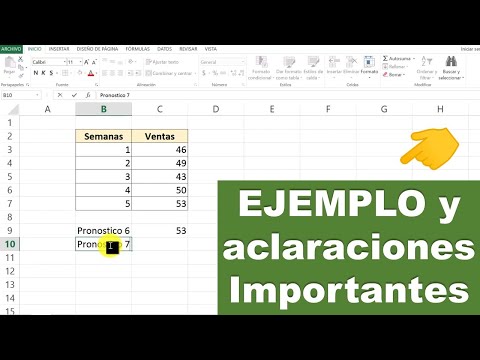
Como hacer un PRONOSTICO en EXCEL 👉 (función pronóstico)
How to Create Forecasts in Excel
Introduction to Forecasting
- Felipe introduces the video, stating that viewers will learn how to create forecasts in Excel for various metrics such as sales, costs, and demand.
- He mentions a specific case involving calculator sales over five weeks and the need to forecast demand for week six.
Data Preparation
- The first step involves copying sales data into Excel, creating two columns: one for weeks (1-5) and another for corresponding sales figures (46, 49, 43, 50, 53).
- Felipe prepares the spreadsheet by labeling it clearly and indicating where the forecast for week six will be calculated.
Using Excel Functions for Forecasting
- To calculate the forecast, he demonstrates using the "FORECAST" function in Excel. The user inputs the desired period (week six).
- He explains how to select known values from previous weeks' sales data while ensuring proper cell selection.
Calculating Week Six's Sales Forecast
- After selecting all relevant data points from weeks one through five, he shows how to finalize the input for calculating week six's forecast.
- The result indicates an estimated sale of 52.7 calculators; rounding this gives a final prediction of 53 units sold.
Common Questions About Forecasting Methods
- Felipe addresses common questions regarding forecasting methods like minimum squares and emphasizes that at least five periods are recommended for accuracy.
- He clarifies that while more periods can provide better insights, too many outdated data points may reduce relevance.
Extending Forecasting Beyond Weeks
- The method discussed is applicable across different time frames (months, years), provided sufficient historical data is available.
Calculating Future Period Sales
- For predicting week seven's sales using a different approach within Excel without navigating functions directly.
- He illustrates writing out formulas manually in cells to achieve similar results as before but with direct input.
Finalizing Predictions
- After entering all necessary parameters again for week seven’s calculation, he arrives at a projected sale of approximately 54 calculators.
Conclusion and Resources