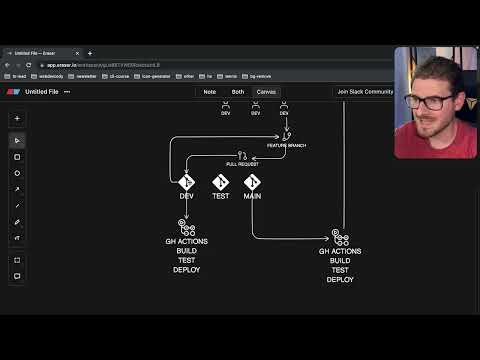
What does larger scale software development look like?
Introduction to Enterprise Software Development
In this section, the speaker provides insights into enterprise software development and explains how a team of developers collaborates to code, integrate, build, test, and deploy applications.
Team Structure and Roles
- A typical team consists of 10 developers, along with a scrum master and project manager. There may also be designers or UX designers.
- The client is the recipient of the software being developed.
Client Interaction
- The client acts as a buffer between the development team and users.
- The client conveys user requirements and provides feedback during daily stand-ups and demos.
Developer Responsibilities
- Developers integrate with users through the client's communication.
- Developers work on tasks assigned by the client to fulfill user needs.
- UI/UX professionals conduct user research while project managers ensure smooth progress.
Shipping Features for Users
This section focuses on the developer's goal of shipping features that meet user requirements.
User Requests
- Clients and users request specific features to be built.
- Developers aim to deliver these features so that users can interact with them.
Feedback Loop
- Developers continuously iterate on features based on user feedback.
- This involves adding new features, improving existing ones, and fixing bugs.
Converting Requirements into Deployable Packages
Here, we explore how requirements are transformed into deployable packages using version control systems like Git.
Version Control
- Developers use Git for managing code changes.
Development Process
- Developers receive stories or tasks from clients.
- Teams often practice ensemble programming in smaller groups (pair or mob programming).
These notes provide an overview of key points discussed in the transcript. For more detailed information, please refer to the corresponding timestamps.
Software Development Workflow
This section discusses the software development workflow, including feature branches, pull requests, code review, and CI/CD pipeline.
Feature Branches and Pull Requests
- Developers work on a feature branch separate from the main branch.
- They continuously add features to the feature branch and push their changes.
- Once they feel confident in their code, they create a pull request to merge the feature into the main branch.
- Pull requests are reviewed by other team members to ensure knowledge sharing and code quality.
CI/CD Pipeline
- After merging a pull request into the main branch, it triggers a CI/CD pipeline.
- GitHub Actions is used in this case, but other tools like CircleCI or Jenkins can be used as well.
- The pipeline includes building, testing, and deploying the code.
- The final result is a shippable feature that can be tested by users.
Testing Environments with Different Branches
- In enterprise software development, additional branches are used for testing purposes.
- A test branch allows QA engineers to verify changes before merging them into the main branch.
- A dev branch serves as an environment for developers to integrate their features together regularly.
Deploying Dev Environment
- When code is merged into the dev branch, it triggers deployment of an entire environment using infrastructure-as-code tools like Terraform or AWS CDK.
- This deployed environment allows developers to test their features with integrated services such as serverless lambdas and DynamoDB.
Release Preparation
- Once everything is tested and working well in the dev environment, a release can be prepared.
- The release involves taking the relevant branch and creating a new version or release from it.
New Section
This section discusses the process of deploying code changes and creating different environments for testing and feedback.
Deploying Code Changes
- When a release is ready, a pull request is made and reviewed by others.
- Once approved, the code changes are merged into a higher environment.
- Merging the changes triggers another GitHub action pipeline.
Staging Environment
- The staging environment is created by spinning up an entire infrastructure similar to the lower-tier environment.
- It may contain pre-production data for more realistic testing.
- Clients or test users can access this environment to provide feedback on new features.
Testing in Staging Environment
- Load tests and smoke tests can be performed in the staging environment using real production data.
- These tests ensure that the system can handle high traffic and verify functionality.
Deployment to Production
- If everything is successful in the staging environment, the features are merged into a main branch.
- This triggers another deployment process to create an identical production environment with updated resources.
- Users will then use this deployed environment for their interactions.
Benefits of Infrastructure as Code
- Infrastructure as code tools like Terraform help manage resources efficiently without manual intervention.
- Using snapshots of current configurations, deployments can be easily replicated across multiple environments.
- Multiple experimental environments can be created for developers to test integration and ensure smooth functioning.
Scaling in Larger Projects
- In larger projects with multiple teams, each team follows a similar deployment process for their own clients and projects.
- Managers oversee coordination between different teams and integrate various production environments with microservices and databases.
Deployment Challenges in Enterprise Settings
The speaker discusses the challenges faced when deploying applications in an enterprise setting, highlighting that it is not as simple as in smaller environments.
Deployment Nuances in Enterprise Settings
- Deploying applications in an enterprise setting is more complex and not as straightforward as in smaller environments.
- There are nuances to consider, such as the release process from development to staging to production, which can introduce issues like unfinished work reaching production.
- Feature flags can be used to control when certain code runs in production, allowing for more controlled deployments.
- Database management and feature flag databases play a role in enabling users or clients to update different settings and activate features for specific users.
Handling Bugs and Ensuring Uptime
The speaker explores how bugs are handled and the importance of maintaining high uptime requirements in enterprise deployments.
Bug Handling and Infrastructure Requirements
- In an enterprise setting, handling bugs becomes more complicated due to infrastructure requirements. For example, there may be a need for high uptime (e.g., five nines uptime).
- Multi-region deployments may be necessary to ensure resilience. This involves setting up separate infrastructures on different coasts (e.g., East Coast and West Coast) so that if one region goes down, users can be redirected to another region.
- Active-passive or active-active setups can be implemented based on latency requirements, with data replication between regions.
- Compliance with data laws and regulations may restrict data replication across regions. Data privacy concerns must be considered when replicating user data.
Responding to Errors and Bug Fixes
The speaker discusses how errors are identified and addressed, including turning off features using feature flags, performing rollback deployments, and implementing hotfixes.
Responding to Errors
- Users or clients typically report errors encountered while using a newly deployed feature.
- The first line of defense is to turn off the feature by modifying the feature flag in the database.
- Rollback deployments can be performed to revert changes made during deployment. This may involve rolling back specific code changes, such as reverting a Lambda function to a previous version.
- In some cases, rolling back or turning off features may not be sufficient. Hotfixes are used to address bugs directly without going through the entire deployment flow.
Conclusion
The speaker concludes by highlighting that enterprise deployments involve complex setups and interactions between various components, including multi-region infrastructure and bug handling processes.
Complexity of Enterprise Deployments
- Enterprise deployments involve intricate setups with multiple components interacting with each other on platforms like AWS.
- Multi-region deployments require careful consideration of data replication, latency requirements, and compliance with data privacy laws.
- Bug handling in enterprise settings involves turning off features using feature flags, performing rollback deployments when possible, and applying hotfixes for immediate bug fixes.
The transcript provided does not cover all sections mentioned in the initial instructions.
New Section
This section discusses the process of merging code changes from different branches and the complexities involved in enterprise development.
Merging Code Changes
- When code changes are made in different branches, they need to be checked and approved by higher-ups before being merged.
- The process involves back merging the changes from the main branch to other branches, ensuring all environments are up to date with the latest changes.
- Enterprise development can become complicated due to these processes, which is why simpler approaches like pushing directly to the main branch may be preferred by smaller teams or startups.
New Section
This section emphasizes the importance of avoiding unnecessary complexity in software development and suggests focusing on bug fixing instead.
Avoiding Unnecessary Complexity
- Using tools like Next.js and Vercel can help avoid unnecessary complexity in software development.
- Start with a simple approach of deploying new features directly to production and focus on quickly fixing bugs reported by users.
- Theo recommends becoming proficient at deploying bug fixes within 30 minutes instead of implementing complex workflows.
- Complex workflows, such as extensive testing and multi-tiered environments, are necessary for high-stakes systems where shipping bugs could have severe consequences.
New Section
This section highlights the importance of considering project risk levels and user impact when deciding on software development practices.
Project Risk Levels
- Projects that perform basic functions may not be high-risk or require extensive processes.
- The ability to fix bugs quickly becomes crucial for projects with potential impacts on people's lives, such as healthcare systems.
- Downtime or breaking critical functionality can have significant consequences for users' well-being.
- It is essential to align software development practices with project requirements and prioritize user safety and satisfaction.
Conclusion
In this video, the speaker discusses the complexities of merging code changes in enterprise development and suggests simpler approaches for smaller teams or startups. The importance of avoiding unnecessary complexity and focusing on bug fixing is emphasized, especially for high-stakes systems. Consideration of project risk levels and user impact is crucial when deciding on software development practices.