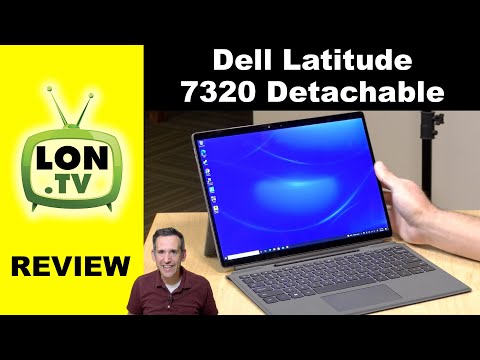
Dell Latitude 7320 Detachable Tablet / PC Review - With Intel Tiger Lake i7
Dell Latitude 7320 Overview
In this section, the speaker introduces the Dell Latitude 7320, a detachable laptop with a Surface-inspired design. The device is priced at around $2000 and offers good performance.
Device Specifications
- The Dell Latitude 7320 starts at $1500 and comes with an entry-level model that has 4GB of RAM (not upgradable). It is recommended to opt for models with 8 or 16GB of RAM.
- The reviewed model features an i7 processor (1180 g7) with Iris Xe graphics, which performs well in games and graphically intensive tasks.
- It has 16GB of RAM (dual-channel configuration) and 256GB of internal storage (upgradable).
- The device has a 13-inch touch display with a resolution of 1920x1280 (1080p), offering sharp visuals. It has a backlight bleed issue but overall provides good quality.
- The display aspect ratio is 3:2, providing more height compared to standard 16:9 displays.
- The device can be used as a tablet or docked to the keyboard. It supports Windows 11 and offers both tablet and laptop modes.
Design and Features
- The tablet portion weighs around 789 grams (1 pound, 7 ounces), while adding the keyboard dock increases the weight to two pounds eight ounces (1.13 kilograms).
- The kickstand on the back allows for comfortable positioning and stability on laps.
- The device has a metal casing design that feels well constructed.
- It features a high-quality webcam with Windows Hello support for facial recognition login. There is also a fingerprint reader on the back for alternative authentication methods.
- There are accessibility concerns regarding camera angle alignment due to the kickstand design.
Ports and Connectivity
- The device includes a Thunderbolt 4 port, which supports video output, data devices, and power delivery.
- There is a speaker disguised as a card slot on one side of the device.
- The speakers on the Dell Latitude 7320 offer good sound quality.
Tablet Mode and Pen
In this section, the speaker discusses the tablet mode and pen functionality of the Dell Latitude 7320.
- The device can be used in tablet mode or with the keyboard docked. It supports Windows 11's tablet mode.
- A pen is included with the device, which docks itself similar to the Surface Pro X. It charges when stowed in its designated spot on the keyboard dock.
- The tablet portion weighs around 789 grams (1 pound, 7 ounces).
- When combined with the keyboard dock, the total weight increases to two pounds eight ounces (1.13 kilograms).
Webcam and Camera Features
In this section, the speaker discusses the webcam and camera features of the Dell Latitude 7320.
- The device has a high-quality 1080p webcam that performs well in low light conditions.
- However, due to limitations in kickstand positioning, it can be challenging to achieve an optimal camera angle for centered video conferencing.
- Windows Hello facial recognition login is supported by both facial detection and fingerprint reader authentication methods.
- There is a rear camera on some models; however, it was not accessible during testing with various software applications.
Ports and Connectivity
In this section, the speaker provides an overview of ports and connectivity options available on the Dell Latitude 7320.
- The device features a Thunderbolt 4 port that supports video output, data devices, and power delivery.
- There is a speaker disguised as a card slot on one side of the device.
- The speakers on the Dell Latitude 7320 offer good sound quality.
Timestamps are approximate and may vary slightly.
Quiet and Cool Laptop/Tablet with Good Performance
The transcript discusses the features and performance of a laptop/tablet device, focusing on its quietness, cooling system, ports, keyboard stability, battery life, web browsing capabilities, media consumption, pen functionality, and gaming performance.
Quietness and Cooling System
- The device is one of the quietest laptops or tablets in a while.
- It has an active cooling system that effectively pushes hot air out through vents from two different directions.
- The performance of the cooling system is better than expected.
Ports and Keyboard Stability
- The device has a headphone microphone jack, volume rocker, speakers, two Thunderbolt 4 ports (with external GPU support), a full-service port, and a security slot.
- The detachable keyboard lacks stability when propped up but provides better stability when laid flat on a desk.
- The backlit keys have decent travel for a thin keyboard.
- The trackpad is functional with good range but would benefit from more rigidity.
Battery Life and Web Browsing
- With reduced brightness and basic app usage like word processing and web browsing, the battery can last around 8 to 9 hours.
- Arm-based devices like the Surface Pro X offer longer battery life but sacrifice some performance compared to this device.
- Web browsing experience is excellent with quick rendering of webpages due to Wi-Fi 6 connectivity.
Media Consumption
- Media consumption on the device is impressive with excellent color display quality.
- Watching videos at 1080p resolution shows no dropped frames except when switching to full-screen mode (common behavior in Chrome browser).
- Aspect ratio differences may result in small black bars at the top and bottom of videos.
Pen Functionality
- The pen design resembles a construction pencil with comfortable handling that avoids accidental button presses.
- It has good detection range from the screen and supports pressure sensitivity for different line styles.
- The pen charges quickly when docked in the keyboard.
Gaming Performance
- Red Dead Redemption 2 runs at 1280x720 resolution with low settings, achieving playable frame rates between 25 and 30 frames per second.
- Intel graphics have significantly improved over the years, making this tablet suitable for casual gaming on the go.
- Fortnite runs at native display resolution (1920x1280) with lowest settings, but frame rates fluctuate due to occasional lag common with Intel chips.
Conclusion
The transcript concludes by summarizing the device's features and performance, highlighting its quietness, cooling system efficiency, port availability, keyboard stability concerns, battery life for basic usage, web browsing capabilities, media consumption quality, pen functionality, and satisfactory gaming performance.
Gaming Performance and Graphics
The transcript discusses the gaming performance of a laptop with an Intel processor and integrated graphics, highlighting its ability to run games smoothly without dedicated graphic chips.
Gaming Performance
- The laptop was able to run games at 1920 by 1280 resolution on the lowest settings.
- It consistently achieved above 30 frames per second during gameplay.
- The performance was impressive considering it did not have any fancy graphic chips or additional hardware.
Benchmark Tests
This section focuses on benchmark tests conducted on the laptop, specifically the 3D Mark Time Spy benchmark test.
Benchmark Results
- The laptop scored 1250 in the 3D Mark Time Spy benchmark test.
- While this score may be lower compared to other i7 chips from the same generation, it is important to note that this laptop is in a smaller form factor.
- Real-world game tests showed satisfactory performance.
Thermal Performance and Stress Test
This section discusses thermal performance and stress testing of the laptop, including its ability to handle sustained load without thermal throttling.
Thermal Performance
- Under constant sustained load during the 3D Mark stress test, the laptop scored 96.7 percent.
- This indicates minimal thermal throttling, as passing is considered at 97 percent.
- The back of the unit gets warm during heavy usage but does not cause any issues due to proper ventilation through side vents.
- The fan operates silently and effectively cools down the device.
Linux Compatibility
This section explores the compatibility of the laptop with Ubuntu Linux operating system.
Linux Compatibility
- Ubuntu 21.04 successfully detected most of the hardware components such as video, touch panel, keyboard, trackpad, Wi-Fi, and Bluetooth.
- However, the audio did not work on this particular laptop.
- Video rendering occasionally experienced some slowdowns, but video playback was smooth.
- Additional Realtek audio drivers may be required to enable sound output through speakers or external devices via Thunderbolt ports.
Overall Impressions
This section provides an overall assessment of the laptop's performance and quality.
Performance and Quality
- The laptop delivers impressive performance, especially considering its fanless design that remains silent even under heavy load.
- Although it warms up during usage, it is not alarming and does not affect functionality.
- The keyboard surface could have been more stable at this price point, but it still offers a satisfactory typing experience.
- Compared to ARM-based Windows machines, this laptop provides superior performance.
Channel Supporters
This section acknowledges the supporters of the channel.
Channel Supporters
- Gold level supporters include Chris Alegretta, Tom Albrecht, Jim Calliger, Hot Sauce and Video Games, and Brian Parker.
- Viewers can contribute as little as a dollar per month to support the channel by visiting lawn.tv/support.
Timestamps are provided in seconds for each section.