UD1 Introducción a los sistemas microinformáticos 8
Introduction to Binary Number System
Overview of Binary Representation
- The discussion begins with an introduction to the binary number system, emphasizing its role in encoding machine states and facilitating communication with machines.
- The binary system is suitable for electronic devices as they can only recognize two states: on (1) and off (0), corresponding to electrical current flow.
- The binary system allows representation of any number using just two digits, 0 and 1, contrasting it with the decimal system which uses ten digits (0-9).
Understanding Decimal vs. Binary
- In the decimal system, numbers are formed by combining ten digits; for example, 1536 is composed of 1, 5, 3, and 6.
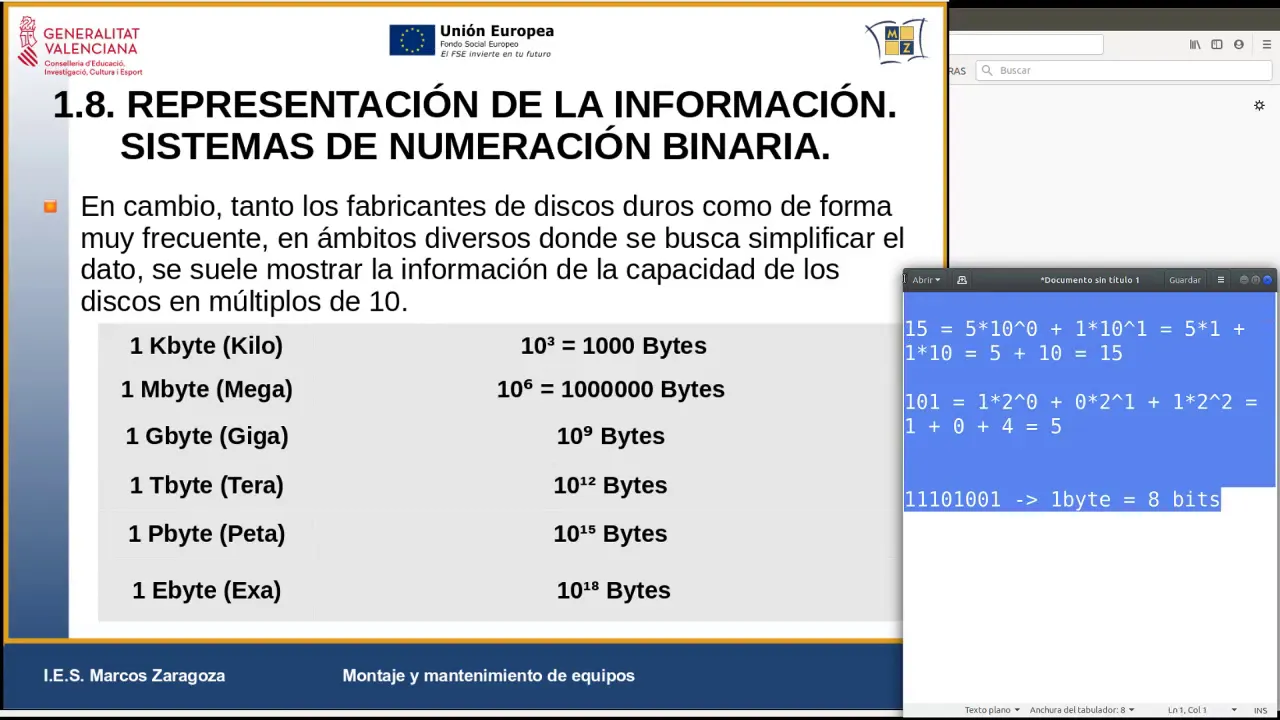
- Each digit's value in a decimal number depends on its position; for instance, in the number 15: 15 = 5 times 10^0 + 1 times 10^1.
Converting Between Systems
- Similar positional value logic applies in binary; for example, the binary number '101' translates into decimal through positional multiplication by powers of two.
- The breakdown shows that 101_2 = (1 times 2^2 + 0 times 2^1 + 1 times 2^0), leading to a total of 5_10.
Binary Coding and Information Processing
Significance of Binary Coding
- Binary coding enables representation of any decimal number digitally; this underpins digital information processing across computers.
- In computing terminology, a single binary digit is called a bit. A sequence of eight bits forms a byte.
Memory Access in Computers
- Modern computers operate using bytes rather than individual bits when accessing memory or data storage.
- Memory access typically occurs in blocks known as "words," where one word often equals one byte (8 bits).
Understanding Multiples and Data Sizes
- Current computer architectures may handle various sizes from bytes up to gigabytes (GB), indicating their capacity for data processing.
- Accessing memory involves retrieving specific bytes based on address locations within the computer's memory structure.
Understanding Data Storage Units
Introduction to Data Measurement
- The discussion begins with the concept of data measurement, specifically focusing on how different units are used in various contexts.
- A kilobyte (KB) is defined as 1,000 bytes, establishing a foundational understanding of data sizes.
Hierarchy of Data Sizes
- A megabyte (MB) is introduced as equivalent to 1 million bytes, expanding the hierarchy of data storage units.
- The relationship between kilobytes and megabytes is clarified: 1 MB equals 1,000 KB.
Multiplication and Conversion
- To convert from megabytes to kilobytes, one must multiply by 1,000; thus, if you have five megabytes, it equates to 5,000 KB.
- Further calculations show that converting from KB to bytes involves multiplying by another 1,000.
Larger Units Explained
- Gigabytes (GB), defined as 10^9 or 1 billion bytes, follow the same multiplication pattern where each step up in unit size involves multiplying by 1,000.
- Terabytes (TB), which equal 10^12, represent an even larger scale at approximately one trillion bytes.
Practical Applications in Technology
- These measurements are commonly used when discussing hard drive capacities and internet speeds. For example, a hard drive labeled as having two terabytes actually contains two million megabytes.
- Internet speeds may be expressed in megabits per second (Mbps), where a speed of 300 Mbps translates to 300 million bits per second.
Binary vs Decimal Measurements
Operating System Measurements
- Unlike manufacturers who use decimal multiples for storage sizes (e.g., powers of ten), operating systems often utilize binary multiples based on powers of two.
Understanding Binary Multiples
- In binary terms:
- A kilobyte is defined as 2^10, or 1024 bytes instead of the decimal definition of 1000 bytes.
- This leads to confusion when comparing manufacturer specifications with actual system readings.
Real-world Implications
- When connecting a hard drive advertised as two terabytes to an operating system that measures using binary multiples, users may find discrepancies in reported capacity due to this difference in measurement standards.
Understanding Disk Size Discrepancies
Disk Size Calculations and Manufacturer Claims
- The operating system often reports a disk size smaller than what manufacturers advertise due to differences in measurement units; manufacturers use decimal (10^3), while operating systems typically use binary (2^10).
- For example, 1024 x 1024 equals 1,048,576 bytes, illustrating the difference in how data is calculated between systems.
- A calculation error is noted regarding the conversion of terabytes to tebibytes; it should yield approximately 1.81 TiB instead of the previously stated value.
Understanding Memory Addressing
- The discrepancy in reported disk space leads to confusion about available storage; users may feel they have "lost" space when it's simply a matter of different measurement standards.
- Memory addressing depends on the number of bits used by the architecture; more bits allow for greater memory access and larger addressable spaces.
Bits and Addressable Memory
- Accessing memory with an 8-bit bus allows for 256 unique addresses (2^8), demonstrating how bit depth directly influences addressability.
- In contrast, using two digits in decimal can represent up to 100 numbers (10^2), highlighting differences between binary and decimal systems.
Evolution of Computer Architecture
- As architectures evolve from fewer bits to more (e.g., from 32-bit to 64-bit), they can handle larger amounts of RAM and provide broader ranges for data access.
- Historically, older processors limited RAM capacity to around 4 GB due to their architecture being based on only 32 bits.
Current Trends in Processor Architecture
- Modern processors predominantly operate on a 64-bit architecture, allowing for significantly higher RAM capacities compared to previous generations.