UD3 Componentes de E S 16
Peripheral Devices: Multimedia Focus
Overview of Multimedia Peripheral Devices
- The discussion concludes with an emphasis on multimedia peripheral devices, highlighting their importance in modern audio and video functionalities.
- These peripherals are essential for enjoying digital content across various platforms, including video streaming and audio playback.
Audio Processing Components
- Motherboards typically include a sound controller that facilitates music output; this is often integrated into the chipset or as a separate chip.
- Key components of audio devices include the Digital Signal Processor (DSP), which processes audio signals, and DAC (Digital-to-Analog Converter), converting digital signals to analog for playback.
Signal Conversion and Quality
- The conversion process involves transforming binary data into continuous analog signals, allowing for seamless audio playback.
- High-quality audio requires effective conversion from digital to analog, ensuring clarity in sound reproduction.
Desired Characteristics of Audio Inputs/Outputs
- Ideal audio outputs should support at least 24 bits and frequencies up to 122 kHz for optimal sound quality.
- Higher sampling rates lead to better representation of sounds; thus, higher frequencies yield clearer audio experiences.
Digitalization Process
- Digitalization enhances signal quality by capturing more analog frequencies through higher sampling rates.
- Aiming for stereo outputs capable of representing high-frequency analog signals ensures superior sound fidelity.
Practical Applications in Home Audio Systems
- For home setups, a minimum of 5.1 surround sound configuration is recommended to create an immersive listening experience.
- Professional recording systems may require even higher specifications than typical home equipment due to the complexity of recorded sounds.
Noise Management and Connectors
- Maintaining a high signal-to-noise ratio (greater than 100 dB) is crucial for clear audio without interference from background noise.
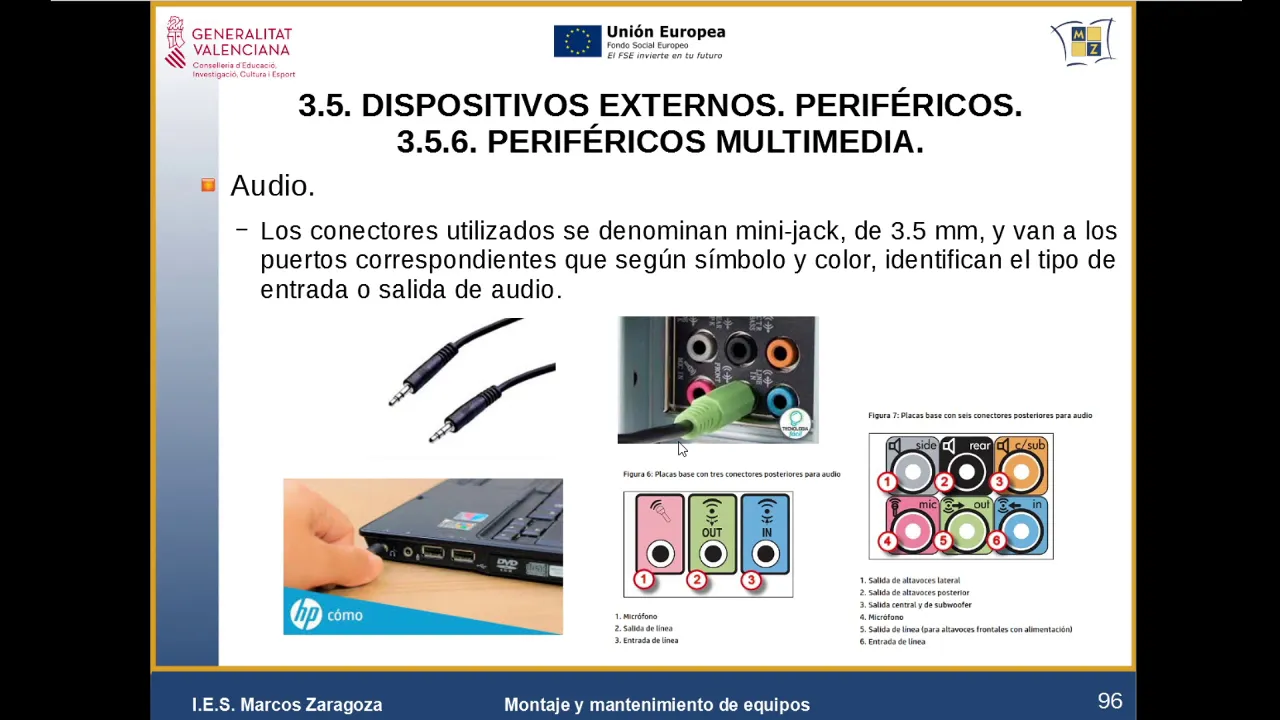
- Various connectors are used in computer systems; color-coded ports help identify specific functions like speaker outputs and microphone inputs.
Configuration Examples
- Typical configurations include multiple speaker outputs (front, rear, subwoofer), enhancing spatial sound delivery in multimedia setups.
Audio and Video Configuration Insights
Audio Setup and Quality
- The configuration of audio devices is crucial, with specific setups like 5.1 surround sound being highlighted for enhanced audio quality.
- For professional audio production, using dedicated audio interfaces or expansion cards is recommended to achieve higher sound quality and power.
- External audio devices help reduce noise interference, providing clearer sound by isolating the audio processing from other computer components.
- DAC (Digital-to-Analog Converters) and amplifiers improve performance when connecting non-PC devices like laptops or mobile phones to enhance audio output.
- Directional microphones are essential for capturing voice clearly while minimizing background noise; they should be sensitive enough to pick up low frequencies effectively.
Surround Sound Configuration
- A typical 5.1 surround sound setup includes five channels: two front speakers, one center speaker, and two rear speakers for immersive audio experiences.
- This configuration aims to create a realistic auditory environment where the listener feels enveloped in the soundscape, akin to a home cinema experience.
- Subwoofers amplify low-frequency sounds, enhancing the overall impact of movie soundtracks by emphasizing bass tones that resonate more deeply.
Microphone Types and Functionality
- Various microphone models exist; high-quality ones often feature jack connections and are designed for professional use with advanced noise-canceling capabilities.
- The choice of microphone depends on whether you want ambient room sound or focused voice capture; directional mics are preferred for clear vocal recordings.
Video Capture Essentials
Camera Types and Sensor Importance
- Understanding camera types—compact vs. DSLR—and their optical sensors is vital as these elements significantly affect image quality during photography or videography.
- The resolution of a camera's sensor determines its ability to capture detail; higher megapixels allow for better image clarity but depend on sensor technology as well.
Storage Solutions for Media
- Cameras typically utilize SD cards or hard drives for storage; recent advancements include integrating SSD technology into cameras for faster data access.
Motion Capture Considerations
Overview of Storage and Communication Technologies
Storage Media and Their Uses
- The discussion begins with the importance of storage media, highlighting magnetic tape as a traditional method for data storage.
- Compact flash cards and dry disks are mentioned as modern alternatives, emphasizing their role in connecting to primary security equipment.
- The evolution of video resolutions is noted, with references to standard definitions like Full HD, 2K, and UHD, which is comparable to 4K technology.
Webcams and Their Applications
- A brief comparison is made between different types of webcams, indicating that while some may be similar in function, they can vary significantly in features.
- Webcams are described as small devices used for recording work sessions on laptops; they have gained popularity due to the rise of videoconferencing and online streaming.