Seedance 2 Workflow | How I Made a 10-Minute AI Short Film
Creating a Cinematic Short Film with SeaArt
Introduction to the Project
- The speaker introduces a 10-minute short film created using SeaArt, aiming to dispel myths about censorship and limitations in creating cinematic content.
- The workflow, prompts, input images, and overall approach will be discussed step by step.
Cost of Production
- The cost for producing the 10-minute video is revealed to be $296, emphasizing transparency in production expenses.
Initial Setup and Image Generation
- The initial setup was simple, starting with one image that served as the foundation for the project.
- SeaArt was used to generate content in 15-second clips for more creative freedom; a wide input image is recommended for achieving a cinematic look.
Experimentation with Famous Actors
- The speaker humorously discusses adding sunglasses to famous actors like Jason Statham as a way to enhance visual appeal and ease censorship.
- Variations were generated based on this concept, showcasing different outcomes from the experiments.
Upscaling Images and Further Development
- Recommendations are made for using Kling 3.0 for static scenes due to its quality being comparable to SeaArt.
- A process involving upscaling images using Nano Banana is introduced, which enhances image quality significantly before further development.
Connecting Scenes and Maintaining Consistency
- The importance of linking various scenes together intentionally is highlighted; maintaining energy from earlier clips helps create cohesion.
- An upgraded image becomes the new base for further refinement in visuals, leading towards a polished final product.
Final Touches and Action Sequences
- Additional prompts were created using screenshots from previous videos to maintain continuity in action sequences.
- As action escalates within the film, experimentation continues with various versions of scenes including absurd variations and slow-motion effects.
Zombie Fight Scene Development
Transition to Hand-to-Hand Combat
- The protagonist begins fighting zombies without weapons, leading to a straightforward combat scene.
- A metal pipe appears during the fight, but the excitement wanes as the action feels repetitive and lacks creativity.
Introduction of Absurd Elements
- The narrative shifts when the protagonist finds a pillow, initiating a humorous pillow fight with zombies.
- The absurdity escalates as more unexpected elements are introduced into the fight scenes, enhancing entertainment value.
Creative Weaponry Concepts
- The idea emerges for the protagonist to discover random and ridiculous weapons throughout his journey.
- An example includes sausages being pulled from walls, showcasing an inventive approach to weapon selection.
Location Change and New Characters
- As fights continue, a change in location is prompted by creative fatigue; new settings are explored organically.
- Milla Jovovich is introduced as a character who provides assistance, further pushing the absurdity of weapon choices.
Unique Conflict Resolutions
- Instead of traditional combat victories, an innovative resolution involves using sleeping liquid on monsters followed by a humorous line: "Sleep tight."
- This transition leads to further exploration of quirky gadgets that add depth and humor to the storyline.
Magical Gadgets and Spells
- A shift occurs where the protagonist discovers a magic stick that transforms into a wand, introducing magical elements into combat.
- Prompts are created for various spells he might cast while engaging with enemies, expanding on this whimsical theme.
How to Create Engaging Video Transitions?
Introduction to the Scene Transition
- The speaker humorously references a spell from Harry Potter, "Avada Kedavra," while attempting to transition into a new scene.
- Initial attempts at creating a transition were unsuccessful; however, a prompt involving casting a spell and running forward showed promise.
Building the Narrative
- The speaker finds an interesting location on Pinterest for the next scene, indicating the importance of visual inspiration in storytelling.
- A moment of levity is introduced where the hero takes a break before action resumes, showcasing pacing in narrative structure.
Action Sequences and Visual Elements
- The transition back to action is marked by using three images featuring vampires and bats, emphasizing thematic consistency.
- The concept of parkour is integrated into the action sequence, demonstrating creativity in movement and character dynamics.
Character Interactions and References
- Characters from "Buffy the Vampire Slayer" are included as part of an iconic vampire theme, enhancing intertextuality within the narrative.
- A humorous moment occurs when the hero sneezes, leading to an action-packed sequence that maintains viewer engagement.
Game Mechanics Integration
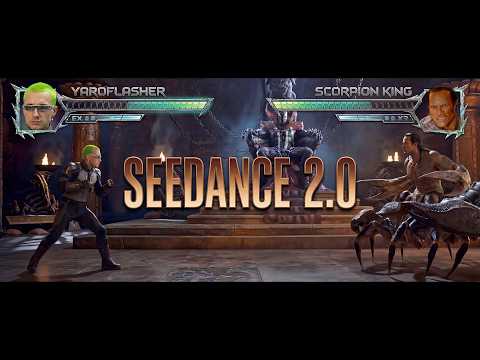
- The protagonist's fall leads to a video game-like scenario reminiscent of Mortal Kombat, highlighting how visuals can evoke specific genres.
- Classic fighting game elements like health bars are added through creative tools (Nano Banana), merging gaming culture with storytelling.
Climax and Conclusion
- A climactic moment features a humorous take on finishing moves with unexpected items like a baby bottle of milk.
- An alternative version of characters is explored towards the end, suggesting flexibility in character design and narrative possibilities.
Meeting Buffy: The Conclusion of the Game
Final Encounter
- The narrative builds up to a climactic moment where the characters are set to meet, indicating a significant turning point in the story. This meeting follows a series of games played by both characters, suggesting themes of anticipation and resolution.
Storytelling Techniques
- The speaker reflects on their storytelling approach, noting a departure from traditional methods such as storyboarding. Instead, they opted for a more fluid technique, capturing frames directly from video content and developing the script dynamically. This method emphasizes adaptability and spontaneity in storytelling.
- The speaker expresses hope that this new structure aids others in understanding narrative construction, highlighting the importance of evolving techniques in creative processes. This suggests an ongoing exploration of effective storytelling methods within their work.