Протокол POP3 | Курс "Компьютерные сети"
New Section
The lecture introduces the POP3 protocol, its history, functionalities, and limitations.
Introduction to POP3 Protocol
- POP3 (Post Office Protocol version 3) is an older email protocol dating back to 1984.
- It allows users to retrieve emails from a server for a specific user and stores messages until they are fetched using SMTP for delivery.
- Limitation: POP3 only allows one mail client to access and delete messages, lacking features like folder creation or message filtering.
Understanding POP3 Commands
Exploring key commands used in the POP3 protocol for authentication and message retrieval.
Key Commands in POP3
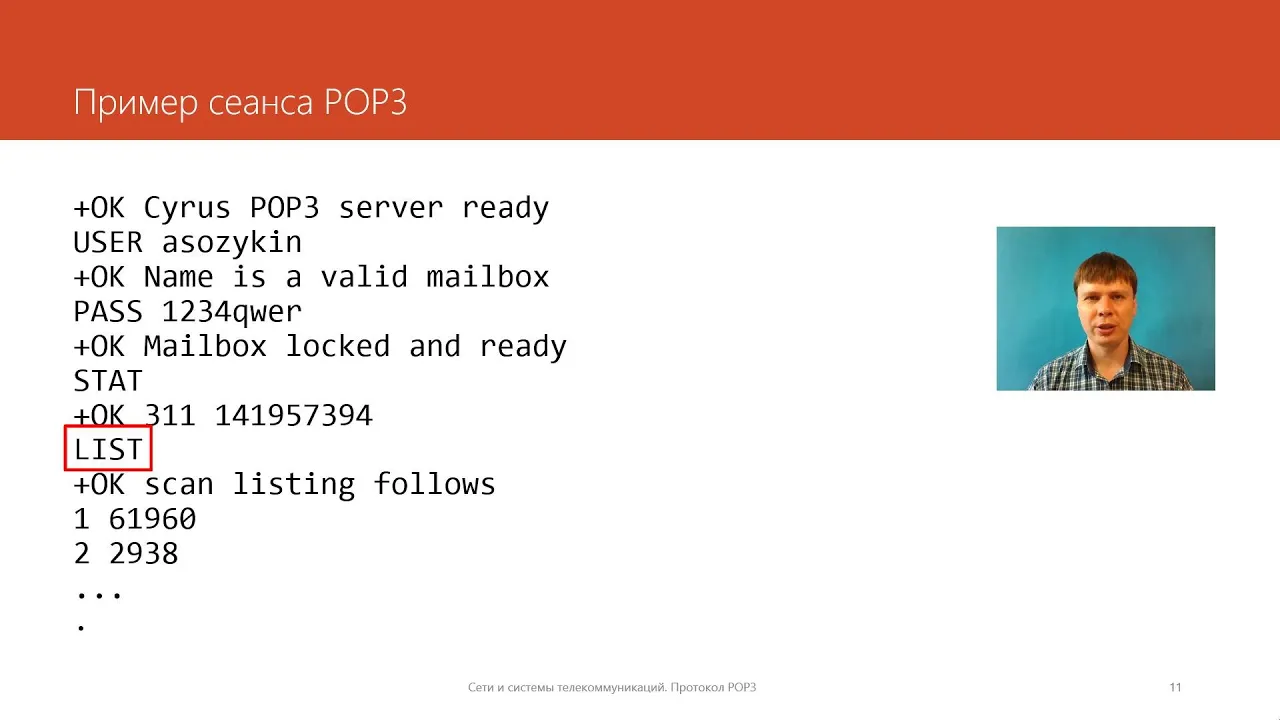
- Commands like User and Pass are used for authentication during the connection phase.
- Stat command displays total emails on the server; List provides information about messages; Ret retrieves a specific message based on its number.
POP3 Session Workflow
Detailing the workflow of a typical POP3 session from connection to message retrieval.
Workflow Steps
- Command D marks messages for deletion after retrieval; Quit command transitions from transaction phase to update phase.
New Section
This section discusses the successful completion of mailbox setup, the blocking of the mailbox for exclusive client use, and the process of authorization in the Post Office Protocol version 3 (POP3).
Mailbox Setup and Authorization
- The mailbox is successfully set up, blocked, and ready for operation after authentication. POP3 protocol is designed to work with only one client at a time.
- Once authorized, the mailbox is blocked from other clients until disconnection using the "quit" command.
New Section
In this part, the transaction phase begins in POP3, involving checking total messages in the mailbox, listing all messages, and preparing for message retrieval.
Transaction Phase Initiation
- To determine total messages in the mailbox, the "Stat" command is used followed by receiving a response indicating successful execution with details on message count and overall size.
- The "List" command provides a list of all messages present in the mailbox.
New Section
This segment covers retrieving specific messages from the server after obtaining information about message count and sizes.
Message Retrieval Process
- After learning about message count and sizes through commands like "Stat" and "List," messages can be downloaded to the client using the "rter" command along with specifying message numbers.
- Messages are transmitted following SMTP format - headers first then message body. Deletion marking can be done using the "D" command.
New Section
This part delves into marking messages for deletion post-retrieval and completing transactions before initiating an update phase.
Marking Messages for Deletion
- Messages can be marked for deletion using the "D" command with successful confirmation from the server.
- Multiple messages can be retrieved sequentially before concluding transactions with a "quit" command to initiate updates including deleting marked messages.
New Section
Here, an overview of POP3 (Post Office Protocol version 3) is provided along with its limitations regarding single-client usage due to its download-and-delete approach.
Understanding POP3 Protocol
- POP3 facilitates reading emails from user mailboxes but operates on a download-and-delete principle.