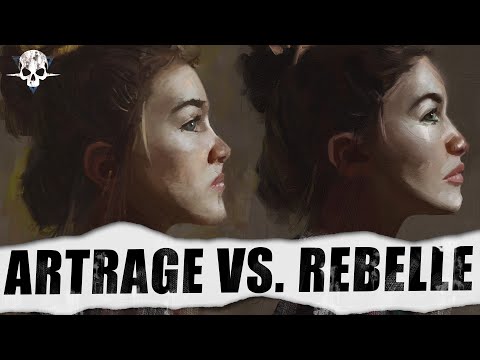
ArtRage Vitae Vs Rebelle 6 Pro - What's The Best Software For Digital Oil Painting?
Introduction to Digital Software Showdown
In this video series, the host will compare two competing digital software programs for creating digital oil paintings. The focus is on ArtRage and Rebelle 6 Pro, which are highly requested by viewers. The goal is to determine which software offers superior features and a realistic oil painting experience.
Comparing Digital Oil Painting Experience
- The host plans to compare the feel, look, and responsiveness of digital oils in both ArtRage and Rebelle 6 Pro.
- Both programs will be tested using the same painting, color mixing, and various techniques to evaluate their performance.
Introduction to ArtRage and Rebelle 6 Pro
The host introduces ArtRage and Rebelle 6 Pro as the latest entries in their respective software categories. These programs will be examined for their ability to provide a realistic digital oil painting experience.
Subjective Opinions and Disclaimers
- The host discloses that they are a featured artist for Rebel and Escape Motions.
- They were involved in beta testing Rebel 5 and Rebel 6.
- However, the companies have no prior knowledge of this video.
- The host emphasizes that their opinions are subjective based on personal workflow preferences.
- The purpose of the comparison is to help viewers make informed purchasing decisions.
Subjectivity of Art Preferences
This section highlights that art preferences are subjective, just like software choices. The best software is one that fits individual needs, budget, accessibility, and personal excitement.
Avoiding Adversarial Approach
- The intention is not to pit one software against another or declare one as terrible or amazing.
- Instead, the focus is on comparing features and finding the best fit for individual users.
- The host aims to determine which software provides a better digital oil painting experience.
Overview of the Video Structure
The host explains the structure of the video, including time lapses, thoughts on time lapse features, and a comparison between ArtRage and Rebelle 6 Pro using a portrait image. Additionally, real oil paints are used for comparison purposes.
Key Points:
- Time lapses will be shown, featuring a portrait image obtained from Pinterest.
- Quick thoughts on time lapse features will be shared.
- The host will provide their thoughts on creating the portrait piece.
- Comparison between ArtRage and Rebelle 6 Pro will involve refining speed lapses.
- Actual oil paints (Zorn palette and Winsor & Newton Artisan water mixable oils) will be used for smudges, smears, palette knife work, and brushwork.
Timestamps have been associated with relevant sections in accordance with the transcript provided.
New Section
This section discusses the process of creating a time lapse in Art Rage and Rebel software. The speaker demonstrates the use of script recording in Art Rage and highlights some issues encountered during the recording.
Creating a Time Lapse in Art Rage
- Art Rage does not have a dedicated time lapse feature but offers script recording.
- Script recording saves brush strokes and recreates the painting on the canvas.
- The recorded script can be played back, allowing for adjustments and additional painting.
- Lowering the opacity of layers affects the playback of the script, causing unexpected results.
Issues with Art Rage Script Recording
- The prompt for the script is dictated by the topmost layer, affecting opacity changes.
- Lowering opacity on sketch layers impacts other elements in the painting.
- Opening an Art Rage file based on a script may result in a blank white canvas.
New Section
In this section, the speaker demonstrates their process using script recording in Art Rage. They block in basic shapes, work on hair details, and encounter issues with hidden layers.
Process Using Script Recording
- Starting with a pencil tool, basic profile blocking is done using a square canvas brush.
- Darker brown color is used for hair details.
- Sculpting lights and shadows using flat and filbert brushes.
- Blocking in shapes and edges to establish form.
Issues with Hidden Layers
- Hiding sketch layers causes unexpected results when painting over them.
- Sketch layer opacity changes affect other elements painted on top.
New Section
This section continues to showcase issues encountered during script recording in Art Rage. The speaker demonstrates how hiding layers affects the painting process.
Unexpected Results with Hidden Layers
- Painting works fine until sketch layer is fully hidden.
- After hiding the sketch layer, the painting becomes distorted and unusable.
- The entire file is affected, resulting in a blank canvas when opening it.
New Section
The speaker warns against relying on script recording in Art Rage for time lapse purposes due to the issues encountered. They transition to discussing Rebel software and its similarities in approach.
Warning about Art Rage Script Recording
- The demonstrated method of script recording in Art Rage may not always work as expected.
- Saving the painting as a PNG beforehand can help preserve progress.
Transition to Rebel Time Lapse
- The speaker mentions using a similar method with Rebel software for time lapse creation.
- They indicate that the process will be similar to what was shown with Art Rage.
Blocking in Tones
The artist starts by blocking in tones using opaque paint. They mention that they haven't started blending yet and are focusing on creating a base layer.
Blocking in Tones
- The artist uses an opaque paint to block in tones.
- They mention that they haven't started blending or refining shapes yet.
- The focus is on creating a base layer of tones.
Refining Shapes and Edges
The artist discusses the importance of refining shapes and edges. They mention struggling with achieving the desired smoothness in certain areas of the painting.
Refining Shapes and Edges
- The artist emphasizes the importance of looking at edges and values when refining shapes.
- They mention struggling with achieving the desired smoothness, particularly on a cheek area.
- There is a back-and-forth process of making edges too harsh or too soft.
Quick Wrap Up
The artist wraps up the discussion on refining shapes and edges, mentioning that they will further analyze the painting later.
Quick Wrap Up
- The artist concludes the discussion on refining shapes and edges.
- They mention that they will analyze the painting more closely later.
Experimenting with Colors and Textures
Before analyzing their actual painting, the artist conducts an experiment using Rebel 6 and ArtRage software to create a canvas with colors matching their oil paints. This allows them to test how these colors respond in different software settings.
Experimenting with Colors and Textures
- The artist opens Rebel 6 and ArtRage software for experimentation.
- They create a canvas using photos of their oil paints to color pick exact colors.
- The purpose is to test how the colors respond in different software settings.
Creating a Canvas in Rebel
The artist demonstrates creating a canvas in Rebel 6, adjusting visual settings, and using various brushes for painting.
Creating a Canvas in Rebel
- The artist adds a new layer and extends the canvas to create a paper plate effect.
- Visual settings can be adjusted to control paper texture and paint texture.
- Different brushes are used, including the flat oily brush for color picking.
Using Brushes and Mixing Colors
The artist explores different brush presets and demonstrates mixing colors using the flat oily brush. They also explain the loading and oiliness settings of the brushes.
Using Brushes and Mixing Colors
- Different brush presets are explored, with emphasis on the flat oily brush.
- Mixing colors is demonstrated using the flat oily brush with size loading and oiliness adjustments.
- Loading determines pigment amount on the brush, while oiliness affects stroke behavior.
Achieving Realistic Looks with Brushes
The artist explains how to achieve realistic looks by utilizing specific brushes like paint and blend, dirty brush activation, and multi-colored brush options.
Achieving Realistic Looks with Brushes
- Paint and blend mode is recommended for achieving blendy effects.
- Dirty brush activation enhances realism.
- Multi-colored brushes provide realistic looks.
New Section
The speaker discusses their preferred painting techniques and tools, focusing on blending and creating texture with different brushes.
Paint and Blend Techniques
- The speaker prefers to use opaque paint for certain effects.
- They demonstrate how they blend two colors together using a specific technique.
- Link to timestamp
Creating Texture with Brushes
- The speaker explains their preference for using a flat boily brush to achieve a specific look.
- They mention the importance of getting nice ridges and gloss effects in the painting.
- Using a dry knife, they scrape around to create additional texture.
- Link to timestamp
New Section
The speaker discusses the appearance of shadows and highlights in their artwork, as well as the color matching between different elements.
Shadows and Highlights
- The speaker points out that the color of shadows matches on different parts of the painting.
- They highlight the presence of ridges where light hits glossy surfaces.
- Link to timestamp
Color Matching
- The speaker mentions that the color of shadows on their artwork matches those on real objects.
- They demonstrate using a palette knife to scrape through layers of paint for added effect.
- Link to timestamp
New Section
The speaker introduces ArtRage software and its features for customizing brush presets.
ArtRage Favorites Menu
- ArtRage has a new favorites menu where users can save their preferred brush presets.
- Users can duplicate or copy brush presets into their favorites for easy access.
- Link to timestamp
Customizing Brush Presets
- The speaker demonstrates how to customize brush presets in ArtRage, adjusting settings such as paint thinner, loading, pigment, impasto depth, and gloss effect.
- Different brush categories offer various customization options for different effects.
- Link to timestamp
New Section
The speaker compares the mixability and feel of Rebel and ArtRage software.
Mixability and Feel
- The speaker mentions that both Rebel and ArtRage excel in terms of mixability.
- They express that ArtRage feels softer to them but will explain further later on.
- Link to timestamp
Painting with Brushes
- The speaker starts painting using different brushes in ArtRage, including a filbert brush and Wes's oil brush.
- They note the differences in opacity and texture between the brushes.
- Link to timestamp
New Section
This section discusses the use of impasto and brushwork in painting.
Thick Impasto and Brushwork
- Some really thick impasto kind of side walls are created using brushwork.
- The brushwork adds texture and depth to the painting.
New Section
This section explores different techniques for achieving desired effects in oil painting.
Softening Oil
- By adding more paint thinner and pigment to brush with oils, the aggressive impasto effect can be reduced.
- Softening oil has more paint thinner, less loading, depth, and gloss compared to regular oil.
- ArtRage provides a more dynamic and surprising experience with its brush presets.
New Section
This section compares the realism of Rebel and ArtRage in digital painting.
Realism Comparison
- Rebel looks more realistic than ArtRage due to its grainy texture. However, ArtRage offers a more dynamic experience.
- Both software produce outstanding results that resemble real paint on canvas.
New Section
This section demonstrates the use of palette knife in digital painting.
Palette Knife Techniques
- The palette knife creates subtle textures when used lightly.
- Different presets allow for variations such as blur effects or dragging out colors.
- These techniques may not replicate exactly what is achieved with a physical palette knife but offer interesting results nonetheless.
New Section
This section explores blending and texture effects in digital painting.
Blending and Texture Effects
- Blender brushes in Rebel can pull colors from the canvas, creating different textures.
- Different presets like oily, dry, rough, matte, flat, and fan brush offer various blending and texture options.
The transcript does not provide any further sections or timestamps beyond this point.
Looking at the Oil Paintings
In this section, the speaker discusses the process of refining each oil painting and compares two programs: Corel Painter and ArtRage.
Comparing Programs
- The speaker mentions that both Corel Painter and ArtRage are excellent programs.
- Corel Painter is more expensive compared to Rebel 6 Pro and ArtRage Vatai.
- The affordability of Rebel 6 Pro and ArtRage Vatai allows for additional purchases such as a new tablet or computer parts.
Brush Feel and Customization
- ArtRage provides a more dynamic brush feel without requiring extensive tweaking of settings.
- The speaker spent more time fine-tuning brushes in ArtRage, which resulted in interesting and dynamic results.
- Rebel has superior soft blending with oils compared to ArtRage's default brushes.
- Customizing brushes in both programs allows for desired effects, but Rebel's brushes may feel similar due to their capabilities.
Palette Knives
- ArtRage's palette knives are considered the best among painting software.
- Scraping paint across the digital canvas using palette knives in ArtRage feels unique and cannot be replicated elsewhere.
- Even with professional client work, the speaker imports paintings into ArtRage specifically for palette knife effects.
Conclusion
The speaker concludes by emphasizing the quality of both Corel Painter and Rebel 6 Pro/ArtRage Vatai. They highlight the affordability of the latter options while acknowledging that personal preferences may vary between programs.
Please note that these notes provide a summary based on the given transcript.
New Section
In this section, the speaker discusses the differences between ArtRage and Rebelle software for digital painting.
Comparison of ArtRage and Rebelle
- ArtRage and Rebelle both have pigment mode, which allows for real blending.
- Rebelle offers more customization options and tools compared to ArtRage.
- ArtRage has a better variety of brushes that feel distinct and unique.
- The speaker follows a specific workflow in ArtRage, starting with the soft Square canvas brush for blocking colors, then using other brushes for different effects.
- Both software are reliable in terms of mixability, color blending, and achieving realistic looks.
- It may be easier to create an ArtRage brush in Rebelle due to its wider range of options.
- Rebel offers more flexibility and features for those who want to dig in and have full control over their artwork.
- The speaker personally prefers the look achieved with ArtRage.
New Section
In this section, the speaker concludes that both ArtRage and Rebelle are strong choices for digital oil painting.
Final Verdict: Choosing Between ArtRage and Rebelle
- Both software can produce stunning results for digital oil paintings.
- If customization, flexibility, and having hands-on control are important factors, Rebelle is recommended as it offers more features.
- However, the speaker prefers the look achieved with ArtRage based on personal experience with two specific artworks done solely in that software.
- Ultimately, both software provide excellent options for creating realistic digital oil paintings.
Timestamps provided above correspond to approximate locations within the transcript.
New Section
In this section, the speaker discusses their preference for digital oil painting software and recommends a specific software called "Outrage" for its ease of use and ability to create painterly effects.
Outrage as the Preferred Digital Oil Painting Software
- The speaker prefers to have fewer barriers when painting digitally and recommends using "Outrage" as the go-to software for creating painterly oil painted pieces.
- They mention that while they also have another software called "Rebel," they find that "Outrage" is better suited for their needs when it comes to creating client pieces with a painterly style.
- The benefit of using both "Outrage" and "Rebel" is that they can utilize the tweakability, nanopixel, pigment blending features in Rebel while starting the base of their artwork in Outrage with its cool dynamic brushes.
- The speaker emphasizes that both software have their strengths and weaknesses, but personally gives the edge to Outrage as the winner in terms of digital oils.
New Section
In this section, the speaker concludes that Outrage is their preferred choice between Rebel and Outrage for digital oil painting. They also encourage viewers to share their thoughts on these software options.
Choosing Outrage as the Winner
- The speaker firmly states that in their opinion, Outrage is the better option between Rebel and Outrage for digital oils.
- They acknowledge that there are no real losers in this comparison as both software have unique strengths and can be exciting to work with.
- The decision ultimately depends on personal preference and what works best for an individual's workflow.
- The speaker highlights that customer support from these companies is excellent, making it easier to make a decision based on personal preferences.
New Section
In this section, the speaker encourages viewers to share their thoughts on the software comparison and suggests potential future comparisons between other digital art software.
Community Engagement and Future Comparisons
- The speaker invites viewers to share their thoughts in the comments section regarding the software comparison.
- They express interest in hearing from the community about their preferences and suggestions for future comparisons.
- The speaker mentions potential future comparisons such as Krita vs. Clip Studio for rendering or watercolors, Corel Painter vs. Rebel, or any other suggestions from the audience.
- They assure viewers that there are no bad decisions when choosing between these software options and encourage them to explore and experiment with different tools.
Conclusion
The transcript discusses a comparison between two digital oil painting software options: Outrage and Rebel. The speaker expresses a preference for Outrage due to its ease of use and ability to create painterly effects. They highlight that both software have their strengths and weaknesses, but ultimately choose Outrage as their preferred option. The speaker encourages viewer engagement by inviting them to share their thoughts on the comparison and suggests potential future comparisons between other digital art software options.