UD1 Introducción a los sistemas microinformáticos 4
Understanding System Architecture
Introduction to System Architecture
- The discussion begins with an overview of the course objective, which focuses on understanding hardware and computer systems at a physical level.
- It introduces the concept of system architecture as the logical structure that governs how computers function, guiding engineers in designing hardware based on this framework.
Von Neumann Architecture
- The foundational model for most modern computers is the von Neumann architecture, established over 70 years ago, which continues to influence current designs.
- This architecture outlines essential internal blocks and their communication methods, forming the basis for how computers process information.
Key Components of Computer Architecture
- There are three critical functional blocks in this architecture:
- Memory Block: Stores programs and data.
- CPU (Central Processing Unit): Responsible for processing programs.
- Input/Output Unit: Facilitates interaction with external systems like keyboards and monitors.
Communication Between Components
- These components interconnect through buses, allowing two-way communication between the CPU and memory as well as with input/output devices.
- Peripherals such as keyboards and printers are categorized as external elements that communicate via the input/output unit.
Execution Process Overview
- The CPU retrieves a program from memory (e.g., a word processor), executes it, displays output on screen, and collects user input through peripherals.
- A series of steps are involved in executing a program stored in memory while managing data processed by the CPU.
Binary Encoding in Computing
- Programs must be encoded in binary language due to electronic devices only recognizing two states: off (0) or on (1).
- Binary encoding allows CPUs to interpret instructions made up of combinations of zeros and ones that dictate specific actions within hardware components.
Functionality Through Binary Instructions
- Each unique combination of binary digits instructs different operations—such as reading data from memory or accessing storage devices—enabling application execution and information processing.
Understanding the CPU: The Brain of the Computer
What is a CPU?
- The CPU, or processor, is described as the brain of the computer, interpreting instructions from programs. These instructions are represented in binary (ones and zeros) and perform basic operations.
- Basic operations include simple arithmetic like addition, subtraction, and logical operations (true/false), which involve moving bits around within the system.
Internal Structure of the CPU
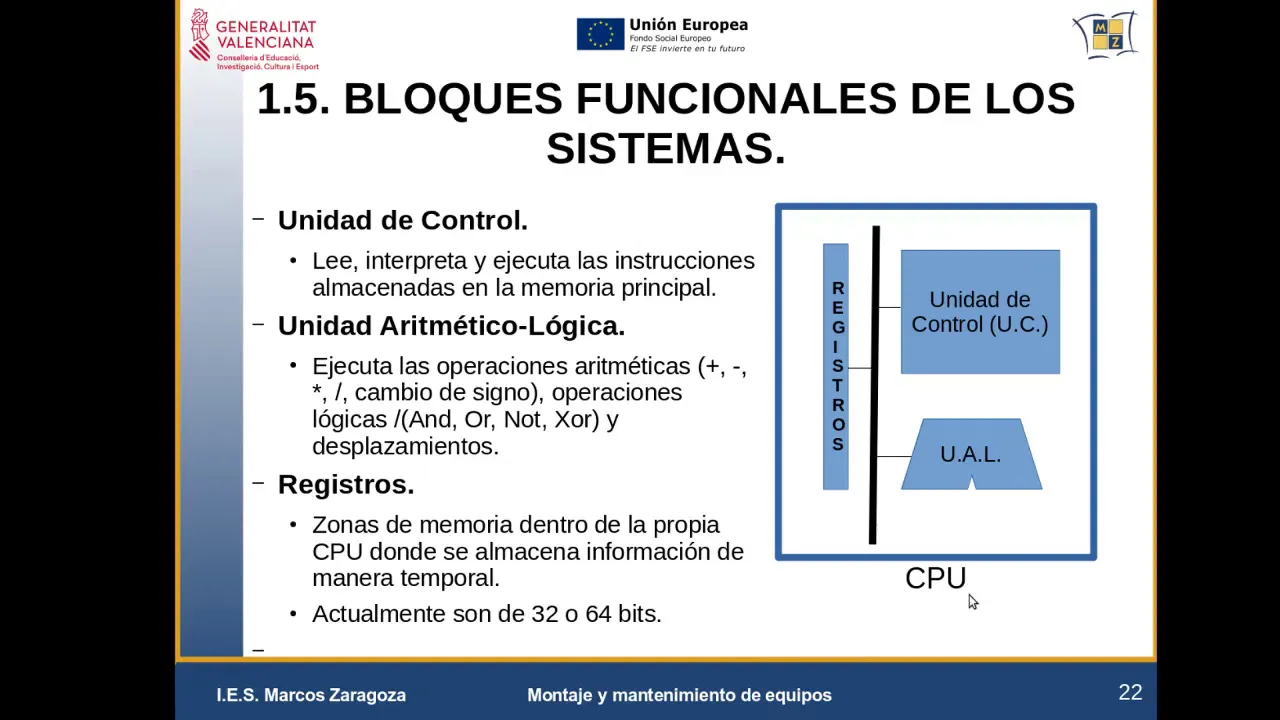
- The internal structure of a CPU consists of three main components: Control Unit, Arithmetic Logic Unit (ALU), and Registers. The Control Unit interprets and executes instructions stored in memory.
- The ALU performs mathematical operations such as addition, subtraction, multiplication, division, and logical functions like AND/OR. It handles all internal calculations within the CPU.
- Registers are temporary storage areas within the CPU that hold data for quick access instead of repeatedly fetching it from memory. More powerful CPUs typically have larger registers.
Memory Hierarchy
- Modern CPUs also incorporate cache memory—smaller but faster than main memory—which accelerates program execution by storing frequently accessed data closer to the processor.
- Additionally, many CPUs feature a Floating Point Unit (FPU), which efficiently handles calculations involving real numbers with high precision.
Interaction with Memory
- Memory serves as a storage device for programs and data that the CPU reads and executes. Programs initially reside on hard drives but are loaded into memory when executed.
- An example instruction consists of 8 bits (zeros and ones). Instructions are grouped into words based on their bit size (e.g., 8-bit, 16-bit).
Data Transfer Mechanisms
- The bus system facilitates communication between the CPU and memory. Its width determines how much data can be transferred at once; wider buses allow for more complex instructions to be processed efficiently.
- Each piece of information in memory has an address similar to houses on a street; this allows random access to any location without needing to go through others sequentially.
Input/Output Operations
Understanding Input/Output Controllers
Overview of Input/Output Units
- The input/output units consist of two main parts: a controller that connects to the peripheral and is often specific to each device, typically housed within the peripheral itself.
- The controller receives instructions from the CPU and sends electrical signals to activate components like printers, which utilize mechanical circuits to perform tasks such as ink application on paper.
Functionality of Controllers
- Input/output controllers operate based on commands received from the CPU, facilitating communication between the CPU and peripherals through an interface.